D.E.N.X
New Member
September 27, 2025
Solved

Figma desktop app is not work , it showing black screen.

  • September 27, 2025
  • 17 replies
  • 1503 views

It’s is showing black screen without any error message. I tried to uninstall and clear all the files in file manager and reinstalled it again but still it's not opening 

I tried All the method listed below : 

1. Clear Figma cache

2. Run Figma with disabled GPU acceleration

3. Update your graphics drivers

4. Reset/Reinstall with full cleanup


Please Help me in this !!! 

Best answer by Ellaine_Gabotero

Thanks to Figma team on getting back to me. 😎🤗


For those still experiencing the issue, try this: https://help.figma.com/hc/en-us/articles/38586610259479-Figma-Desktop-app-not-working-on-Windows 


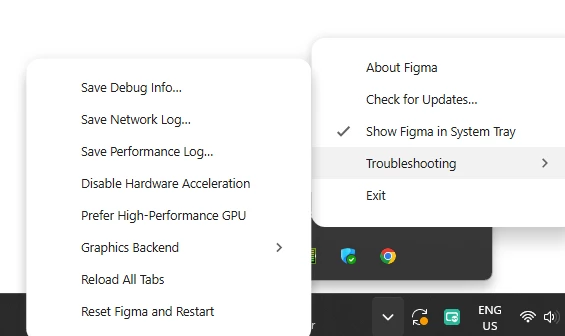
If the Figma Desktop app on Windows is showing a black screen, it's usually due to a compatibility issue between your computer’s graphics card and the app. You may be able to fix the problem by disabling the Prefer High-Performance GPU option.

To do so:

  1. Right-click the Figma icon in your system tray.
  2. Go to Troubleshooting > uncheck the Prefer High-Performance GPU option.


17 replies

Tutil Kazi
New Member
March 26, 2026

Thank you Ellaine,


Deleting ALL the files from %APPDATA%\Figma worked for me too (finally!)

Deleting all the files worked for me too. Thanks much!

Ellaine_Gabotero
April 25, 2026

you should get a medal for the last solution 🙌🏻

HAHAHAHA happy to help and simplify

Best,
Ellaine_Gabotero
May 8, 2026

Actually, as of today I am still experiencing this - can someone from Figma team check why this is happening and provide a permanent solution? It really affects productivity, thank you.

Best,
Celyn_L
Figmate
Figmate
May 8, 2026

Hey ​@Ellaine_Gabotero, Celyn from Figma Community Support here.

Thanks for following up on this. I understand that you’ve already tried several troubleshooting steps and workarounds, and are still encountering this issue.

I’ve gone ahead and created a support ticket for you so the team can take a closer look and assist you with this. Your ticket number is #1890812.

When you get a chance, please reply directly to the ticket with a link to the impacted file and invite support-share@figma.com with “Can View” access (this won’t impact your billing and will allow us to reproduce the issue and investigate further with Engineering).

Appreciate your patience here, someone will be in touch with you soon.

Ellaine_Gabotero
May 13, 2026

Thanks to Figma team on getting back to me. 😎🤗


For those still experiencing the issue, try this: https://help.figma.com/hc/en-us/articles/38586610259479-Figma-Desktop-app-not-working-on-Windows 


If the Figma Desktop app on Windows is showing a black screen, it's usually due to a compatibility issue between your computer’s graphics card and the app. You may be able to fix the problem by disabling the Prefer High-Performance GPU option.

To do so:

  1. Right-click the Figma icon in your system tray.
  2. Go to Troubleshooting > uncheck the Prefer High-Performance GPU option.


Best,
Celyn_L
Figmate
Figmate
May 13, 2026

Thanks so much for sharing this, ​@Ellaine_Gabotero! Glad to hear it’s resolved on your end, and appreciate you posting the solution here - this would be really helpful for anyone else running into the same issue.

I’ll go ahead and mark this as the best answer so it’s easier for others to find. Thanks again 🙌

Remus Curte
New Member
May 13, 2026

Thank you so much ​@Ellaine_Gabotero for the update