juannuan.huang.hp
New Member
Oct 21, 2026 10:57 AM UTC
Solved

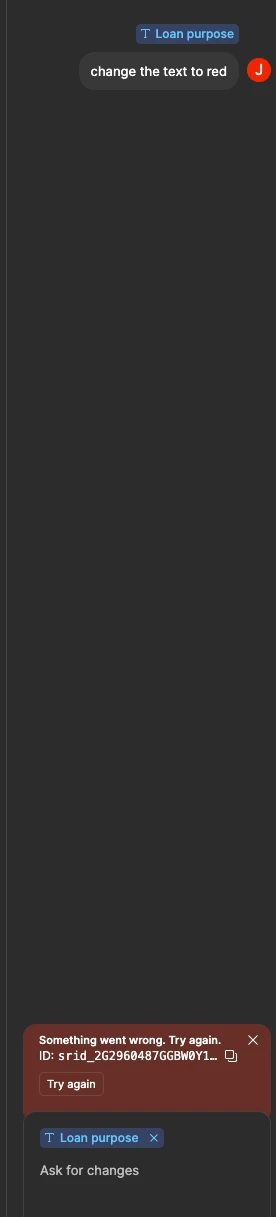
Figma AI something went wrong

Howdy, I keep getting persistent Figma AI errors no matter what I do. Can y’all help me out?

srid_2G2960487GGBW0Y13NN21GQTT


Celine_
Celine_Solution
Community Support
Oct 21, 2026 1:50 PM UTC

Hey there, Celine from the Figma Community Support team here! Thank you for flagging the “Something went wrong” errors and sharing the error ID! Is it happening in a specific fil or any files here? Can you please wait and try again to see if that helps?

If the issue still persists, I’ve created a support ticket on your behalf so our team can investigate further. Your case number is 2212419 sent to you email address: jxxxxn.hxxg@axxxp.xm.

Please check your inbox when possible, and reply directly in your case (please mention any steps you have already tried and shared the affected file, and grant Can View access to support-share@figma.com so the team can take a closer look at it). Thank you!

Update: I can see in the backend that our support team has replied to you, and is waiting for your reply to investigate it further. Please continue directly there so we can take a closer look at it, thank you! I am marking the topic as solved here, as your case has been addressed.

2 replies

Celine_
Figmate
Celine_Solution
Community Support
Oct 21, 2026 1:50 PM UTC

Hey there, Celine from the Figma Community Support team here! Thank you for flagging the “Something went wrong” errors and sharing the error ID! Is it happening in a specific fil or any files here? Can you please wait and try again to see if that helps?

If the issue still persists, I’ve created a support ticket on your behalf so our team can investigate further. Your case number is 2212419 sent to you email address: jxxxxn.hxxg@axxxp.xm.

Please check your inbox when possible, and reply directly in your case (please mention any steps you have already tried and shared the affected file, and grant Can View access to support-share@figma.com so the team can take a closer look at it). Thank you!

Update: I can see in the backend that our support team has replied to you, and is waiting for your reply to investigate it further. Please continue directly there so we can take a closer look at it, thank you! I am marking the topic as solved here, as your case has been addressed.
Wirkkarl
Active Member
Oct 26, 2026 1:00 PM UTC

I’d try refreshing the file and starting a new AI chat thread first, just to rule out a temporary glitch. If it keeps happening even with a simple prompt, it might be an issue on Figma’s side rather than anything you’re doing wrong. The srid ID should also be useful if you need to contact support, so I’d include it along with a screenshot of the error.