
yoshio
New Participant
May 28, 2025
Solved

Exported image size is different from the real image

  • May 28, 2025
  • 2 replies
  • 237 views

Hi all.


I exported a frame (1920x720) and it outputs a 1928x720 PNG file.
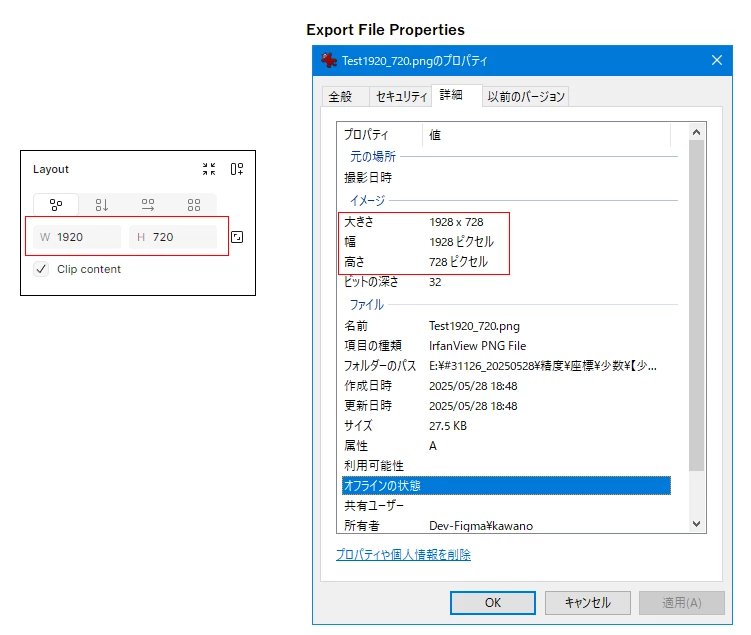
 

Is it possible to export an image the same size as the frame?


Do you know why you can't export an image the same size as the frame?

 

This topic has been closed for replies.
Best answer by Ondrej_Pavlicek

Hi there!

I think it’s most likely caused by the drop shadow effect on the frame. When I tested it, applying a shadow to a 1920×720 frame resulted in a 1928×728 export. Try removing the shadow effect and it should export at the expected size.

Hope this helps!

Effect


2 replies

Ondrej_Pavlicek
Power Member
May 28, 2025

Hi there!

I think it’s most likely caused by the drop shadow effect on the frame. When I tested it, applying a shadow to a 1920×720 frame resulted in a 1928×728 export. Try removing the shadow effect and it should export at the expected size.

Hope this helps!

Effect


Product designer @ NETWORG | Designing Model-driven Power Apps in Figma | Power Apps DesignKit (Model-driven)
yoshio
yoshioAuthor
New Participant
May 29, 2025

Hi Ondrej_Pavlicek

Thank you. That solved it.