

Adrian_Rymuza
January 18, 2024
Question

Emojis disappearing from the thumbnails

  • January 18, 2024
  • 19 replies
  • 1004 views

Hi everyone! I have a problem with emojis disappearing from the thumbnails.

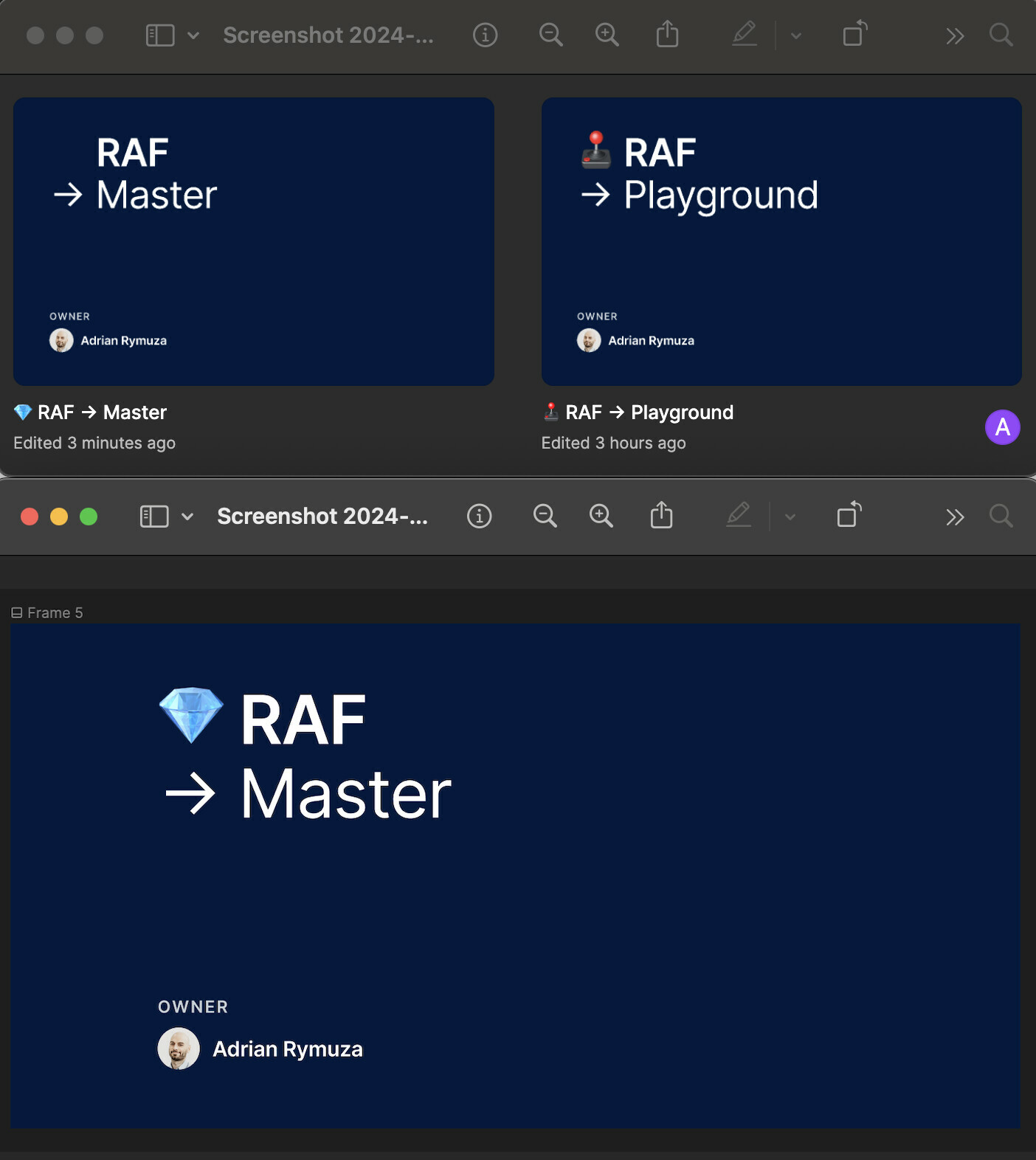
As you can see the master file has a gemstone on the cover, but it doesn’t appear on the thumbnail. I designed it last year and everything was perfect, but now when I try to recreate this approach, the emoji just don’t show up on the thumbnails.

What’s funny is when I copy the cover from the old files and copy it to the new one, everything works fine, but when I start making changes to the text frame in the copied cover, the emoji disappears from the thumbnail again.

Things I tried to do so far:

  • resetting the app
  • clearing the cache
  • building the cover again from scratch

It seems like Figma completely lost the ability to show the emojis on the thumbnails for me. Any ideas on how to fix that? Anyone has the same problem?
This topic has been closed for replies.

19 replies

sarahkozic
New Member
February 19, 2025

Thank you for the quick response!

The emoji should be where the white square is, and this is how it looks in Figma. It is a part of shape with a fill (gray background). 


djv
Figmate
Community Support
February 21, 2025

Thanks for the context, ​@sarahkozic! 

It seems like the export is only picking up the shape upon export. Be sure to select both the shape and the text containing the emoji on the canvas. Then, Group your selection via the right-click menu or using the shortcut Cmd/Ctrl + G, This will allow you to export the entire group instead of the individual layers. 

Chloe Jean
New Member
February 24, 2025

Hey everyone, I’m also encountering this issue with emojis disappearing from thumbnails. It’s a bit puzzling since they show up fine when copying from old files, but as soon as I make any edits, the emoji vanishes. I've tried the usual steps, like clearing the cache and resetting the app, but the problem persists. Any new updates on this? Would love to know if there’s a more specific fix or workaround.

adilhassan
New Participant
February 24, 2025

It could be an issue with the font or how Figma renders emojis in thumbnails. Try using a different font or pasting the emoji as an image instead. Also, check if Figma updates or system changes affected emoji rendering. 

Illia Planeta
New Member
July 24, 2025

Hello. Has anyone managed to solve this problem?

Juan_Coleman1
July 29, 2025

Also reporting in on this.

Emojis not showing up in comments, comment reactions or page titles. That’s stock emojis and Figma native emojis. These have always worked fine, yet the last 6 months, they have not worked. I work across 2 computers, and both have this issue. 
 

Emoji List in Blank


Sergey Tarasov
New Member
August 5, 2025

Suddenly text emoji disappeared from layouts where they were visible before! Also currency symbols disappear, although available in the given font. Even when editing a line that contains a currency symbol, suddenly the symbol is replaced with a blank!

Desktop App Windows.

Sergey Tarasov
New Member
August 5, 2025


in windows app 

in browser

Gayani_S
Figmate
Community Support
August 6, 2025

Hey ​@Sergey Tarasov, thanks for flagging this! I’ve left a response on your post: 


Please try clearing the desktop cache and let me know if that helps, thanks you!