

MoniqueD
April 11, 2024
Question

Don’t show dropdown item in variables if matches conditions

  • April 11, 2024
  • 5 replies
  • 337 views

Hi all,

Wasn’t able to find an answer, so hopefully, I didn’t overlook things and this is not a duplicate question.

I have a dropdown component that I want to populate with different options, depending on the mode I choose. However, different modes have a different amount of options.

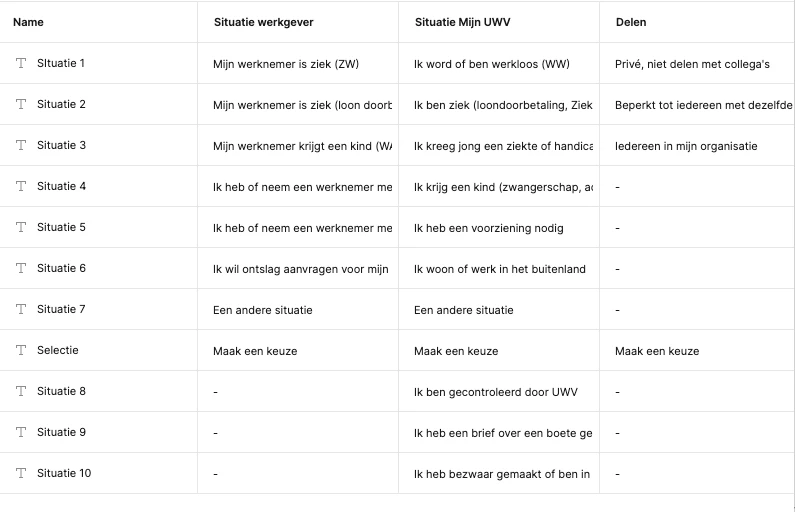
Mode 1 has 8, mode 2 has 10 and mode 3 has 4. Can I hide options in the dropdown when I choose a mode that has less options? See screenshot for clarification. The ‘-‘ options should not be shown when that mode is selected.
This topic has been closed for replies.

5 replies

Nate_G
Power Member
April 11, 2024

You could try using boolean variables assgined to each option, then turn them on/off depending on the selected mode.

I put together this dropdown example awhile back that I built using variables and modes, which will show/hide options depending on the selected mode.

View Example File

Nate G
MoniqueD
MoniqueDAuthor
April 12, 2024

Thanks Nate, it looks like this is what I need. The example file looks great, thanks for sharing!

MoniqueD
MoniqueDAuthor
April 12, 2024

Hi Nate,

Hope I can ask you another question. Most things do seem to work well, however, when I open the prototype preview, it does show the options it shouldn’t, while they aren’t visible in the mockup itself. Any idea what could cause it?

MoniqueD
MoniqueDAuthor
April 12, 2024

FYI: I found this is only happening in the preview in Figma with shift spacebar, not in the actual prototyping environment.

Nate_G
Power Member
April 12, 2024

Looks like a bug with the preview panel, you could create a separate post and call this out as a bug for Figma to address.

Nate G