

Carson
January 29, 2021
Question

Defaults for Auto Layout Resizing

  • January 29, 2021
  • 14 replies
  • 2761 views

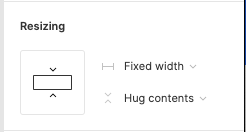
Been using auto layout a LOT recently and it’s absolutely game changing. My only gripe is that resizing defaults to fixed width, when 90% of the time I’m using “fill container”. I could see an argument both ways, but curious if others feel the same way.

A solution, although cumbersome, would be to allow users to set a default themselves for auto layout.
image

This topic has been closed for replies.

14 replies

jonathanparra
January 31, 2021

I also have this gripe. I use Auto Layout to build pretty much every section and it’s annoying how sometimes moving frames with Fill Container somewhere else will default to Fixed Width.

I think a good middle ground is default to Fill Container when moving to Auto Layout parent and keep Fixed Width for everything else.

kolyba
New Participant
January 31, 2021

Not sure, but setting “fill container” as the default might mess up the page when applying auto-layout while “fixed width” sort of mimics the previous state when auto-layout was not added. So seems logical?

Maybe this should take constraints into account and set resizing based on that

Dario_Stefanutto
New Participant
February 16, 2021

Absolutely agree. I actually came here to write the exact same thing you wrote.

I think the default settings when changing Auto Layout “direction” should be improved.

Lee_McEwen
October 13, 2021

99% of the time I use fill container.

Shift-A to set items into an auto-layout; but then i have to re-click each separate item to set to fill container. So redundant, all day every day.

Giovanni_Dufour
February 18, 2022

Same here, and it’s a bit annoying and time-consuming going through the layers to ser fill container rather than fixed width.

Juwon
February 20, 2022

I’m experiencing this same issue rn, thought this happens to only me. If anyone here knows mizko, he did a video on constraints and autolayout and he was able to apply constraints to the desktop frame, I still can’t figure out how he was able to do this on his own app…

Mojo
New Participant
February 20, 2022

Yep, I wish at least that when you select elements that are already set to fill, and you wrap them on a new auto layout (Shift + A), to preserve that, and not reset to fixed. For me, that makes no sense at all.
What you think of this suggestion? Wrap elements in autolayout and preserve resizing of children

Damir
May 27, 2022

I’m dumbfounded by how the Figma team hasn’t included exactly such a feature. It’s as it they don’t want power users.

“We’re busy working on new features” is not an excuse. This is one of the slowest moving mainstream products on the internet.

Joe_Garlick
Active Member
August 31, 2022

I also want to ‘fill container’ 99% of the time. I also dislike how it changes the settings of all children inside it from whatever they were already set to ‘fixed’. I do a lot of work with large nested auto layouts for responsive web design (as opposed to say apps).

Fabien_Renault
December 5, 2022

This is killing me every day I use Figma