

Question

CSS Variable Name differently for Style vs Variable

  • May 28, 2024
  • 5 replies
  • 202 views

Josh_Bi

Hi there,

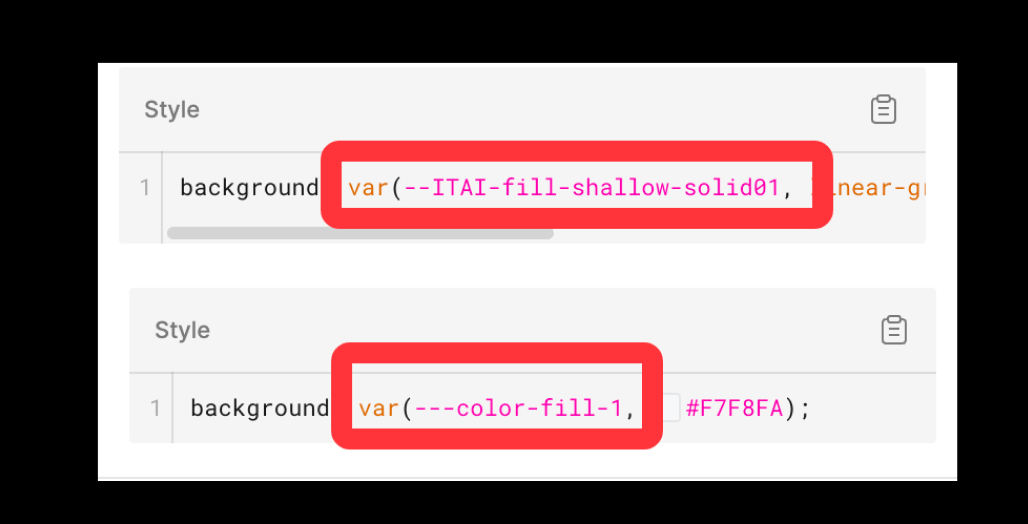
The development provide CSS code with name of color token included. We recently encountered an issue where the name of color token is not always accurate: sometime it shows “–” in front of the name (which is desired), and sometime it shows “—” (with 3 dashes). Please see the attached image.

After some investigation, I found out it may have something to do with using a Variable or Style. Has anyone else faced this issue previously? Is there any suggestion to fix the issue?
This topic has been closed for replies.

5 replies

y_toku
Figmate
  • Community Support
  • May 30, 2024

Hi there,

Thanks for reaching out. I’m checking with our internal team. I will get back to you when I have anything I can share with you.

Thanks for your patience.
Toku


y_toku
Figmate
  • Community Support
  • May 31, 2024

Hello!

Could you share what the name of the variable is? Is there a dash in front of it? We hope to check the patterns.

Thanks,
Toku


Josh_Bi
  • Author
  • June 3, 2024

Hi Toku,
Thanks for following up. I attached a screenshot which includes both name of the variable & style name. None of them have dash in front of their names.


y_toku
Figmate
  • Community Support
  • June 5, 2024

Hi there,

Thanks for the details. As I checked about the issue with our internal team, our support team hopes to investigate with your file information, so could you reach out directly to the support team with a copy of your file: https://help.figma.com/hc/en-us/requests/new? Our support team will look into it. My apology that I can’t help much here.

Please make sure you use the email associated with your Figma account, include links to the file in question, and share access with support-share@figma.com. Don’t worry, inviting us to view your file won’t impact your billing.

Thanks for your understanding.
Toku


Josh_Bi
  • Author
  • June 7, 2024

sounds good. will do. Thanks