

ahmad_tabby
New Member
February 3, 2023
Question

Component overrides get broken after library publish

  • February 3, 2023
  • 19 replies
  • 2246 views

We’re experiencing a random problem with component overrides in our design system which consists of multiple library files. Our components use an atomic structure, where small individual components are combined (sometimes with overrides) to create larger components.

The problem we’re facing
We’re using some components in a design file and they have overrides applied to them. When a new library update is published, taking the new updates in the design file breaks our overrides. The component properties/variant selection is intact, even the value of the overrides are intact, however the instance would either loose border radius, or have its alignment changed or the layer name resets to the original name from the atomic component. This happens to some specific components, and not others. And this also happens randomly, sometimes some components break, while others don’t.

We tried recreating the whole library from scratch with a few components to see if the problem persists, and unfortunately the instances still break.

Here’s an example of a list component that has a logo element which breaks on a new publish:
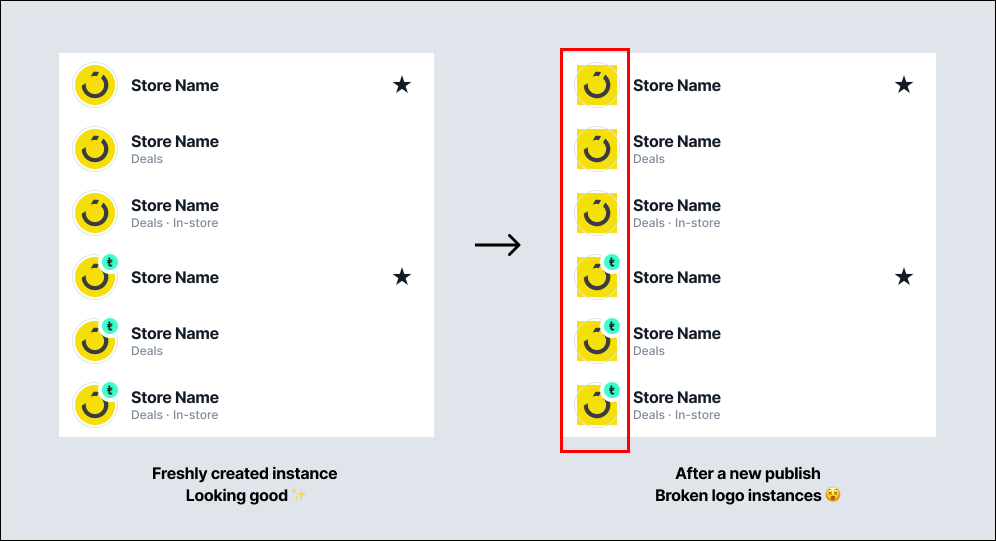
If you inspect the broken instance, you can see that the border radius has gone to zero. After toggling something back and forth from the component properties, the original value comes back.
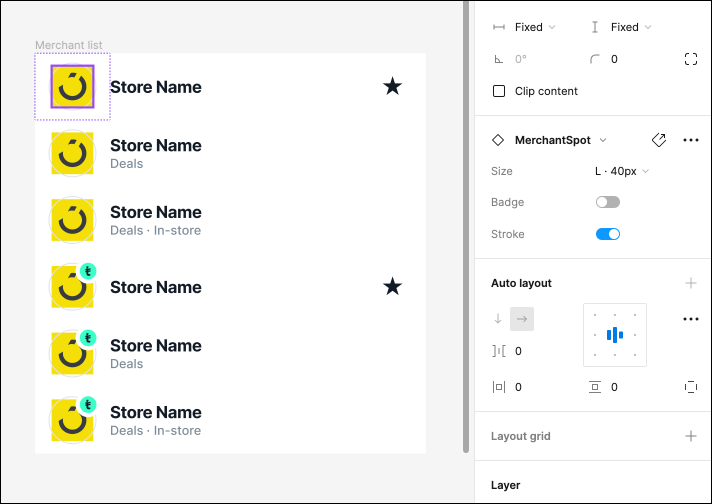
I’ve created a detailed screen recording along with commentary showcasing this problem happening on a particular logo element: View screen recording

We’ve tried a lot of things and nothing seems to be working, so our assumption is that it might just be a bug. Is there something in the way the component is built that is breaking it? Or perhaps this is a known bug?
Any support will be appreciated. I’m happy to share more details needed to investigate this issue.

This topic has been closed for replies.

19 replies

Oliver_Schwaiger
New Participant
October 16, 2024

Hey there; any updates on this @Celine_Figma?

Brian_Putz
October 16, 2024

When doing this, did the component in your copy/paste get updated by the updated library publish or no?

Brian_Putz
October 16, 2024

We are facing a similar issue when publishing library updates, some components are reset to default values. My assumption is that this may be occurring due to slight format changes.

That said, has anyone figured out any process or solutions to mitigate this or if there if any guidance in how to avoid moving forward?

Celine_
Figmate
Community Support
October 17, 2024

Hi everyone, thanks for flagging it.
I’ve checked in our backend, and we have a similar bug that has been fixed in 2023. I also checked the support ticket of @ahmad_tabby , it seems that the issue has been fixed on its own.

This may be a regression, but it’s hard to tell without investigating further the root cause of your issue on your end.
For others, if you are still encountering the issue, please reach out directly to the support team so we can investigate it further with a copy of your file and we can try to replicate it. As mentioned, please fill out this form: here
Be sure to use your Figma account email, include the URL of the file, and share it with support-share@figma.com as an Editor so they can take a closer look.

Thank you 🙏

Martin_Marinov
New Participant
October 24, 2024

It happenes all the time to our team. When you click they reset to the correct properties and positions and once you restart they are broken again.

The funny thing is that a colleague of mine sees it fixed but when I open it on my machine it’s broken.

I even tried duplicating the artboard to try a fix suggested here. I saw it ok but my colleague broken. I think it has something to do with updating library inside a file, because it happenes when we update the library in a file. Also I noticed that my colleague had no update for the file but I see the Library update that I need to do, which is really strange having the fact an update is on a file level not on user level.

Edit:

I had unaffected file. I had library changes so I clicked Update on all pages. The Figma file froze so I had to close it. After reopening it it was updated and all components broken. Now another file of ours is basically unusable

lpmramos
New Member
April 8, 2025

I am having the same issue. Is the only solve is to reach out to support?

Paul_Lyons
New Participant
May 18, 2025

This has been a consistent problem for almost a year at least now and kind of renders the updating to master components useless.

Is anyone at Figma going to provide a solution? 

I guess pushing new AI tools is more important than fixing things which are broken within the fundamentals of the application.

Apolline
Active Member
May 19, 2025

I’ve had this issue on and off as well. Hard to tell what’s causing it.

chris_hatfield
September 9, 2025

This issue is still very current and a huge problem. Almost every instance we have of large component sets such as buttons and images are overridden when we publish the component to the library again after a small change such as spacing. Yes they are built properly. Text overrides etc return to the word button, images return to a default image. It renders the product largely useless as a DS platform. All efficiency is gone.