

Question

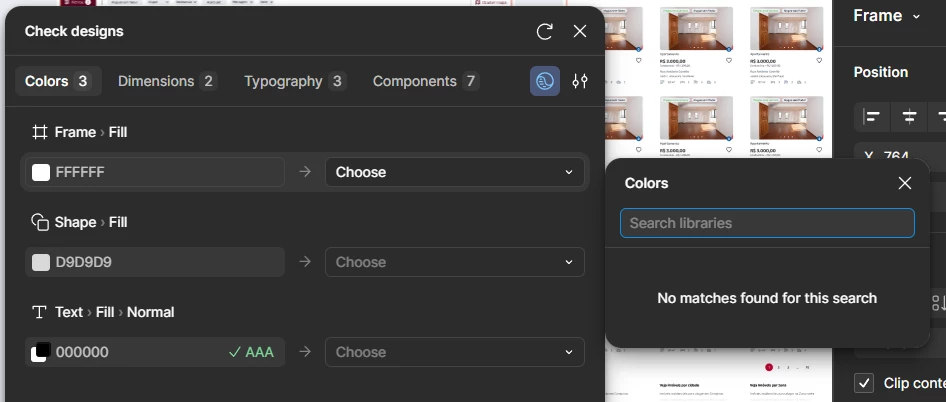
Check design does not find the colors of the design system library

  • May 29, 2026
  • 1 reply
  • 38 views

Jorge_Herrero


I really liked the new check design tool, but I believe I encountered a problem.
When I find a color and try to replace it in side, it doesn't find the colors in my library. My design system is published and normal, it should appear, right?
I've already selected it to just base it on my library, but it still doesn't find anything.

I also noticed that the colors in the switch menu only appear if I create the color as a variable, but I should use it from the color styles library, right?

Would you have to duplicate all colors as variables? it's not so practical if that's the solution.
 

1 reply

adamsmasher
Figmate
  • Figmate
  • May 29, 2026

Hi, ​@Jorge_Herrero! Thanks for your post - glad that you are really liking the Check designs tool!


The Check designs help article has a couple suggestions that will help in this situation:

  • Check designs works best with a published, variables-based design system. By default, Check designs pulls suggestions from all libraries added to this file. However, we recommend marking a specific selection of libraries to pull from in Check designs’ settings menu to improve suggestion quality.
  • Use precise variable scoping in your design system to improve suggestion quality. For example, you can hide primitives to prevent them from appearing in your design check, or scope variables to specific asset types (like text colors) for more relevant results. Learn more about scoping variables.


It sounds like you already discovered the first point yourself, though the second is still helpful to know. Let me know if you continue to have trouble!