

Thomas_dF
New Participant
March 8, 2024
Question

Change variant and open Overlay with position Manual

  • March 8, 2024
  • 7 replies
  • 1677 views

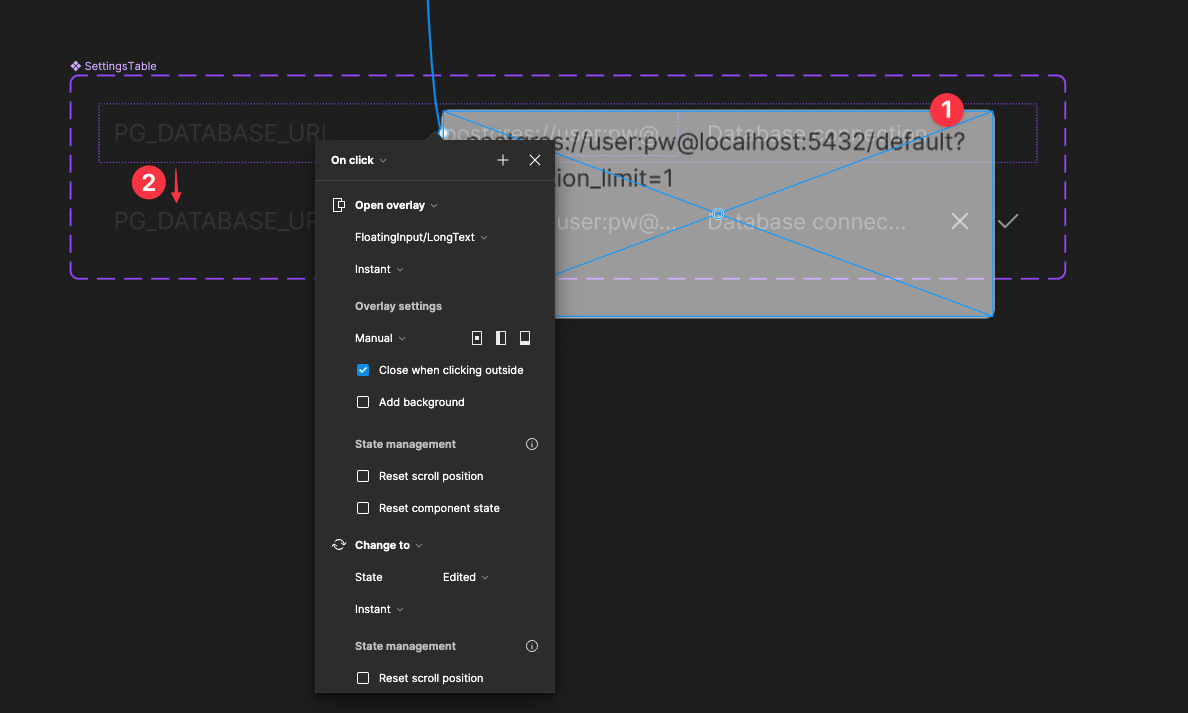
I want to change a variant and open an overlay with “Position: Manual” after a “click trigger” in Figma. The trigger performs both actions, but the overlay opens as “Centered” instead of “Manual.” Any suggestions? Thank you!
This topic has been closed for replies.

7 replies

Celine_
Figmate
Community Support
March 11, 2024

Hey Thomas,
Thanks for reaching out to the community! I try to replicate the Manual feature in overlays and it works on my end 🤔
It looks like that you have added your interaction (the overlay) in your main component, but not in the frame where your instance component is located. In order to fix it, you have to create interaction in the frames where you want the actions to be done.

Can you also share quick video recording? Please include the whole window, with the properties and layers panels in view and relevant layers expanded, and select any layers you’re having trouble with so we can check any relevant settings.

It would be also great to have a copy of your file so we can try to replicate and investigate it further. If you are hesitant to share publicly here, feel free to reach out directly to the support team by filling this form: here

Be sure to use your Figma account email, include links to the file, and share it with support-share@figma.com so they can take a closer look.

Thomas_dF
Thomas_dFAuthor
New Participant
March 11, 2024

Hi @Celine_Figma, Thanks for your answer! Here’s a video:

Celine_
Figmate
Community Support
March 11, 2024

Thanks for the video! This seems buggy to me.
Can you please reach out directly to the technical team with your screen recording and a copy of your file and grant access (share it to support-share@figma.com) by filling this form: here ! This will help us to investigate further.

In the meantime, as a workaround, the best option would be to create this interaction directly in the frame (and not in the main component) to see if this helps? I’ll pass also the mic to the community if they any other interesting workarounds! Thank you

Aditya Shinde
New Member
February 26, 2025

@Thomas_dF Did this get fixed?

Thomas_dF
Thomas_dFAuthor
New Participant
February 26, 2025

No response from them since this message in March 2024:

Hello Thomas,
 
Thank you for your patience. 
 
Our engineering team has conducted a comprehensive investigation and confirmed that the problem you're facing is indeed related to a bug. Unfortunately, at this time, we do not have an estimated timeline for a resolution. 
 
I understand that this is not an ideal solution, but please know that we are actively working on improving our platform and addressing issues like this. We appreciate your understanding and patience as we strive to provide a better experience for our users. 
 
As this issue is still under investigation, I'm going to mark this ticket as closed soon while we wait for more information, but note this will not affect your ticket's status on the bug report. If you have any follow-up questions or want to check on progress, just reply here and the conversation will re-open so we can give you a hand.
 
Thank you for your understanding and please let us know if you have any further questions here.
 
Best regards,

Anju | Technical Quality Specialist | Figma

Aditya Shinde
New Member
February 26, 2025

Thats not good, I was facing a similar issue, and was hoping for a solution

mohamed-Bouhamza
New Member
April 24, 2025

Hello, you can put your instance in a new frame ( name this frame “container” for example ) and then, connect the button to this “container” frame on Overlay mode with a manual position.

So instead of connecting the instance, you’ll connect the frame container which contains your instance.

Here’s an example 


Good luck :)