

Joel_Mertz
October 6, 2023
Question

Change default variable mode?

  • October 6, 2023
  • 11 replies
  • 5190 views

I’ve set up a large table of variables with different modes. These have all been connected to hundreds of components. Unfortunately, I’m just now realizing that my default mode (aka, first column of variable table) actually needs to be another mode in my table.

Really want a way to drag and drop the variable columns so that I can set a new default mode…

Any ideas? Thanks!
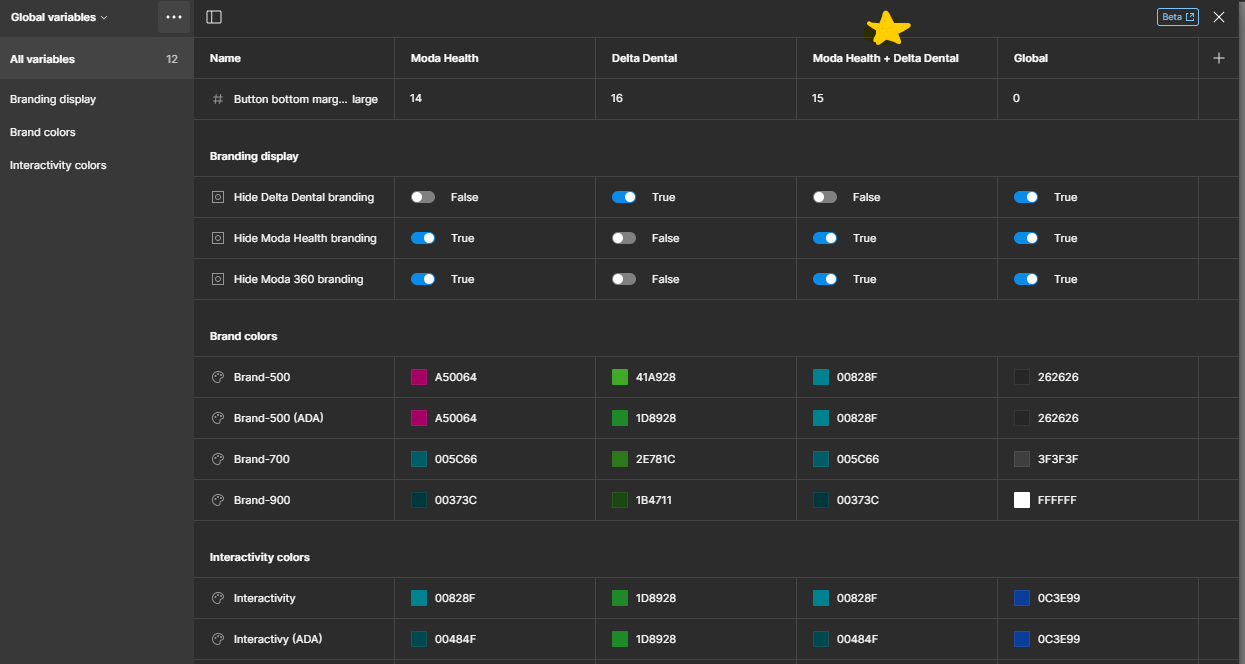

Need “Moda Health + Delta Dental” to be positioned in first column, so that this mode becomes new default.

This topic has been closed for replies.

11 replies

Hiro_Matsui
November 22, 2024

It would be incredibly helpful to have a way to set default modes at the file or account level. 🙏🙏🙏 I hear this from all my Figma friends.

I get that there’s a way to set a default at the workspace level, but since it applies to everyone, it doesn’t really solve the individual needs.

Here’s a story I’m facing

Figma promotes variables and modes as the new best practice, so I consolidated my mobile and web typography libraries into one using “modes.”

However, this creates a challenge: web designers must manually switch to the “web” mode every time they add a new page to their design files. 🥲🥲🥲 Half of the people don’t even remember to switch so gets really inconsistent. 😭😭😭

For Figma to really show the value of variables and modes, having a way to set a default mode at the file level would be a game changer. It’d make it so much easier to get teams on board and keep things consistent, especially for design system owners.

I look forward to seeing this added to the upcoming updates!🙏🙏🙏🙏🙏