

Challenge in figma-mcp to get the details of the main design system components from the Designed Pages.
Hello There,
Need help in make the figma-mcp to provide the components details.
We are using a Design System and using those DS components we are designing our pages, As a frontend developer using claude to to connect with figma mcp and do the frontend development. I am not getting the details of the components in the page like variants, size, which are the properties defined in the Design System.
Without much knwoledge about figma and did an analysis with claude and come to know the desing in the page has overwritten in the instances so it is differ from the main component, the figma-mcp will give a flat data instead of the properties choosen in that component. Also we can see there is a ‘i’ icon with the information in the figma that, “The border, text and layout in this instance differ from the main component.”
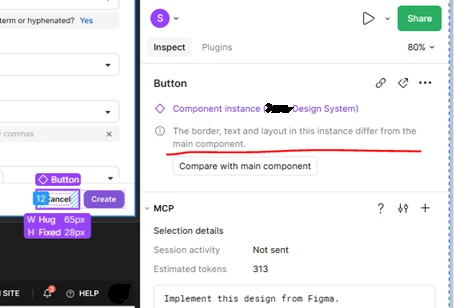
When we connected with the designers, they are expressing that it is not possible.
“It isn't feasible because the DS master components are designed with all possible variants. When we use those components (instances) in feature designs, we naturally override properties such as text, icons, toggles, and other content. So it's expected that the instance won't exactly match the main component.”
I want to get help and clarity from the designer community, is this a real challenge in figma and is there any solutions to make it work?
As a prompt engineer to make claude work better, We need those “button/tab/input/menu/pop-up/….” components actual selected variant type, style etc.., details so Claude can map and pick the right web componects from our UI Design System library and set the neccessary properties by itself. Now we need to do a lot of manual work of instructing claude to chose those properties by prompting manually.
Any help to solve this highly appreciated. Glad to recive any other alternative way to try out as well.
PS: We use professional full seat by Designers and Dev seat by Developers.