

Question

Can Figma render stroke shadows inside a closed path?

  • June 22, 2026
  • 4 replies
  • 257 views

Uhl
  • Active Member

Sanity check before I submit this as a bug or feature request:

  • Is there an easy, non-destructive way to make Figma show drop shadows on the inside of a closed path, like a circle?

I don’t want to use Outline Stroke since that’s destructive. I’m trying to keep it as a normal editable circle and have it behave like it does in apps like Sketch or Affinity Designer, where a drop shadow on a stroke renders on both sides of the path.
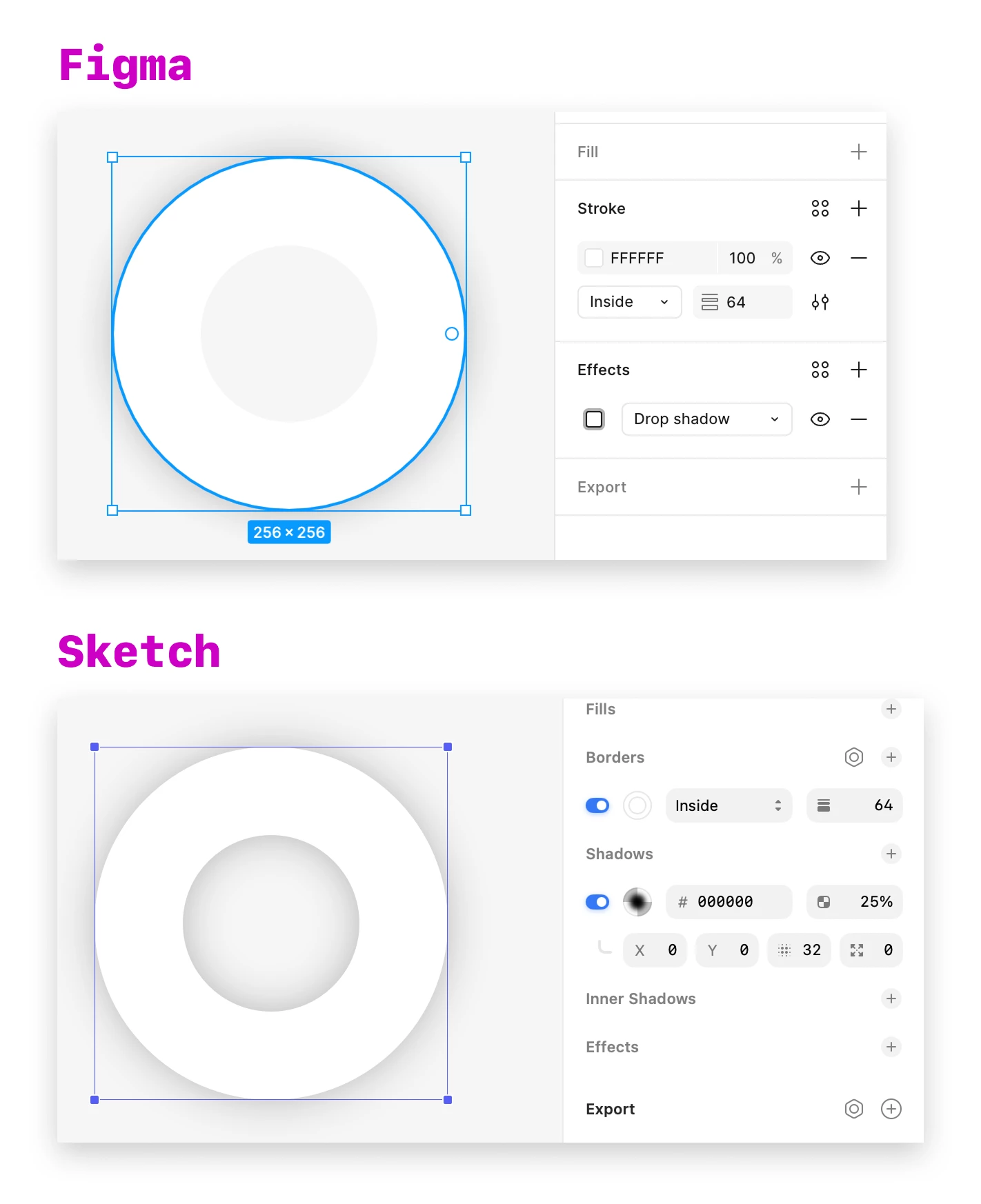
Same editable circle, inside stroke, and drop shadow setup. Figma doesn’t render the shadow inside the closed path, while Sketch creates the expected inner-shadow effect without outlining the stroke.


4 replies

Uhl
  • Author
  • Active Member
  • June 26, 2026

Since it’s been a minute with no replies, I went ahead and created a feature request.

If you agree, please vote for it here:


AnatolyAnatoly

Nothing in Figma binds an effect to a stroke. Effects apply to the layer as a whole, and a drop shadow is drawn behind that layer, so there is no single effect that can wrap the path the way Sketch does. That is why your feature request is the right shape for the real fix, and also why no setting will get you there today.

What works today, non-destructively: keep it as a normal editable circle and stack two effects on the same layer, Drop shadow and Inner shadow, same colour, same blur, both offsets at 0. The drop shadow gives you the outside half, the inner shadow the inside half, and at zero offset the two read as one symmetric shadow around the path. No Outline Stroke, still fully editable.

The detail that makes this look broken on a first try: the inner shadow is anchored to the path, and your stroke is inside-aligned, so the path is the outer edge of the stroke. A blur smaller than the stroke width is drawn underneath the stroke and you see nothing at all. Make the inner shadow's blur clearly larger than the stroke width before concluding it does not work.

If you want a directional light rather than a symmetric one, offset the drop shadow and leave the inner shadow at 0. Chasing matching offsets on both is not worth the time — the inner shadow does not move in the direction you expect it to.


Uhl
  • Author
  • Active Member
  • August 6, 2026

The detail that makes this look broken on a first try: the inner shadow is anchored to the path, and your stroke is inside-aligned, so the path is the outer edge of the stroke. A blur smaller than the stroke width is drawn underneath the stroke and you see nothing at all. Make the inner shadow's blur clearly larger than the stroke width before concluding it does not work.


 Thanks for the detailed reply. I was hoping it’d work, but I can’t get the inner shadow to appear inside the stroke like my earlier Sketch example.


Here’s what I get with an inner shadow using the same Blur value as the drop shadow:


I also tried increasing the Blur, but the shadow still doesn’t render inside the stroke.


Could you post a screenshot of the settings you’re using to make this work?


AnatolyAnatoly

I owe you a correction, and thank you for pushing back instead of just walking away.

I tested it properly this time, and my suggestion cannot work for your setup. I should have flagged it as a guess rather than writing it as a detail I had observed.

Here is what I actually reproduced. One ellipse, inside stroke at 6px, a single Inner shadow at X 0, Y 4, Blur 30, Spread 0, black at 80%. With no fill on the shape: nothing renders at all, exactly what you are seeing — and note that the blur there is five times the stroke width, so this is not a case of the value being too small. Then, changing nothing else, adding a fill makes the inner shadow appear immediately.

That is the whole mechanism. An inner shadow is painted into the layer's own alpha. A stroke-only circle has painted pixels in the stroke band and nowhere else, so the hollow interior has nothing for the effect to land on and the result is clipped away rather than drawn faintly. No Blur value reaches it, which is why raising it changed nothing for you. My line about making the blur larger than the stroke width was wrong, and it was wrong in a way that cost you time.

So the honest answer to your original question is my first paragraph without the workaround: there is no non-destructive way to get the Sketch behaviour today. Your feature request is the right fix and it is correctly scoped — I have voted for it.