
January 17, 2024
Question

Button | negative offset + auto-layout

  • January 17, 2024
  • 3 replies
  • 534 views

Hey everyone,

current problem is the following:
I want to create a button with auto-layout and negative offset for the color-frame/rectangle below. The width of the button therefore needs to adapt to the content, but the main/parent frame is not allowed to be bigger than the stroke of the actual button (without color) for layout/design reasons (in combination with other components within a website/design).

Is there way this can work? I know I can create another frame w/o auto-layout so it has the same width as the frame with black stroke but this means the whole button won’t adapt to the content.
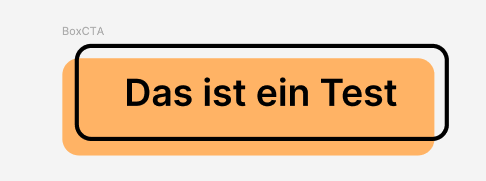
Bildschirmfoto 2024-01-17 um 15.10.13

Thanks in advance 🙂

This topic has been closed for replies.

3 replies

January 17, 2024


To make it a bit clearer:

tank666
January 17, 2024

Just apply an absolute position to the background layer and give it left and right and top and bottom constraints.

Approximate component structure:

Button (auto layout frame)
    Content (auto layout frame with stroke)
        Text
    Background (an absolutely positioned rectangle with left and right and top and bottom constraints)
UX/UI designer. Figma expert. Creator and developer of plugins and widgets for Figma and FigJam. Check out my resources in Figma Community: figma.com/@tank
Ewald_Human
May 5, 2024

You my sir are a genius thank you very much 😁