

Piotr Niklas
New Member
February 9, 2025
Question

Button Auto layout problem

  • February 9, 2025
  • 5 replies
  • 141 views

Hey there!

I’m trying to create a resizable button component. Along with text, I’d like to nest an additional resizable component as a background. Now, I know I could simply generate fill and stroke color in this example, but that’s not the case. How can I make the rectangular component resize itself along with the text on top of it? Thanks!
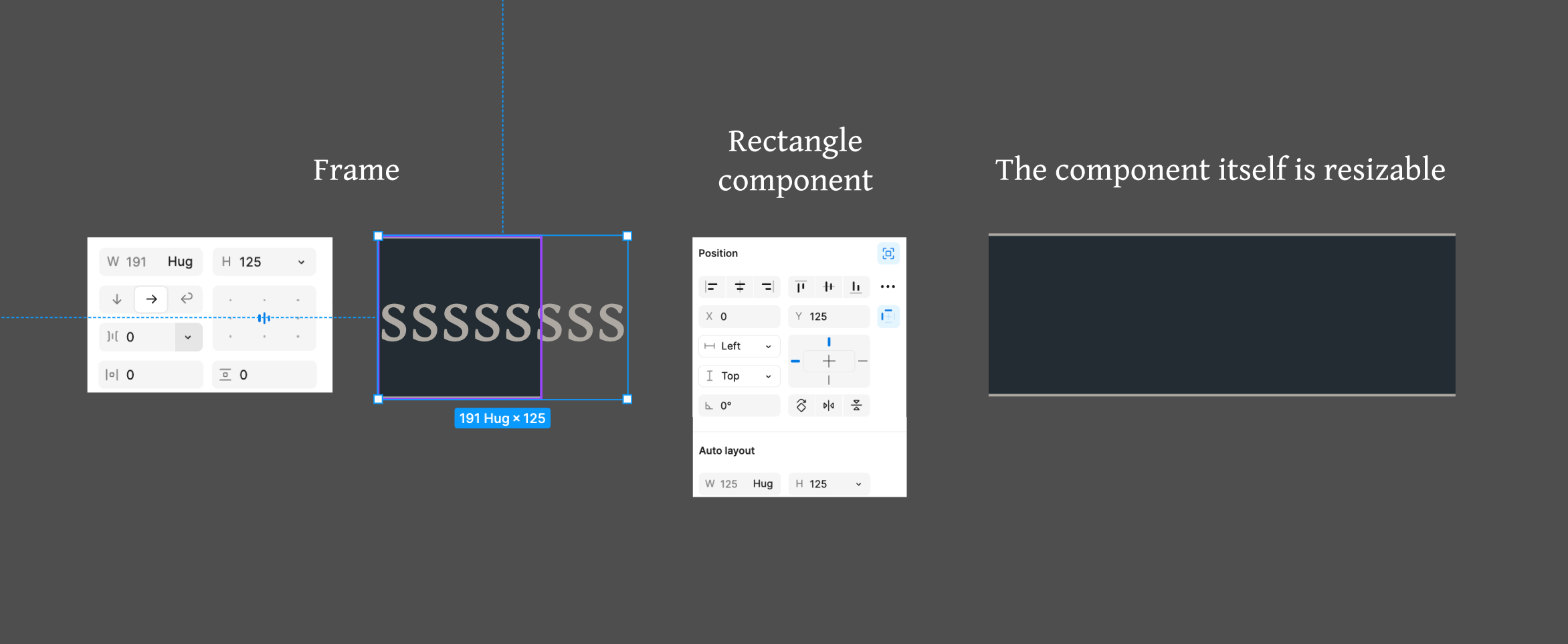
 

This topic has been closed for replies.

5 replies

tank666
February 9, 2025


UX/UI designer. Figma expert. Creator and developer of plugins and widgets for Figma and FigJam. Check out my resources in Figma Community: figma.com/@tank
Piotr Niklas
New Member
February 9, 2025

Thanks, but I’ve actually seen that answer, but it doesn’t work. Please refer to my image above.

tank666
February 9, 2025

It doesn't work for you because you didn't complete step 3.

UX/UI designer. Figma expert. Creator and developer of plugins and widgets for Figma and FigJam. Check out my resources in Figma Community: figma.com/@tank
Piotr Niklas
New Member
February 10, 2025

Oh I tried different options, but this doesn’t change anything….

tank666
February 10, 2025

Now follow step 4.

UX/UI designer. Figma expert. Creator and developer of plugins and widgets for Figma and FigJam. Check out my resources in Figma Community: figma.com/@tank