

Ming_Liu
New Participant
March 1, 2024
Solved

Boolean properties - how to turn one boolean off when turning another on?

  • March 1, 2024
  • 12 replies
  • 4201 views

Hello, i saw somewhere someone create a toggle (boolean) to turn a property on or off e.g show icon or hide icon, and on toggling that boolean, another toggle would switch off.

I was wondering if anyone has done this and where i can go to learn how to do it.
It would be v helpful.

Another example:
I have two property boolean switches.

One is to show/hide an orange pin.
One is to show/hide a grey pin.

I would never show both at the same time.
How can i create a condition whereby if i decide to toggle and show the orange pin, it automatically switches the other boolean toggle and switches grey pin off?

This topic has been closed for replies.
Best answer by Vince11

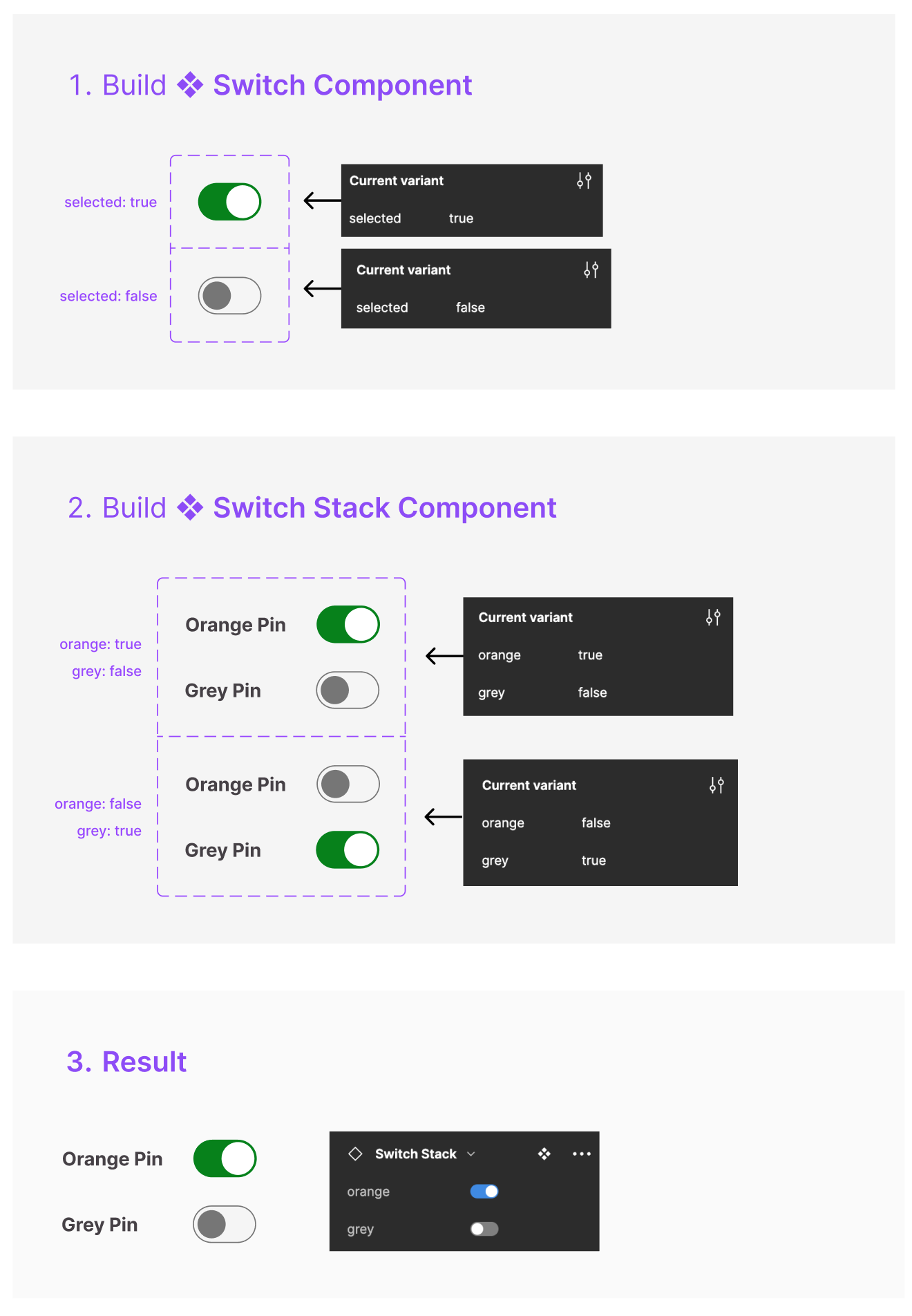
I’m not sure if i’m getting you right, but this behaviour is what you are trying to achieve right?

Here is how to do it:

  1. Build the Switch Component, with one property called selected and apply the values true and false

  2. Using the Switch Component you build another Component called “Switch Stack”.
    This time you will need two Variants:

  • For each of these variants apply the properties orange and grey.
  • First Variant: Set the property value for the first switch totrue and for the second switch to false.
  • Second Variant: Do the same thing but vice versa.

12 replies

Hensmon
New Member
October 8, 2024

Yes drop down was my choice in the end, I dont think I was doing the right thing trying to use boolean hide

Arvi_Raquel-Santos
November 18, 2024

Hi Vince, any chance you can share the Figma file for this? Trying this out but can’t seem to get it to work. Thanks!