shkxzo
New Member
June 22, 2025
Solved

Auto Layout panel not showing in Figma desktop app

  • June 22, 2025
  • 6 replies
  • 1078 views

Hi! I have a strange problem.

When I use Auto Layout in the **web version** of Figma, everything works fine. The Auto Layout panel appears on the right and I can change padding, spacing, direction, etc.

But in the **desktop version**, even after pressing Shift + A and applying Auto Layout to a frame, the Auto Layout panel doesn't appear on the right side at all.

Things I already tried:
– Reinstalled the app
– Cleared cache (from AppData folders)
– Restarted computer
– Switched UI modes
– Tried different files
– Used another Windows user account
– Checked latest version

Still the panel is missing in desktop app, but works fine in web. I'm using Windows and live in Uzbekistan.

Any help would be really appreciated. Thanks in advance!

 

    This topic has been closed for replies.
    Best answer by Nellya

    I'm experiencing the exact same issue!
    Attaching two screenshots — one before and one after adding Auto Layout to the frame.

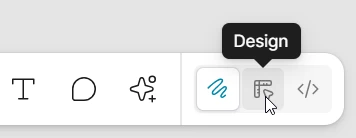
    Hi. You’re in a Draw mode. Switch to Design


    6 replies

    driftingsteps
    New Participant
    June 22, 2025

    Can you share screenshots of the desktop app before and after applying Auto Layout to a frame?


    Rachel C
    New Member
    June 22, 2025

    I'm experiencing the exact same issue!
    Attaching two screenshots — one before and one after adding Auto Layout to the frame.

    As you can see, nothing changes visually in the right-hand panel, even though in the “after” image it technically shows as being in Auto Layout (I get the option to “Remove Auto Layout” in the right-click menu).

    Joining the question here - would really appreciate any help!

    Nellya
    NellyaSolution
    Power Member
    June 22, 2025

    I'm experiencing the exact same issue!
    Attaching two screenshots — one before and one after adding Auto Layout to the frame.

    Hi. You’re in a Draw mode. Switch to Design


    Tom Reem
    Figmate
    Figmate
    June 22, 2025

    👋🏻 Hey ​@shkxzo and ​@Rachel C — welcome to Figma Forum, and thanks for flagging these issues!


    ​@Nellya, really appreciate you jumping in to help with Rachel’s question. 🎯 ​@Rachel C, let us know if that cleared things up. 🙏🏻


    ​@shkxzo, just checking in — are you still seeing trouble with the panel in the Figma Desktop app? Thanks for taking the time to troubleshoot. Reinstalling usually resolves this, but just to confirm, are you running the latest version (125.4.9)?


    Keep us posted — happy to keep digging if needed and know we’re always iterating based on your feedback!

    naeim
    New Member
    June 22, 2025

    It's because you're in draw mode, change to layout mode

    Rachel C
    New Member
    June 23, 2025

    Thank you guys for the help ​@Nellya ​@Tom Reem !