

Matt_W
New Member
September 6, 2023
Question

Auto layout makes contents absolutely positioned

  • September 6, 2023
  • 29 replies
  • 5559 views

I’m loathed to post this because Figma is becoming a time sink and nothing ever gets fixed, sh!t just gets bolted on with very poor testing and planning to avoid fallout. It’s the new Sketch, Photoshop, you name the bloatware, Figma is it.

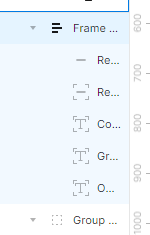
Having a group elements in a container that i want to apply auto layout to, let’s say a simple row with cells, doesn’t matter. I have the row, I apply auto layout… yet now I have auto layout of one item with the rest being absolutely positioned. The container element with the background and shadow is now within the auto layout and the rest sit on top with some arbitrary position. This is garbage. Manually fixing this retroactively to the elements is a massive waste of time. Figma is becoming a massive waste of time.

There was an update that changed this behaviour. Previously the container element would be applied as the background, and the contents would be auto-laid-out as you’d expect.
image

This topic has been closed for replies.

29 replies

February 29, 2024

I concur with this statement… It seems there is no ablity to have (Nested AL components)… are there any updates on a fix?

March 1, 2024

Hey,
Just adding that I also agree, this absolute position update is total garbage. Totally slows down my workflow.

P.s. everything else with Figma is ace!

Megan_McGlynn
New Member
March 7, 2024

I agree, this is incredibly annoying and wastes time.

Andrea_Lau
March 13, 2024

Hello Figma and community, just adding another voice to the mix to agree that this behaviour is confusing.

I find that I can’t always recreate or redo what happens which means that I can’t figure out how the interface can help me ** …Recognize, Diagnose, and Recover from Errors**.

Sometimes elements also get rotated 90º in my experience and completely changes how the layout should work (horizontal v vertical).

I understand that the feature is required but some work needs to be done on 1. identifying that something different has happened and 2. recoverability so people can avoid the auto absolute position in the future.

Shukri
New Member
July 22, 2024

Same is happening to me.
When placing a component within an autolayout frame, some layers WITHIN a component instance itself become absolute position!! This breaks the way the component is expected to look, and I cannot make it “not absolute”.

Figma can randomly override my component layout in the instance, but I can not override the problem Figma has created. It’s infuriating, because I have to detach components to just get designs done

Delia_Sopca
New Member
August 1, 2024

Same keeps happening to me

Jack_Taylor2
New Member
August 5, 2024

This has annoyed me and wasted time since the change was made – auto layout shouldn’t try to guess the exception to the 'auto layout rule I might want to manually make! It should apply auto layout – if I selected a completely random jumble of elements it should stack them neatly even if that means completely changing what it looks like, since auto layout is a rule not a visual design tool. At the absolute most it should guess if I want that stack to be vertical or horizontal, but even just defaulting to vertical is better than trying to be too clever

mpowers
New Member
September 10, 2024

In the case of making auto-position an automatic feature of auto layout, relying solely on ‘internal testing’ within Figma seems insufficient. For a change with this level of impact, extensive external testing should have been conducted.

Slava_Yakovlev
New Member
December 3, 2024

What keeps happening to me is all my frames that are set to be fixed height and width change their setting to fill and I have to manually change it back editing all values again.

Expected behavior from auto layout with ANY element → elements keep their parameters and get aligned with auto layout default settings. As simple as that.

Guys, please, make your system less adaptable and automated and more straight forward. This is a design tool, not a mobile game, there is no need for automation that “makes life easier”. Many of us UX designers here and we all know that “Smart” things < Predictable things. Make your system consistent please.