
June 16, 2023
Question

Auto Layout Bug?!

  • June 16, 2023
  • 13 replies
  • 3576 views

Hi everyone
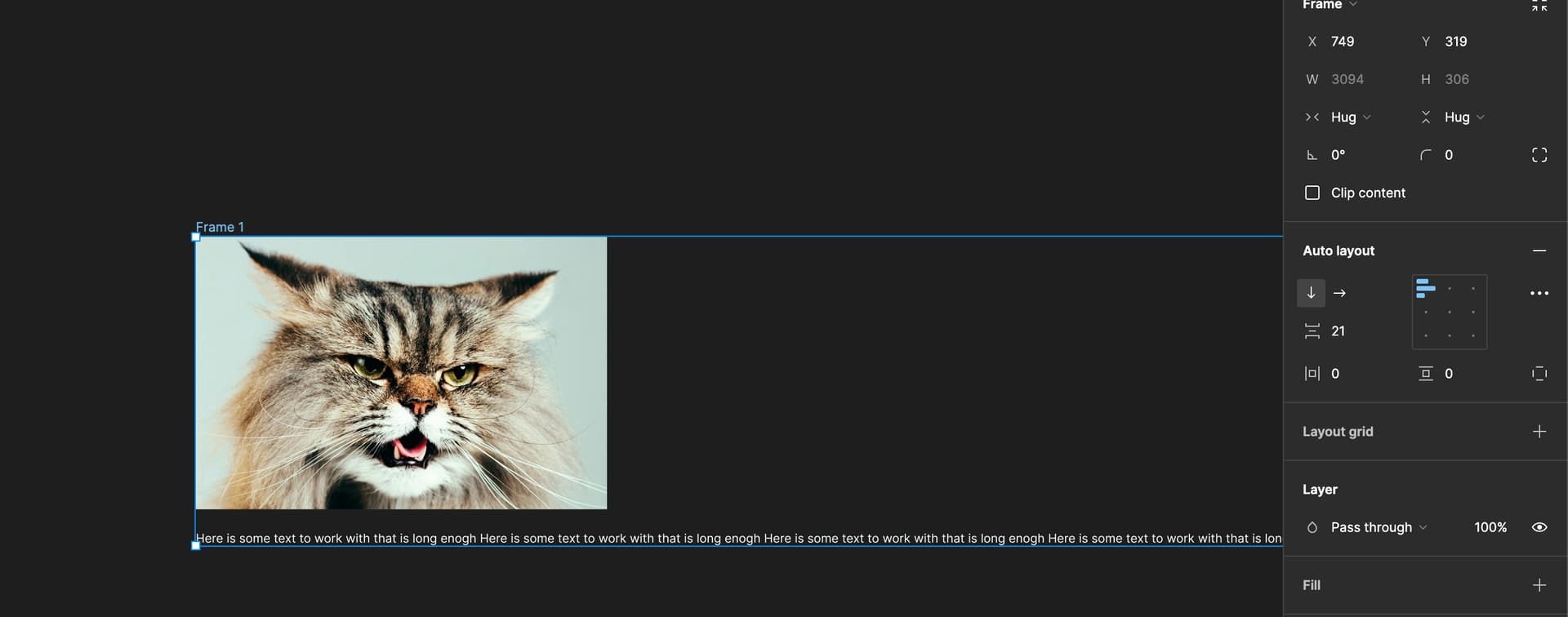
I ran into an auto layout “problem” that makes me doubt what is the expected behaviour.

I could swear by that having the following settings resulted in an auto layout hugging the fixed item and the text adapting to the width of the fixed item. Instead the text just runs as wide as it can and the auto-layout adjusts itself after it. The only fix is setting the auto layout to fixed and then adjusting the fixed item to match the size.

Auto layout
Width: hug
Height: hug

Item A Image
Width: fixed
Height: fixed

Item B Text
Width: Fill
Height: Hug
This topic has been closed for replies.

13 replies

Arnaud4
July 18, 2023

After this morning’s Figma update, I ran a test by re-releasing a UI kit from Ant Design. The bug seems to have been fixed with this new library release. Thanks @Figma_Support

July 28, 2023

@support_team I can confirm I’m also getting this issue. a work around is to remove the item from the auto-Layout in the layers window and then place it back into the same Auto-layout Group

Josh
Former Community Manager
July 28, 2023

Head’s up that support_team isn’t a user/group associated with Figma.