

Solved

Conditionals with Variables not working

  • October 16, 2023
  • 1 reply
  • 880 views

Keitel_Oliver

Hey everyone,

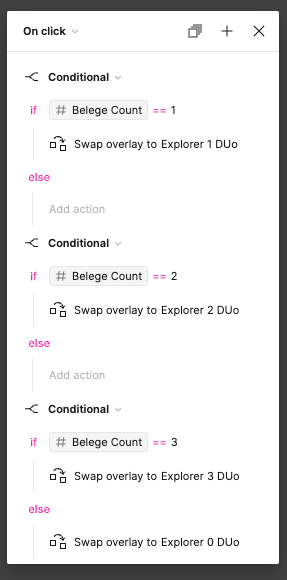
I’m currently trying to control different frames using conditional statements in Figma. To do this, I’ve created a variable named “Beleg count.” The idea is that in another part of the prototype, I want to set the variable to a fixed value (1, 2, or 3) using a button, and depending on the variable’s value, I want to navigate to a different window here. My issue is that the “Default” (Explorer 0 DUo) frame is always being opened, and the entire set of if conditions never seem to work. Have I done something wrong?

Best answer by uxcal

Hi there,
Your last conditional reads if “Belege Count” is 3 then swap overlay… else swap overlay to “Explorer 0 DUo”.
This means that if “Belege Count” is any other number but 3, then the overlay will be “Explorer 0 DUo”. I think since it is declared last, that conditional will overwrite the other conditionals above. Because code is typically read from top to bottom.

This topic has been closed for replies.

1 reply

uxcal
  • New Participant
  • Answer
  • October 16, 2023

Hi there,
Your last conditional reads if “Belege Count” is 3 then swap overlay… else swap overlay to “Explorer 0 DUo”.
This means that if “Belege Count” is any other number but 3, then the overlay will be “Explorer 0 DUo”. I think since it is declared last, that conditional will overwrite the other conditionals above. Because code is typically read from top to bottom.