
Question

Animated submenu in an animated menu

  • September 23, 2022
  • 4 replies
  • 947 views

sararas

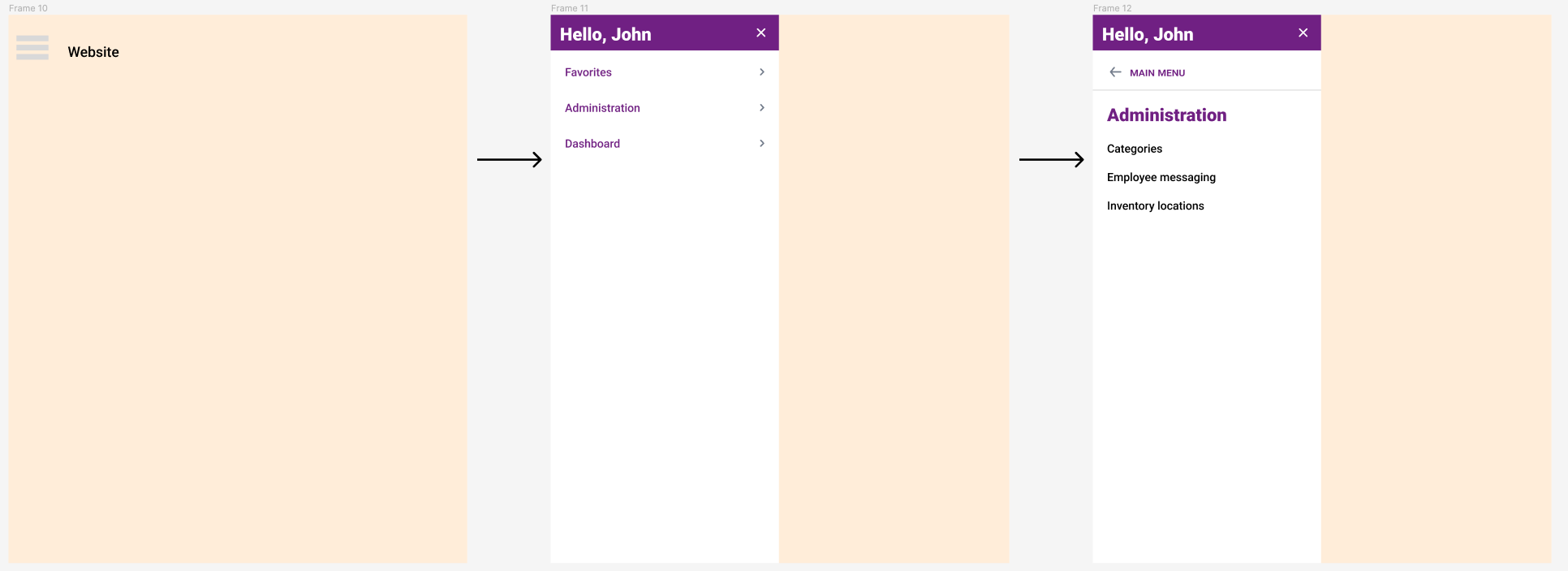
I want to make a main menu that slides open from the left and then when clicking on one of the subsections, i want it to slide in from the right and replace the main menu content. Then the user can click a back button within that subnav and slide back over to the main menu content. How do I animate within an animated thing? I can make this work without any internal animation, but i want animation between the main menu and sub menus.

This topic has been closed for replies.

4 replies

sararas
  • Author
  • September 23, 2022

Also - i don’t want the submenu to fly in from the right of the entire screen, just from within the menu space.


Some for me. Have you found the solution?


y_toku
Figmate
  • Community Support
  • February 6, 2024

Hi there,

Thanks for the post. Probably I’m misunderstanding about your question, but would you like to achieve interactive menu like this: https://www.figma.com/community/file/1059520912220032057/interactive-dropdown-menu?searchSessionId=ls9s4e55-tlpj5ppoee?

There are great resources in Community too, so exploring community would also be helpful to learn from other creators.

If you can’t solve, would you mind sharing your file link please? I hope I can support!

Thanks,
Toku


Raphael_M
  • Power Member
  • February 6, 2024

Hi, all.

This technique is quite complicated, I’ll just put an example here so you guys can check how to do it.

Menu Animation - Smart Animate Trick.fig (41.5 KB)