Solved

Stop ui elements from shrinking upon reaching a certain size

  • November 30, 2023
  • 2 replies
  • 709 views

In my current design I have a textbox that I want to be used to write a review for something. I have been figuring out constraints and dynamic resizing so the UI can be visible from different phone screen sizes, however while I believe I now understand dynamically stretching the elements in an auto layout, shrinking them isn’t behaving as I’d like.

I have a fairly large text box that when I expand the frame size, expands too, which is what I’m after.

But when I shrink the frame, it keeps on shrinking to the point where it just disappears.

image

Ideally, I’d like it so that the textbox stops shrinking once the frame gets to a certain size, but at the moment it keeps shrinking. As I’m still figuring things out, what can I do to stop this element from shrinking too small when the outside frame is resized?
Best answer by Dan_Hopewell

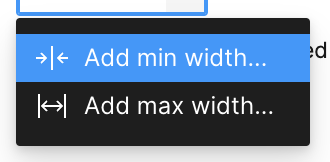
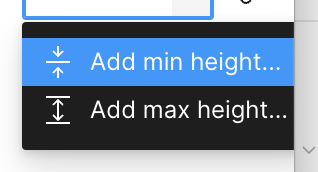
Have you played with min width/height on the text box?

Screenshot 2023-11-30 at 11.04.10 AM
Screenshot 2023-11-30 at 11.03.11 AM

If not, check out “Minimum and maximum dimensions” here:

Figma Learn - Help Center
This topic has been closed for replies.

2 replies

Dan_Hopewell
  • Active Member
  • Answer
  • November 30, 2023

Have you played with min width/height on the text box?

Screenshot 2023-11-30 at 11.04.10 AM
Screenshot 2023-11-30 at 11.03.11 AM

If not, check out “Minimum and maximum dimensions” here:

Figma Learn - Help Center

  • Author
  • November 30, 2023

Aha! That’ll be it. never noticed that dropdown before, that’s gone and fixed it.

Thanks a lot Dan, appreciate it!