

Question

Creating copy of node without affecting the original

  • September 21, 2023
  • 6 replies
  • 774 views

Akshith_Pottigari

I am developing a Figma plugin that replaces the colors of the selection, with new ones. I want to display on the screen how the change will look before generating it on the Figma canvas.

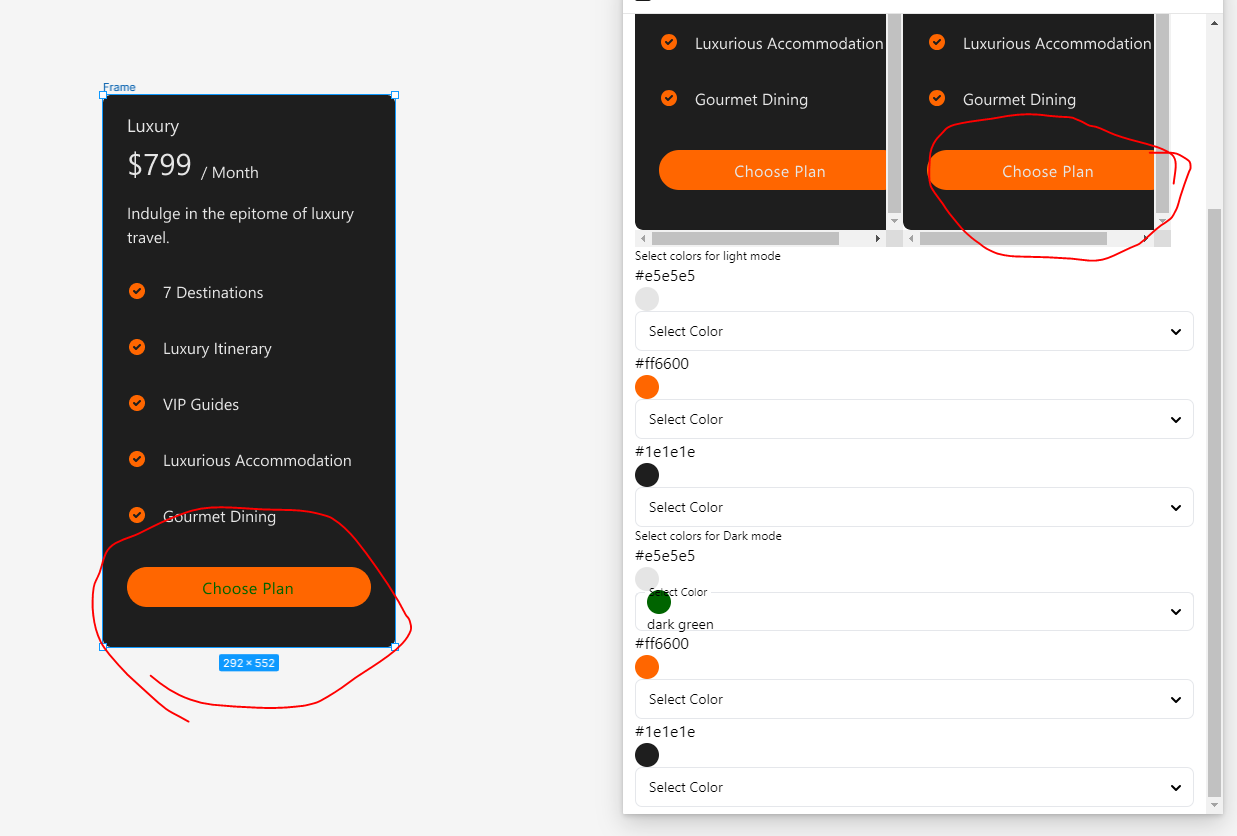
What I did was to store the node into a variable and then try to change it according to it. What happened was, it was changing the actual component in Figma, not on the copy of the selection have. I want something which can create an exact replica of the selection, and then i want to use it for viewing it on my plugin, because the changes that i do for it is actually affecting the original node.

This topic has been closed for replies.

6 replies

tank666
  • September 21, 2023

Clone a node and change its properties.

figma.com

Akshith_Pottigari


My changes should not affect the original


tank666
  • September 21, 2023

Are you sure you cloned the object? Changing the properties of a clone will not affect the original object in any way.


Akshith_Pottigari

traverseForColor(getDarkModeNode().clone(), darkModeMapping);
getDarkModeNode() will return the selection directly


tank666
  • September 21, 2023

Does your screenshot above show a clone or the original frame? Do you see this clone in the layers panel? Does the clone overlap the original frame on the canvas (located at the same coordinates)?

And I don’t see the code for the function to change the clone properties. Are you sure you are changing the properties of the clone and not the original node?


Akshith_Pottigari

As soon as the user starts the plugin, I will save the current selection and using getDarkModeNode(), i will get the saved one. And the clones are overlapping upon each other.