

Question

Centering two elements with Auto layout issue

  • January 5, 2024
  • 2 replies
  • 279 views

PFEIFFER_Amanda_CNH_Industrial

Hello all,

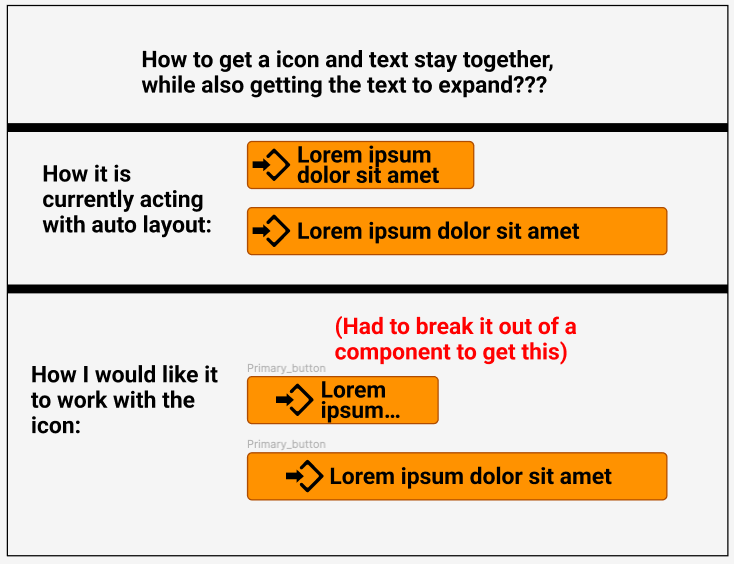
I want to adjust the width of a button while keeping the icon, and text centered within the button. This works when it is not a component it seems, but when I make it into a component it does not work (Refer to image).

Does Figma not support this functionality yet with icons?
This topic has been closed for replies.

2 replies

Nate_G
  • Power Member
  • January 5, 2024

@PFEIFFER_Amanda_CNH_Industrial To keep the icon+text centered and then later truncated, there isn’t an automatic way I found with auto layout that works, because you would need to have the text dynamically change between a hug and fill (center and truncate).

So a workaround I’ve used is to create a button component built using auto layout with 2 variants:

  • One has the text set to hug, which keeps the text centered
  • The other has the text to fill, which will truncate the text when the button scales down.
  • I then can toggle between those 2 settings as needed as I adjust the button instance’s width.

That all said maybe there is another way I haven’t found yet using min-max width, layout grids, etc.

Get Example File


PFEIFFER_Amanda_CNH_Industrial

Hi @Nate_G, thank you so much for this!

That is a clever workaround! Not sure if it will work for us. But still very helpful and a great idea if we want this to work.

It would be great if Figma would help with this. I feel like this shouldn’t be so complicated. But maybe that is just me. 😀

Many thanks!
Amanda