Question

How to create a correct relativeTransform for objects?

  • May 20, 2023
  • 9 replies
  • 1446 views

Alex_FG

Trying to apply several transformations in a row to a Figma object, including skew, and keeping the full working matrix (with correct scale values), how do I apply the final composite transformation?

I know that Figma objects don’t care about the scale in the relativeTransform and have to be resized using resize(). How do I adjust the transform to “remove” the scale but keep the correct rotation and especially skew?

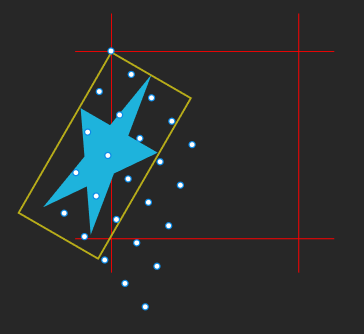
In this picture I first scale then rotate, the points are transformed correctly, the rectangle and star are not. 😦
image

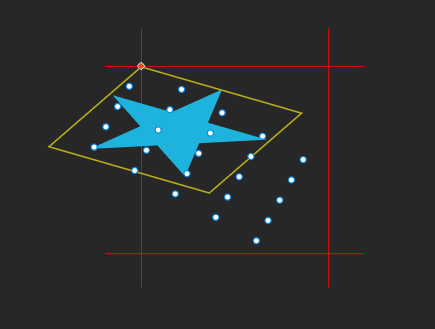
Here first I rotate then scale:

image

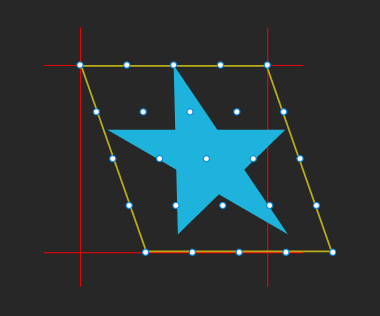
Here is skew. If that’s all I do, it works:
image

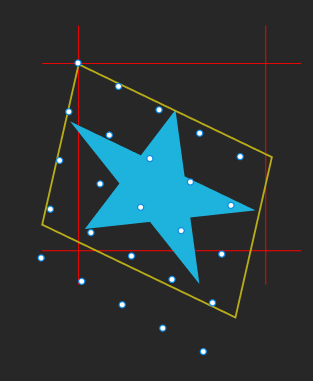
but as soon as I rotate the result, the objects and points do different things (the points are correct):
image

So, if I take an identity matrix and apply a bunch of transforms to it, how do I translate the final result to Figma objects?

This topic has been closed for replies.

9 replies

Gleb
  • Power Member
  • May 20, 2023

Can you please share the code you used for these examples?


Alex_FG
  • Author
  • New Participant
  • May 20, 2023

Sure, it’s just basic transform code.

The transform function is

function applyTransform(obj, xform)
{
    // add to object's "total" transformation

    obj.xform = mulm3m3(obj.xform, xform);

    // apply only this transformation to the position (only for points)

    const p = mulv2m3(
        point(obj.x, obj.y), 
        xform);

    obj.x = p.x;
    obj.y = p.y;
}

and the transforms are

applyTransform(obj, // move
    [[1, 0, x],
     [0, 1, y],
     [0, 0, 1]]);

applyTransform(obj, // scale
    [[sx, 0,  0],
     [0,  sy, 0],
     [0,  0,  1]]);

applyTransform(obj, // rotate
    [[ Math.cos(angle), Math.sin(angle), 0],
     [-Math.sin(angle), Math.cos(angle), 0],
     [ 0,               0,               1]]);

applyTransform(obj, // skew
    [[1,  sx, 0],
     [sy, 1,  0],
     [0,  0,  1]]);

Then, when it comes to actually updating the objects, I have two functions:

// figObj is the Figma object I'm updating, this is what is coming out wrong
// genObj is the generated object that I calculated

function setObjectTransform(figObj, genObj) // called for objects
{
    // make axis vectors == 1

    const scaleX = Math.sqrt(sqr(genObj.xform[0][0]) + sqr(genObj.xform[1][0]));
    const scaleY = Math.sqrt(sqr(genObj.xform[0][1]) + sqr(genObj.xform[1][1]));

    genObj.xform[0][0] /= scaleX;
    genObj.xform[1][0] /= scaleX;
    
    genObj.xform[0][1] /= scaleY;
    genObj.xform[1][1] /= scaleY;
    
    // do magic to make object transform correctly ???

    figObj.resizeWithoutConstraints(
        Math.max(0.01, genObj.width  * scaleX),
        Math.max(0.01, genObj.height * scaleY));

    figObj.relativeTransform = 
    [
        genObj.xform[0],
        genObj.xform[1]
    ];
}


function setPointTransform(figPoint, genPoint) // called for points
{
    figPoint.resizeWithoutConstraints(0.01, 0.01);

    figPoint.x = genPoint.x;
    figPoint.y = genPoint.y;

    // no transform here, points are already transformed at every step
    // so here I only care about their positions
}

mulm3m3() and mulv2m3() multiply vectors and matrices as their names imply.

So, every time I do a transformation, I update the object’s xform member (my own internal 3x3 matrix), but I also use just the current transformation to transform the object’s position.

On the Figma side, I use the transform if it’s an object and .x and .y if it’s a point. This way the points arrive correctly transformed and I can use them to test object transformation. Right now the result is not the same.

Maybe I’m not understanding the matrix thing correctly. Can’t I just have a complicated compound “final” transform applied to an untransformed object and have it do all the transformations in correct sequence?

Or, now that I think about it some more, do I have to keep an array of transformations, and then resize/transform/skew the object once for each transformation?


Alex_FG
  • Author
  • New Participant
  • May 20, 2023

An animation shows what is happening much better:

As you can see, the points are doing what they’re supposed to, while the object is not.


Gleb
  • Power Member
  • May 20, 2023

Thank you for the details! It seems like this is too complex for me to figure out, I hope someone smarter will be able to help. 🤓

I’m now also very curious about this thing: is this a plugin you are building? Or a widget, I guess? Looks very intriguing! I’d love to learn more if you can share the details.
image


Alex_FG
  • Author
  • New Participant
  • May 20, 2023

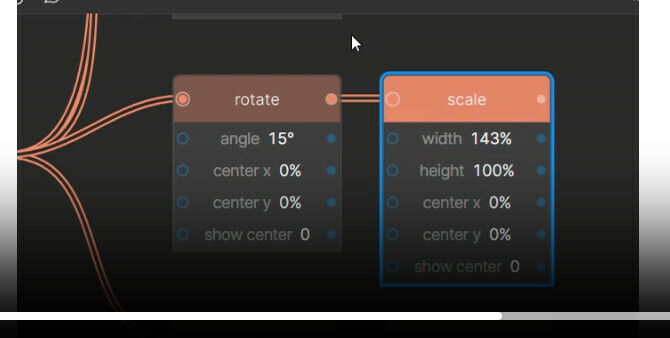
It’s my plugin Generator (https://www.figma.com/community/plugin/899028246731755335), I’ve always planned for it to have geometry nodes, just now getting around to work on them.

You can see how it works here: https://twitter.com/brainshift_/status/1653677256504475651

But I want to keep objects as themselves as much a possible (keep text editable etc), and the transformations are stumping me a bit. Hope someone can help. 🤷


Gleb
  • Power Member
  • May 20, 2023

Oh yes I’ve seen it when it was just released, it evolved quite a lot! 😍 Amazing work!

I’ve shared this post in the Figma Discord for visibility, hopefully someone can help.


Alex_FG
  • Author
  • New Participant
  • May 20, 2023

Thanks for the kind words! 😀


Alex_FG
  • Author
  • New Participant
  • May 22, 2023

Btw you can also work with text. 😉

twitter.com

Gleb
  • Power Member
  • May 22, 2023

Epic stuff!