Question

Prototype connections not working for button

  • November 16, 2023
  • 1 reply
  • 203 views

Hi everyone,

I am making a button that has a default, hover, press state but it’s not working.

I would like the ‘default’ to dissolve into the ‘hover state’, and then ‘hover state’ instantly goes into the ‘press state’ when pressed. I then would like the ‘press state’ to go to ‘hover state’ when clicked.

However it doesn’t seem to be working in presentation mode - please any advice?
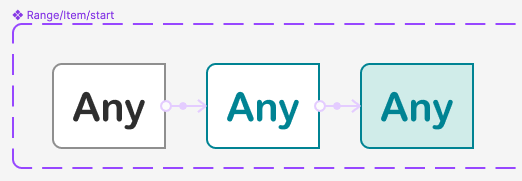
Screenshot 2023-11-17 at 9.11.40 am

Figma – 11 Nov 23
This topic has been closed for replies.

1 reply

Gayani_S
Figmate
  • Community Support
  • November 17, 2023

Hey Annie, thank you for reaching out! I have adjusted the interaction between the hovered state and the clicked state from “While pressing” to “On click”. Also I have added another interaction to unselect the button. You can see these in the screen recording below, the interaction seems to works now.