
Question

Assets don't export as is when a "layer effect" is applied

  • June 30, 2022
  • 2 replies
  • 1734 views

Natalie13

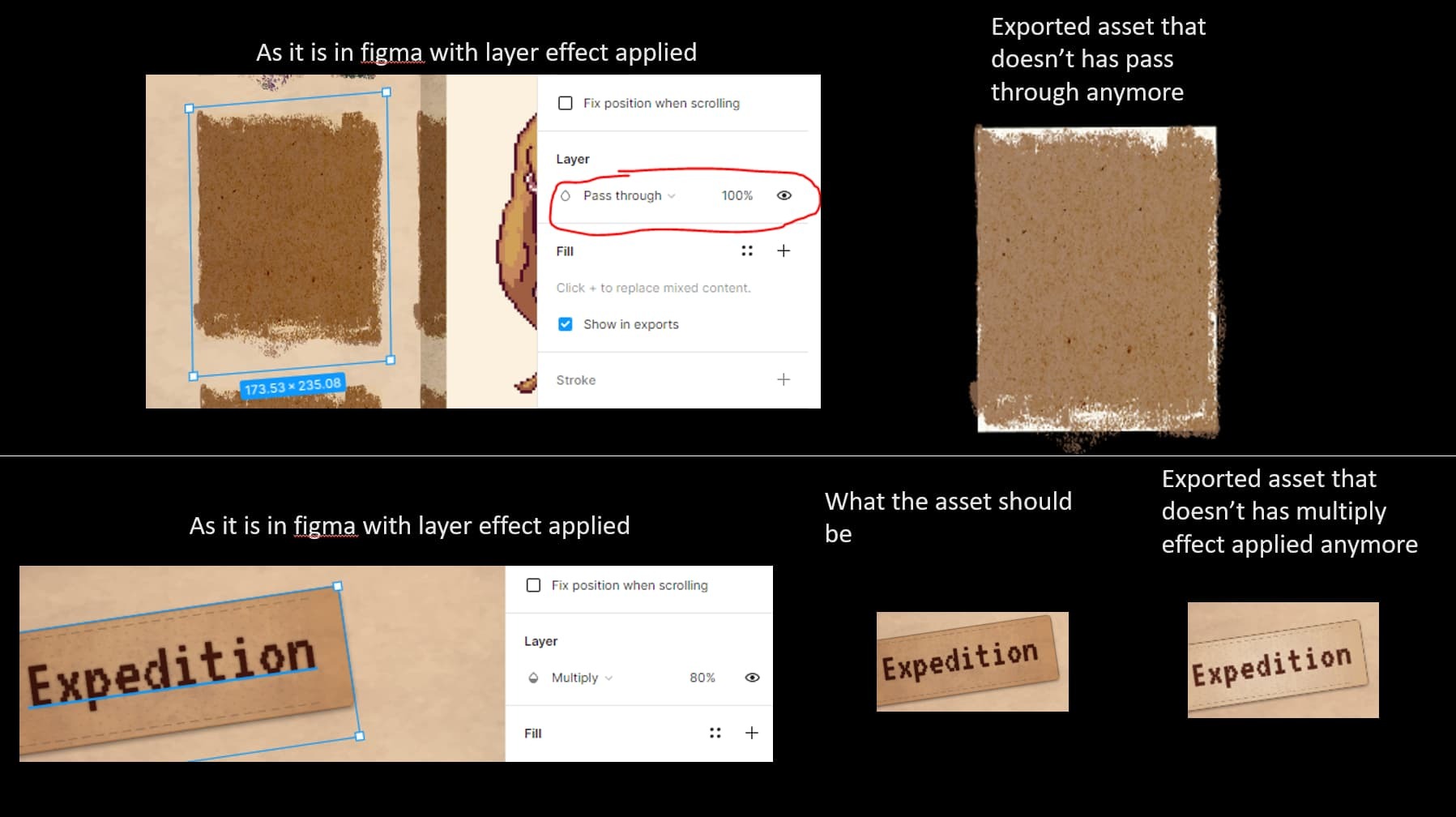
When we’re exporting our asset that have any layer effects applied - such as “multiply” or “passthrough”; the exported asset/image looks different.

Any way to export assets as they show up in Figma with the applied layer effects?

I have two cases below - each one using a different layer effect, but same problem where the exported asset doesn’t have the effect applied anymore
Any help would be much appreciated!


This topic has been closed for replies.

2 replies

Nikolaj
  • February 7, 2024

Yep! Would love an answer to this!

Thank you ❤️


y_toku
Figmate
  • Community Support
  • February 8, 2024

Hi @Natalie13 @Nikolaj,

Thanks for reaching out. Have you tried “ignore overlapping layers” when exporting before? If no, could you try along this help center article?

If the issue stile persists, the exporting issue could be tricky. So, could you reach out directly to the support team with a copy of your file: https://help.figma.com/hc/en-us/requests/new

Please make sure you use the email associated with your Figma account, include links to the file in question, and share access with support-share@figma.com. Don’t worry, inviting us to view your file won’t impact your billing.

Thanks,
Toku