Question

get_code method on MCP server does not return expected results for Android (Jetpack Compose)

  • July 23, 2025
  • 11 replies
  • 385 views

Yehor Korniienko

I’m sending a get_code request to the Figma MCP server via Cursor AI.
Here is the request body I’m using:

{ "nodeId": "XXXX:XXXX", "clientLanguages": "kotlin", "clientFrameworks": "android,compose", "clientName": "cursor" }

However, the response I receive is in JSX (JavaScript XML) format with Tailwind CSS classes, not Kotlin.
I would expect either Kotlin code (Jetpack Compose) or at least a clean JSON representation of the selected frame.

Question:
How can I retrieve Kotlin code or a raw JSON object for the selected frame?

11 replies

alongmao12
  • New Member
  • July 25, 2025

same issue for swiftui


Ihor Rudenko
  • New Member
  • July 31, 2025

the same issue


Phaioka-san
  • New Member
  • August 8, 2025

the same issue


djv
Figmate
  • Community Support
  • August 21, 2025

Hi All, thanks for reaching out!

I passed this onto our MCP team, and they confirmed that if the component is code connected, it should return a snippet of the given language. 


Adam_Butterfield

My team also hit this same issue. We have it with common components that are used in both web and app designs. Sending requests to `get_design_context` (formerly called `get_code`) always returns the last published code, even when using `clientLanguages` and `clientFrameworks` to specify what we want returned.


djv
Figmate
  • Community Support
  • October 23, 2025

Hi ​@Adam_Butterfield, thanks for chiming in here! 

Can you please confirm that you’ve applied Code Connect to your components to link your Figma libraries to the corresponding code components in your codebase?

If your components are code connected, we can send this over to our MCP team to investigate further. 


Adam_Butterfield

Hi ​@djv !
Yes I can confirm the connection is set up correctly. In the Figma UI we can see the code examples for web and apps. 

After experimenting a bit more, it appears that the MCP always returns the last published code snippet.

How I tested:

  • Called get_design_context, got React code returned no matter what we specify for `clientLanguages` and `clientFrameworks` (React was the last one published)
  • Unpublished React connection
  • Called get_design_context, got Compose code returned no matter what we specify for `clientLanguages` and `clientFrameworks` (it was the one published before React, and we also have iOS connected)
  • Published React connection
  • Called get_design_context, got React code returned again no matter what we specify for `clientLanguages` and `clientFrameworks

djv
Figmate
  • Community Support
  • October 31, 2025

Hi ​@Adam_Butterfield, thanks for the additional context and so sorry for the delayed reply! 

I was out of the office when you originally replied, but I’ll pass this onto the team right now to help with their investigation. 

We appreciate your patience and understanding. 


Lokmane Krizou

Hi ​@djv 

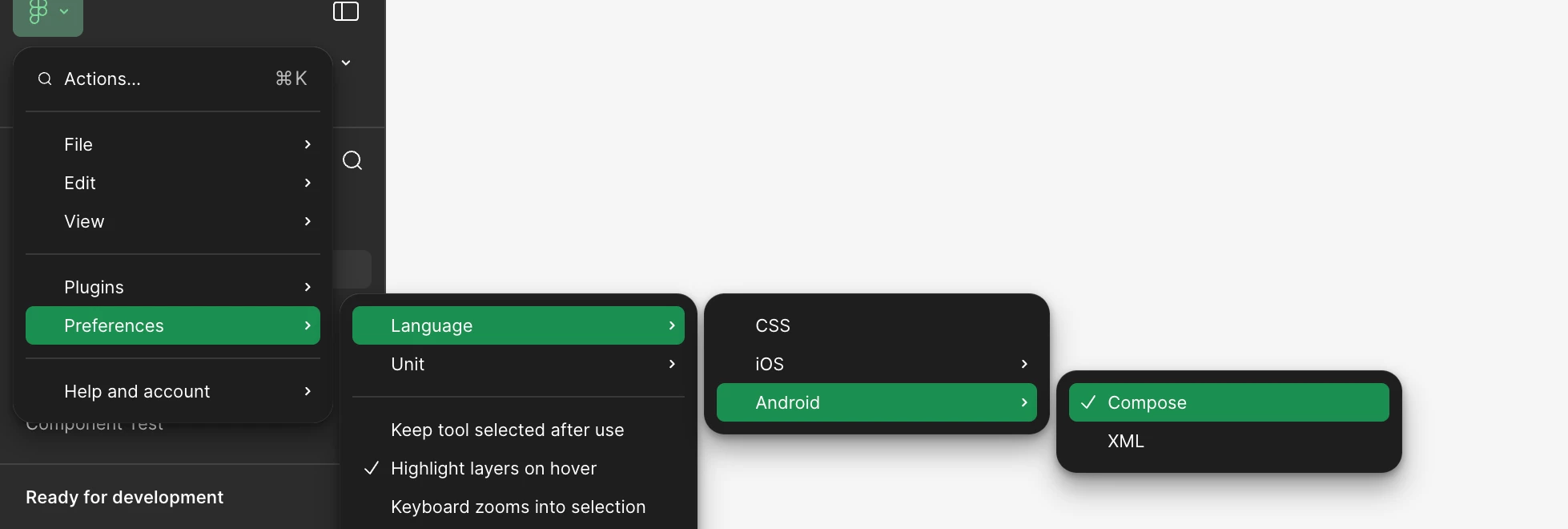
I’ve discovered that you can control which language MCP Figma responds in by changing the preferred language you’ve selected on Figma Remote/ Desktop App preferences under language option. I only found this by accident, so it might be worth highlighting this behaviour in the documentation if it isn’t mentioned yet. It would also be great if the ClientFramework and ClientLanguage parameters were used to determine the response language directly, instead of being used solely for logging purposes.


Adam_Butterfield

Thanks for the insight ​@Lokmane Krizou !!!

I just tried and I get the same result for `get_code_connect_map` tool as well.

Although, it seems like it only works for Android/Compose and CSS (which returns React code for me). I can’t get iOS code at all from the MCP (even though I can see the correct code in the Code Connect panel in the Figma UI).


Adam_Butterfield

Just figured out our iOS issue. We were publishing with the wrong label….
Now using “SwiftUI” as label, MCP is returning the correct code after setting language preference to iOS/SwiftUI. Seems like the label we publish with needs to match the language preference labels in Figma. 


Would also be really nice if this was documented as well.