Question

Figma MCP Server not displaying annotations from nested component instances

  • July 18, 2025
  • 4 replies
  • 266 views

Marina_Nechyporuk

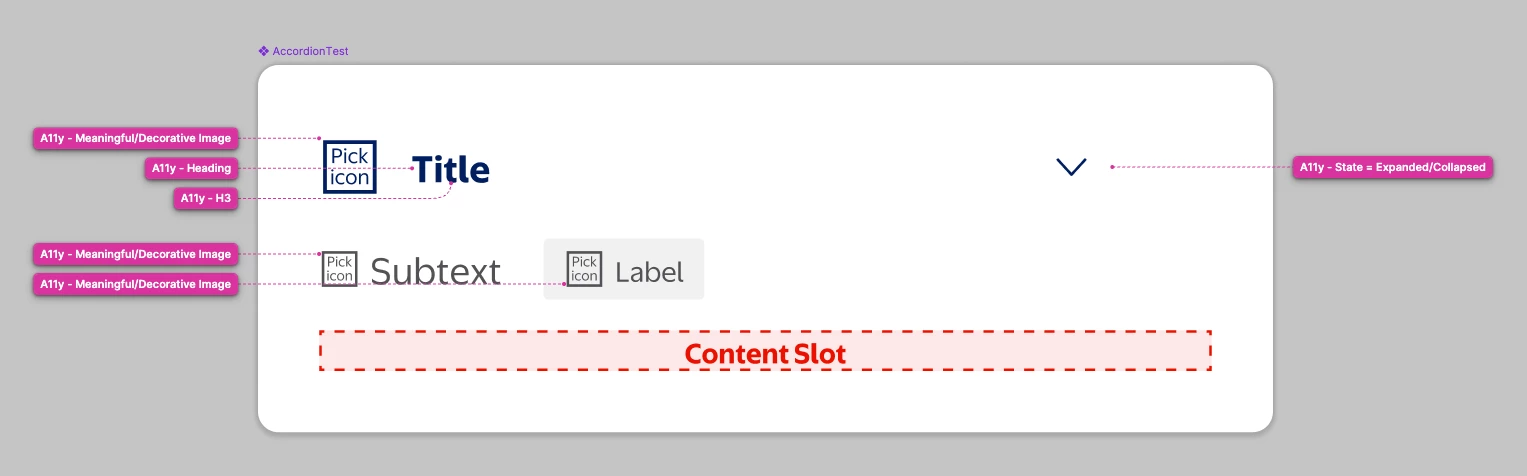
I'm experiencing an issue with the Figma MCP server where annotations are not being recognized by Figma AI. I believe this is related to how annotations are handled within component instances and nested structures.


Since our design system follows an atomic design approach and composes components using other components, annotations placed within inner components are not visible to the MCP server. The annotations appear to be hidden when they exist inside component instances, as Figma doesn't expose nested instance annotations unless working with the original master component directly.


Please advise if there are plans to enhance the MCP server's ability to access nested component annotations, or if there are recommended ways to add annotations in atomic design systems to ensure they work well with the MCP server.

4 replies

Diana1d1
  • New Participant
  • July 21, 2025

Can you share screenshots of what your annotations look like and prompt you are providing your chosen coding editor?


Ryan_Phillips

I am experiencing the same issue. When I add annotations to a component, they are not showing up when running in agent mode on VS Code for eng’s to see. I had watched the recent ‘Release Notes’ video for July 2025 saying that this was a feature release that was now available. Is there any update on this by chance. Have run Figma MCP in various trials asking it it in prompts and .md files but still no luck. Thanks for any insight! Much appreciated! (Attaching annotation image and prompt)

Generate my Figma selection in 'React Native' code and be sure to include annotations from the selection, get_variable_defs, create_design_system_rules and analyze the README.md file for instructions. Figma selection: https://www.figma.com/design/...


VickyChing
  • New Member
  • December 8, 2025

still no. bad.

no get_annotations on figma mcp call tools.


Alex C
  • New Member
  • December 12, 2025

This looks like a case of poor or lacking documentation.  In both the official docs and Figma’s latest MCP video guide, they imply that annotations should work easily over MCP;

https://developers.figma.com/docs/figma-mcp-server/structure-figma-file/


That’s not quite true.

After a lot of digging and experimentation, I discovered some of the annotations are named as follows in the get_design_context response:

`data-development-annotations`
`data-content-annotations`

The instructions below might help Cursor find them.

**Use `mcp_Figma_get_design_context`** to fetch:

- Complete design specifications
- All component variants and states
- Spacing, typography, and color values
- Layout structure (mobile/desktop breakpoints)
- Interactive states (hover, selected, disabled)
- **Nested components automatically included** - The tool recursively includes all nested components and their annotations

**What the `mcp_Figma_get_design_context` tool extracts:**

- ✅ Component structure and relationships
- ✅ Component prop types and variants
- ✅ Design tokens (spacing, typography, colors)
- ✅ MCP tags in component descriptions/properties
- ✅ Node IDs for tracking nested elements
- ✅ **Figma annotation attributes** embedded in Figma elements:
- `data-development-annotations` attributes
- `data-content-annotations` attributes

**CRITICAL: Recursively Extract All Figma Annotations from All Components**

The `mcp_Figma_get_design_context` tool includes nested components in its output, but you must **recursively fetch each nested component separately** to extract all annotation attributes. Figma annotations can appear in two data attribute formats:

- `data-development-annotations` - Developer implementation notes
- `data-content-annotations` - Content and behavior requirements

Follow this systematic process to extract **both** annotation types:

**Step-by-Step Recursive Extraction Process:**

1. **Initialize tracking**:
- Create a set to track processed node IDs: `processedNodeIds = set()`
- Create a list/queue of node IDs to process: `nodesToProcess = [mainNodeId]`
- Create a map to store annotations: `annotations = {}`

2. **Process each node in the queue**:
- While `nodesToProcess` is not empty:
- Pop the next node ID from `nodesToProcess`
- **If node ID is already in `processedNodeIds`**: Skip (already processed)
- **If node ID not in `processedNodeIds`**:
- Add node ID to `processedNodeIds`
- Fetch design context: `mcp_Figma_get_design_context(fileKey, nodeId)`
- Extract **ALL** annotation attributes from the design context output:
- `data-development-annotations="..."` attributes
- `data-content-annotations="..."` attributes
- Store annotations in `annotations[nodeId] = [list of annotations]` with annotation type noted
- **Extract ALL `data-node-id` attributes** from the design context output
- Add all extracted node IDs to `nodesToProcess` (if not already processed)

3. **Extract annotation attributes**:
- Search the design context output for **both** annotation types:
- `data-development-annotations="..."` attributes (developer implementation notes)
- `data-content-annotations="..."` attributes (content and behavior requirements)
- Each attribute contains implementation notes, behavior requirements, or content specifications
- Extract the full text content of each annotation
- Note which component/node each annotation belongs to using the node ID
- Record the annotation type (`data-development-annotations` or `data-content-annotations`) for each annotation

4. **Continue recursively**:
- The process continues automatically as new node IDs are discovered and added to the queue
- Each nested component's design context may contain more nested components
- Process continues until all unique node IDs have been fetched

5. **Compile final annotations**:
- Combine all annotations from `annotations` map
- Maintain hierarchy showing which annotations belong to which component
- Include component prop types, variants, and design tokens alongside annotations