Mr.Biscuit
New Participant
January 23, 2021

LAUNCHED: True Aspect Ratio Lock

  • January 23, 2021
  • 214 replies
  • 31503 views

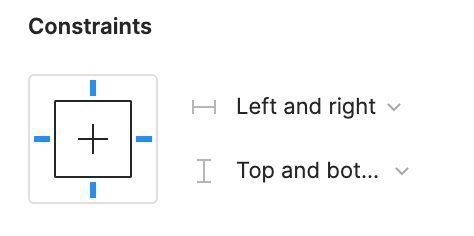
Can we get a true aspect ratio lock when the ‘Constrain Proportions’ is on?WX20210123-114719@2x A true aspect ratio lock means two things:
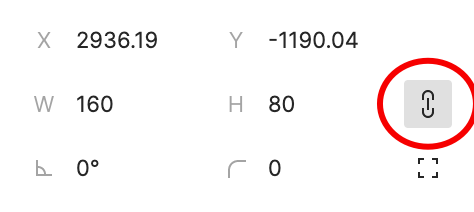
  1. When dragging on a node with ‘constrain proportions’, its width and height always stay in their original ratio no matter which direction you drag it.
  2. When resizing on the parent of a node with ‘constrain proportions’ that happens to be constrainedWX20210123-112532@2x, the node takes on the smallest of its supposed width and height, and calculates its ratio accordingly.

This would be so very helpful to polygon shapes that want to stay in that shape. Consider a spider chart. When you resize its parent, you don’t want the ‘spider net’ to squish squash; neither will you want a doughnut to turn into an oval.

*Resizing of the node’s parent layer is inevitable if you need responsive designs.

Pinned Reply By Celine_

Hey everyone, thanks for your patience! It’s fully rolled out now!

You can now lock the aspect ratio of almost any object in Figma – including frames, shapes, images, videos, vectors, and text – so that the proportions of that object are respected as you scale the object or its parent container.

 More info in the release notes here.

214 replies

mnorooz
New Member
March 18, 2023

True aspect ratio lock would mean that the height of the frames needs to grow (hug) when resizing the width. This in combination with min/max widths and percentage based sizing would be a game changer for our workflow at our company.

wgo
Active Member
March 29, 2023

I’m grateful for Figma’s recent 32 little big updates but this would have been worth being one of them. It’s such a basic feature and we still have to use workarounds with components to make it happen. But yeah, let’s be patient…

Hello @Figma_Support, are you aware of this thread?

Dave_Soderberg
New Member
April 4, 2023

Just chiming in to hopefully bump this up — have been hoping this comes for a while! Janky workarounds make files clunky 😕

April 9, 2023

Haven’t found a good workaround to this yet. Hopefully someone at Figma is monitoring this.

aric
New Member
May 2, 2023

Hey everyone, I released a free plugin to help with this while we wait for this to become a standard feature:
https://www.figma.com/community/plugin/1234709595094737890

May 5, 2023

OMG I can’t believe this. This is like the 3rd major missing feature I’ve encountered in the last 30 minutes in Figma. Might need to go back to XD. At least the basics are there.

djv
Figmate
Community Support
May 5, 2023

Hey All,

The expected behavior for the “Constrain Proportions” option will only affect the size of the object when changing the number values found on the Design Panel.

If you want to proportionally scale an object by mouse dragging, the best option would be to hold Shift while dragging it.

To be fair, we hear you and completely agree that this isn’t clear from the UI. Rest-assured, our team is aware of this issue, and we’re tracking this in our backlog already. We hope to have better timeline on fix in the future.

Jun1
New Member
June 2, 2023

Another huge +1. Able to maintain aspect ratio would be super helpful for designing and prototyping responsiveness

tdeverx
New Member
June 24, 2023

With the introduction of min/max sizes, aspect ratio lock would really come in handy for creating responsive designs where the element needs to remain square.

Even with the addition of the new dev mode, handoff to express that it should stay locked to an aspect ratio would be an amazing improvement!

Zhenmin.Li
June 26, 2023

Need this lock aspect ratio feature indeed!