Hide values in component properties if the Variant is not created
I don’t want to see some properties or values of any properties, if they are not used in the component. This is making it difficult to use the components.
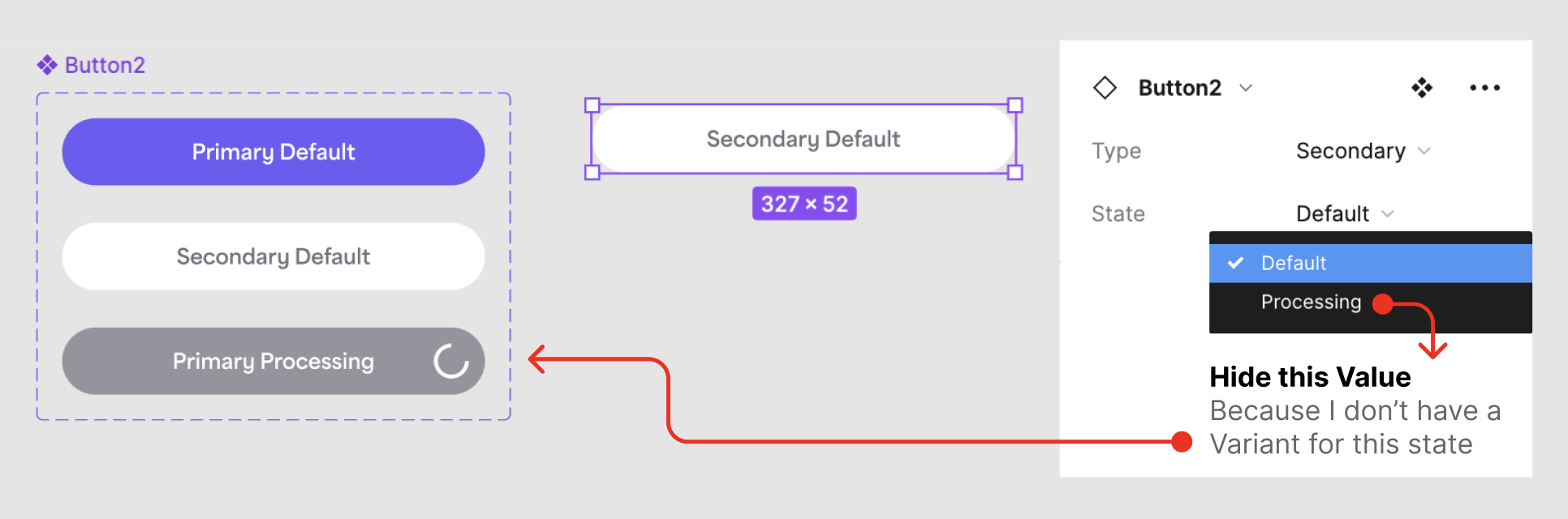
Example: I have a button component with
- Property 1 (Type: Primary, Secondary)
- Property 2 (State: Default, Processing)
I only want “State: Processing” to be available for “Type: Primary” button. I have created a Variant of “Type: Primary” button with “State: Processing”.
Currently the problem is when I use “Type: Secondary” button, I can see “State: Processing” in the properties. When I select it, the button “Type” changes to “Primary”. It would be great if the “Processing” state doesn’t show up in the properties list, since I don’t have that “State: Processing” created in the component Variants.