Create Folders/Categories/Tags for files

  • January 26, 2021
  • 295 replies
  • 78582 views

Show first post

295 replies

Hleb_Bartalevich

Hello!
During our work a large team of designers create hundreds of drafts and templates on different categories (landing pages, cases, presentations, logos etc.) & it is very hard sometimes to find what you need in the large list of drafts or team projects. We will be very grateful if you could make a possibility to create folders or category-list/tabs on Drafts/Team Projects pages!
Sincerely, BYYD.me team


Phil_Larsen
  • Active Member
  • July 7, 2021

I’m getting to the point where my projects have a lot of files within it and they’re kind of hard to manage. Can we get some foldering capabilities so we can have sub groups of files?


Graham_Hulbert

Hi,

Fairly straightforward feature request; would really like the inclusion of subfolders in Projects to help with file organisation. Currently I either have a large number of files in one project which can be cumbersome to navigate (am aware of the search function etc), or have to set up a lot of projects which can also get a bit cluttered. Again, I’m aware of the current feature of favouriting projects so only they display in the sidenav but these are already constantly growing in number! 🙂

If I could create subfolders for product features as children of main product modules that would make the overall organisation of the files simpler and tidier.

Thanks!
Graham


Hoby-Van-Hoose

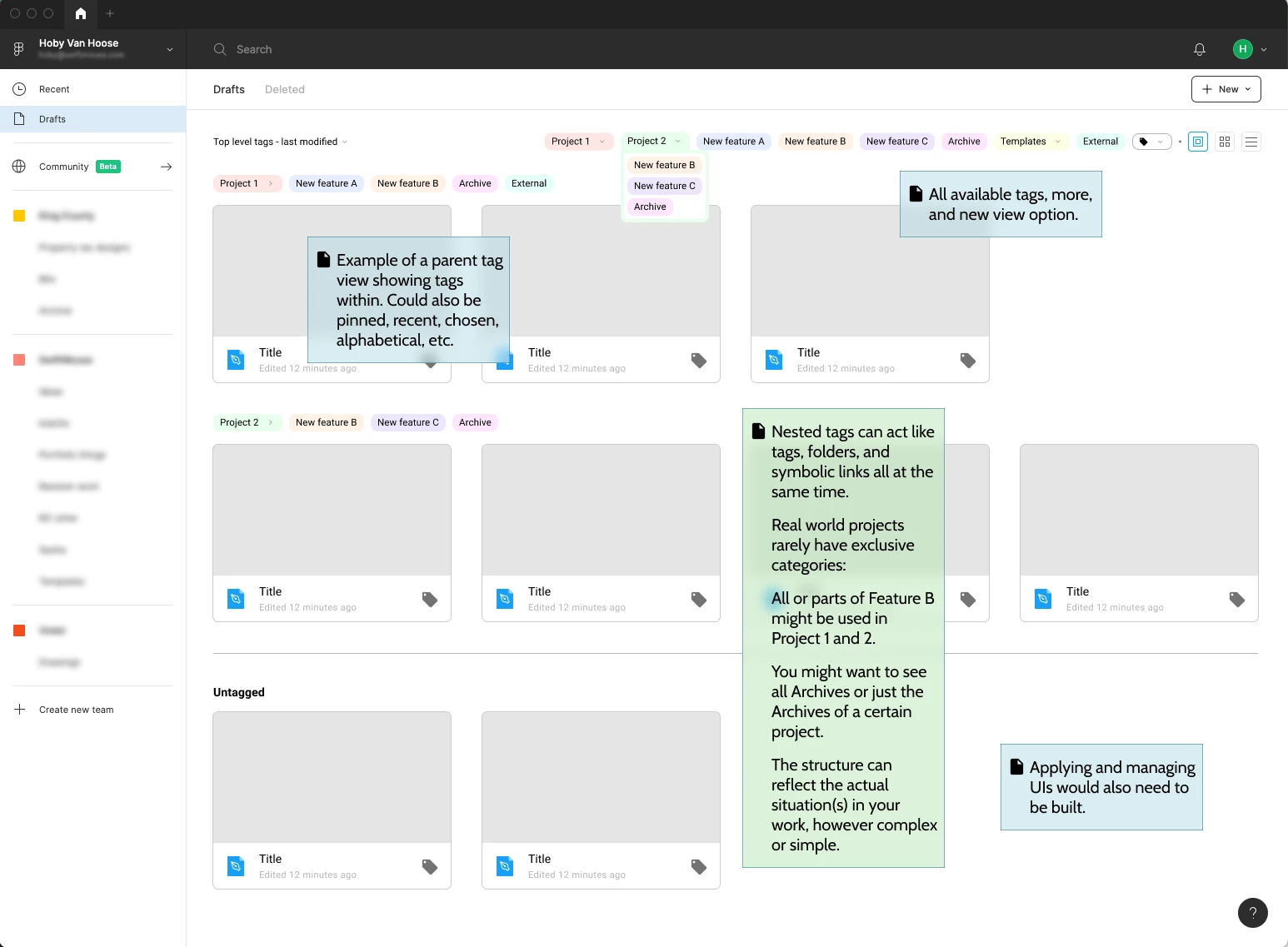
I’ve created a visual example of how nested tags could be used in a new file browsing experience.

Note that Nested Tags act both like folders and tagging at the same time, without the pitfalls of actually using them separately.

So files and tags can be shared across hierarchies (legacy folders) because that’s what real projects do. They’re adaptable to any kind of organization structure(s), instead of being locked into a linear hierarchy. I’ve seen too many fileshare subfolder mazes (especially with empty folders) to want that mess repeated in Figma.

Nestable groupings could be based on anything (again at the same time):

  • client, audience, persona
  • project hierarchies (initiative, epic, feature, story, task)
  • company structure (team, group, employee)
  • phase, stage, difficulty, completion
  • activity type (design, discussion, test, charrette)
  • favorite, pin, star

Beyond accurately organizing, you can simultaneously managing multiple organizations schemes that are important to different people. One person’s method can be applied without disrupting another person’s different method.


DanieleLanzetta

As already said by most, being able to create folders in drafts would be a great start.

next: tagging projects and being able to search these tags in the input form.


Ryan_Williamson-Cardneau

Sub folders inside of projects (or folders) would be hugely helpful for large enterprise companies who have 1 figma account for the entire company consisting of dozens of business units, hundreds of editors, and thousands of viewers.

At a top level a business unit gobbles up a team space which means we have a project (folder) for each of our products but then loose the ability to create great categorizing and organizing from there.

Our designers want a messy space to do research and exploration that isn’t quite ready to begin a branch off of a product file yet. All of these files and no good way to archive or organize them means these projects get really busy really fast.


Maximilian_Korbel

+1

In large Projects with high amount of different files it would be great if you can create files, tags, headlines (like in Zeplin) to sort the files a little.


Roseguz
  • September 2, 2021

As designers we all have multiple projects in Figma. Some of us have so many projects that we would like to be able to group them together. This is why we need to be able to group the drafts in different folders so that we have everything in order and be able to access each category without having to waste time looking for each of the projects. This would save us time and space and in turn, have everything perfectly organized.
In short, we want to create folders without limit and be able to change the color of each.

🙂


Yuri
  • September 2, 2021

I wholeheartedly support you in this case!


Tirachaimongkol_Treerat

I’m working with a complex team setting and a design file can relate to many different teams. However, when I need to sort for all files that related to some specific team it’s almost impossible since the file would be all over in different projects/folders. So I wish we also have tag system that we can use to tag and sort the file.


Victor_C
  • September 13, 2021

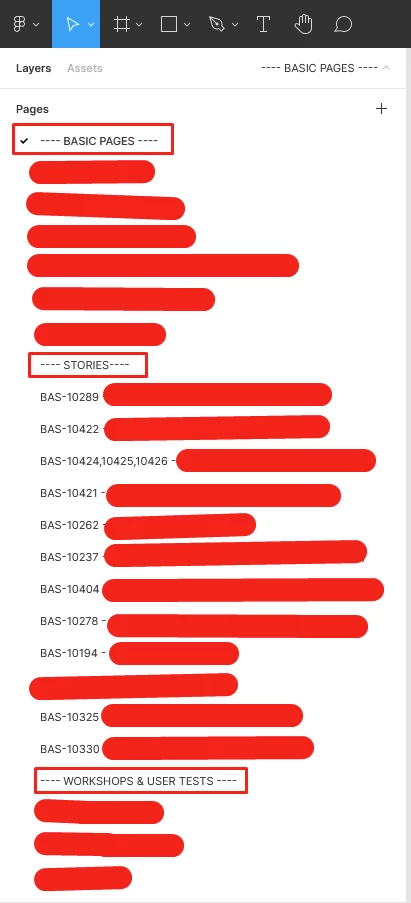
I just want to be able to categorize my pages into folders or layers, as illustrated on my current project (red squares being the “parents” and red lines being the “children”):

Tags could be useful as well. One solution doesn’t need to exclude the other =)


Carlos_Vargas

I find it a bit unnerving that devs dismiss the request based on the fact you could organise via projects. Feels like I need to apologise for working on a dynamic environment where I need more advanced organisational tools.

I turn the question around to Figma: Is there a strong reason why tags absolutely can’t be implemented? Will this break something?


Carlie1
  • September 20, 2021

My organization groups it’s teams to differentiate projects. Within those groups, there is no further group functionality. All of my teams files are just existing together rather than grouped and organized in sub-categories.

I would like to be able to create sub-groups within my team’s group.

How it is now:
ORGANIZATION XYZ
-Team A
—Figma Board Z (project 1)
—Figma Board Y (project 1)
—Figma Board X (project 2)
-Team B
—Figma Board W (project 3)
—Figma Board V (project 4)

How I’d Like it to Be

ORGANIZATION XYZ
-Team A
–Project 1
—Figma Board Z
—Figma Board Y
–Project 2
—Figma Board X
-Team B
–Project 3
—Figma Board W
–Project 4
—Figma Board V


vtolk
  • September 29, 2021

omg please- I spend a lot of time looking for the files I need - we really need folders ❤️


Jonathan_Meyer
  1. When working in large Figma files with multiple (20+) pages, some sort of folder solution so that files could be sorted into bins to help would be great!

Khalil_Boukhelifa

It is a no question problem. We don’t have to ask to simply have the possibility to create folders on the draft’s page to organize the design files… It is OBVIOUS and easy to implement even if it is a paid feature it is so stupid we can’t have that simple feature… Things like this can change minds to go to other design platforms.


AmodeusR
  • New Member
  • October 10, 2021

It has passed almost a year, and nothing of such funcionality?! What a shame! Figma is an awesome platform, but lacking in organization is a big hit.

Bring it as soon as possible, because working in a messy workspace is really… Discouraging.

Edit.: I just discovered it, but specially now that we can only create one project/folder per team lol

Edit².: Yet again, I found out you can only have 3 figma files in these “project folders” 😐


Isaac_Nip
  • October 11, 2021

Almost a year but no solution yet LOL.
I wanted to subscribe Figma but found that lacking this function would be really inconvenient to me and my team.


Isaac_Nip
  • October 11, 2021

We need folders to manage our design progress, history, versions.

If you were managing a huge design team that receives massive requests a day from product managers, you would want to distribute some approved requests into designs and put them into pending to develop folders for IT team to check out. In the process, you really need to mark which versions are “production”, “developing”, “pending to design”, etc so that they can be easily distinguished.

Please consider to put it into backlog and make it happen! I believe that every manager / designer will love it!

Thanks and have a good day


farshad.sadri

I believe they deliberately don’t develop this feature as the structure is already in place. I think this is because they use it as a motivation for purchasing premium and this is very disappointing! I think if more people use Figma they more chance is there to convert them rather than limiting users!


user85
  • October 20, 2021

It would be nice to add the ability to sort projects by folder in the Drafts section. It was cool if you could separate different drafts according to specific genres. And working on a new project, you would immediately refer to the necessary folder, and not search among the large canvas of all projects. that would make the task very easy. Thanks 🙂


Jung_Lee_ESI

I feel the same way. This is a very easy feature to develop. The problem is, they don’t even have this even for Enterprise account so people are forced to create Teams when they really don’t have to.


Yariv
  • New Member
  • November 4, 2021

Hi all.
I am assuming it was already said and requested a lot of times - having one level of “files holder / aggregator” is not enough when wanting to arrange your files in a more organized hierarchy. In big projects its becoming quiet messy…
Would be great to have the ability to do so.

Thanks


Karol2
  • November 4, 2021

I think grouping Design Files together is a missing feature that would add the possibility for cleaning drafts feed.


Travis2
  • Active Member
  • November 10, 2021

Echoing what it seems many, many others are saying, file management in Figma is lacking. It goes Org/Team → Project → annnnd whatever files you have better fit inside there because that’s all you get. Subfolders? Never heard of 'em.