Create Folders/Categories/Tags for files

  • January 26, 2021
  • 295 replies
  • 78598 views

Show first post

295 replies

mtartaglia

This could work in so many ways (onboarding, cross-feature work, etc), replying to keep the dream alive!


eymen
  • April 21, 2024

Adobe bought Figma, and still ignored this feature! are there something we don’t know would happen if they added or something?


eymen
  • April 21, 2024

I deleted some projects to organize the most important ones I have. there should be folders, Figma!


aolko
  • April 25, 2024

Adobe didn’t buy Figma, this is misleading


Emil10
  • April 25, 2024

Since 2021 this still hasn’t been implemented? Such basic features. It’s very frustrating


Gloria_Lee

please make this happen Figma 🥹


Story:
Having to retroactively find and organise files is a time sink.
Particularly at an organisational level, if your team iterates loads and quickly.

I think a tiny amount of design friction here would help improve quality of life.

Suggestion:
I would recommend that if an organisation:

  • Has projects or teams set up > Popup to select location of file > user selects location > new file opens

  • Does Not have projects or teams set up > Just open new file (as clearly no system in place)


Ingrid3
  • May 13, 2024

I have different projects like Web designs, Mobile designs, Marketing and so on. Within Web I have around 150 files that are an absolute nightmare to find, sometimes even with the search tool (which struggles for whatever reason to find them, even when writing the full exact name of the file).

Having an inner organisation here in the shape of folders (or anything as mentioned, categories or tags too) would be extremely useful.

In the company I work for we are leaving Sketch behind in favor of Figma, and this is one thing Sketch simply does better with the called Collections. I find myself scratching my head and wondering why other customers of this product were repeatedly told about projects as their solution. We know about those, we need inner organisation within those projects. This thread is very old and it is concerning that people are still bringing this up with the same replies.

Are there any plans to implement this basic improvement?


fab1An
  • New Participant
  • May 16, 2024

It’s simply incomprehensible that there’s no way to further structure files. We’re just starting to set up Figma (moving over from Sketch), and are already stumbling over this limitation, mindblowingly bad for such a big and successful tool. 😳
Please add tagging – or at least folders!


Sasha_Plakhova

I’ve only just started my design journey, so in the early days, I didn’t realise that I had a huge number of drafts and community files piling up. A few days ago I decided it was time to organise the files in the drafts into folders like ‘Studies’, ‘Community’, 'My Ideas, ‘References’, etc. I right-clicked on the empty space in the drafts section, expecting a list of commands to pop up, including ‘create folder’. I expected that because in 2024 the option’s been implemented in phones, in computers, in cameras, in just about every device! But nothing happened.

I went online to find out what was wrong and found out that in Figma you can organise files by using something called “projects”. I have a student subscription, so I was able to create projects… But they turned out to be completely useless. OK, I created the necessary folders/projects (‘Studies’, ‘Community’, 'My Ideas, ‘References’) in my team and dragged my drafts there, because… Yes, you still can’t create a folder/project in the drafts section, even with a paid plan. Folders/projects are only available within a team, gosh. Well, I can live with that last fact, but what if the organisation gets more complicated?

I am not able to create a subfolder/subproject ‘UX/UI’ in the ‘Studies’ folder/project, so I have to create an additional folder/project ‘UX/UI’ NEXT TO the ‘Studies’ folder/project instead of IN the ‘Studies’ folder/project, making it impossible to establish a hierarchy between these folders/projects. I don’t understand why. It’s basic mechanics, man, even physical libraries have directories with subdirectories, because hierarchy is important when working with any information. It is not just some random UX/UI folder, it is actually a subfolder with UX/UI for my studies and nothing else that I expect to see.

And what do developers and efficient managers hope for? That we will switch to a paid tariff? Well, we do, but even then we don’t have this BASIC function of data organisation. I feel like I’m not even in the Middle Ages (btw with its passion for classification!), but on another planet, and I can’t imagine how professionals work with dozens of projects and clients despite current conditions.

I’m not talking about the fact that this topic has been banally ignored for three or four years. Imagine Apple releasing a phone with a camera that only shoots in black and white. People are used to taking pictures in colour. They ask for the ability to see colour again, but the company blithely ignores them. It’s the same here. I am really confused.


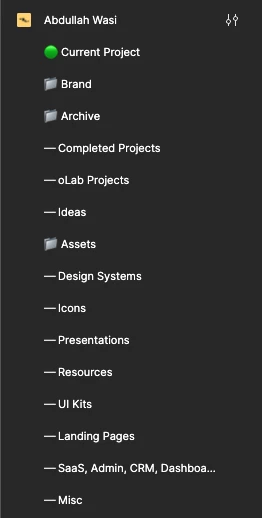
Abdullah_Wasi

Ahh, the good old Figma organization mess


ImCarlo
  • New Member
  • May 29, 2024

It’s pretty obvious that if it is not allowed to create folders (or projects, whatever) in Drafts it’s just because Figma want to push its users to upgrade to the Professional plan. It’s not like they haven’t thought about it all these years, given that teams with a paid plan already have the feature


Sasha_Plakhova

But even with a paid plan, you can’t create a subfolder/subproject within a folder/project. Really nice lmao


aolko
  • June 4, 2024

you just have to pay more


Figma, my team’s workflow would be much improved (and time would be saved) if you created subfolders within projects. People on my team who are less hands-on with the design are unable to make sense of how files are organized and find the design they are seeking when they look in the file browser. Our current work-around for this is to create a folder/subfolder system on a shared server and place individual links to Figma files inside this folder/subfolder system. It takes up time, and it is hard to “toggle switch” to keep this external folder/subfolder system up-to-date with the latest Figma files.


Else_Markslag

In my company we already tried to organise our files using projects, but often we’ll have a design file that could belong in multiple projects because a certain page appears. In that case it would be nice if we could use tags so we can still keep the files in the correct project folder whilst still being able to find all the design files with a certain tag (like “login” or something) and not having to specifically mention the name in the file just because that page happens to appear in the file and none of the designers are able to find it out in any other way.


Joshua_Johnson

Something so simple like basic folder structures has consumed many meetings over my career, past companies and dev teams.

@figma, please add folder structures.


Mariana_Arrioja

Simple, add subfolders in projects to organize files.


dennsi
  • Active Member
  • July 31, 2024

~ bump ~

This request has 1.3k votes and exists for 3,5 years.


Robert_Bye
Figmate
  • Figmate
  • August 8, 2024

Hey everyone, I’m Rob a PM at Figma. I’ve recently started working on the file browser and we are now actively exploring this.

Sub folders make sense, but I would love to hear peoples arguments/preferences for folders vs tags?

Really appreciate everyones input on this as well, I’ve been reading through the feedback above and there are some great ideas.


fab1An
  • New Participant
  • August 9, 2024

Ideally it would be both. I can’t talk for agency people or freelancers, but we are designing the same elements or layouts for different website areas and app platforms. We also have products and projects. A deeper folder structure would help with the latter, tags would help to find similar layouts over different projects and products, like ‘search’ or ‘menu’.

And: Thank you for looking at this topic!


shu
  • New Member
  • August 12, 2024

Being able to tag files would be super helpful for my project. Often, the iterations we’re doing are cross-modules, so it doesn’t make sense to house the new version under any modules (or folders). (I did not read through the whole thread, so apologies if this was mentioned/off-topic)


MG17
  • New Participant
  • August 19, 2024

Push.

Plus some characters to reach the min amount.


SonjaBe
  • September 3, 2024

This would be really helpful!
We work for multiple clients, so each ‘project’ is a client.
For each client, we have Design files (e.g. for website, app, design system), different FigJam files for Research, and now we also use Slides for presentations. So there can be quite a lot of files in one project, which makes it difficult to get a good overview of everything.

Would be very helpful to be able to create folders, e.g. for ‘Research’ or ‘Presentations’


Travis2
  • Active Member
  • September 6, 2024

We put things in folders because they share some broad categorization like sports (baseball, football, soccer) then tag individual files for narrower focus like offense, defense, active, injured, etc. Folders are more important than tags, but please, ideally we need both of these.

I’ve been reading through the feedback above and there are some great ideas.

The thread is almost four years old, we’ve had some time to think about it. 😀