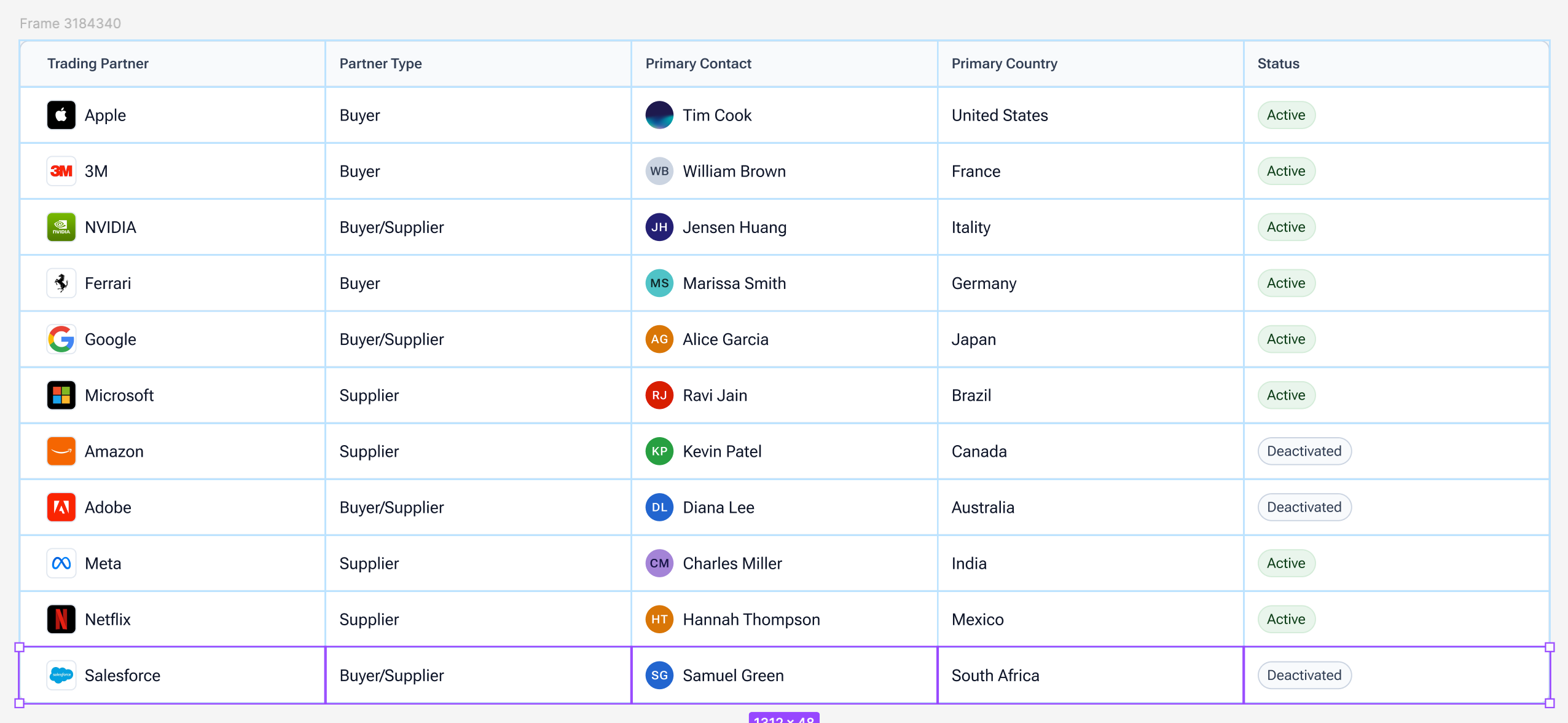
I was very excited to hear that grids were coming to Figma. CSS Grid was introduced years ago and brought with it many things that flexbox was incapable of doing, so I was hoping for a similar level of new capabilities here, and I genuinely cannot believe that this feature is being shipped in its current state (even as a ‘beta’). This is a very long post, but I feel like this feature has been implemented so poorly that it legitimately sows doubt in Figma’s capabilities to deliver features in the future.
Inability to ‘hug’ contents
Both rows and grids themselves are unable to resize themselves to match their contents (‘Hug”).
Row heights must be either “Auto” (1fr) or a fixed height, meaning that if you want your rows to be sized per their elements, you’ve now manually defined each row height in px (not even a variable value), and instead of getting a clean CSS output, now you have however many rows defined in exact values, destroying any chance of scalability.
This alone makes this feature nearly useless to me.
‘Cannot remove row from a grid when it has content’
One of the great aspects of CSS grid is that, without having to do anything to the children of the grid, I can change the number of columns/rows and the grid will re-flow all the elements for me.
Figma does not do this. It will add rows/columns only if they are larger than current, but it will not remove rows/columns unless they are empty, so you have to manually move everything into the place you want, and then you are able to remove the extra rows/columns. This is an incredibly cumbersome way to handle this and immediately made this feature hard to use.
Why do I even need to define the number of rows?
One of my biggest gripes with Figma’s ‘Fill’ mode is that there are no percentage based widths. Say I want my items to take up 25% width, but I only have 3 items total, I now have to create an empty ‘spacer’ frame so that my design can stay responsive without manually setting pixel values
With grid, well now I can define my number of columns and get the nice percentage based widths I want, but I also have to define the number of rows, making it incredibly tedious, and since I can’t even set their heights automatically, I genuinely might still be better off just using horizontal auto layout with spacer frames.
Inability to select the elements in a row/column all at once
In all other areas of Figma, selecting a parent and hitting Enter will select all children. In grid, selecting a row/column and hitting enter only allows you to change the width/height, you must manually select each item one by one.
Table behavior
After I’ve manually selected each item in a row, now I’d like to create a new row, let me hit Cmd+D and... After I’ve manually selected each item in a row, now I’d like to create a new row, let me hit Cmd+D and...
oh. This also happens in reverse when selecting an entire column. Tables to me seem like the most obvious use case of grid, because managing tables in Figma has been a pain for years, you either get nicely sized rows, or nicely sized columns, but now trying to use Grid for table somehow creates an even worse experience. Duplicating a row grants you more columns, and duplicating a column grants you more rows. You have to manually add the row/column first before duplication, and then it will work as expected.
I sincerely hope that some of these issues/limitations have already been addressed internally and are just not public facing yet. I’m very disappointed in this release, as Figma has had years to approach their CSS grid implementation, and they’ve provided a solution that is obnoxious to use and far too limited in scope.
[Subject line updated by a moderator and linked to new features post on May 9, 2025 — changed from “Grid for Auto Layout is horribly limited in scope and very awkward to use” to “[Config 2025] Grid Auto Layout Flow — let’s hear what you think!”.]
Hi all! First, big thank you to everyone who took time to share feedback on Figma Grid. During Config 2025, we were ecstatic to share all the work we’ve done to make it happen.
Your input really helped us understand where things are working — and where things can improve — across different workflows, use cases, and team sizes. The purpose of this post is to give you a reflection of every user who's utilized Figma Grid, and what we’re doing to improve the experience.
🗣️ Top Common Concerns and Limitations
The ability to “Hug Contents” for columns and rows Grid columns and rows are not able to adjust dynamically to fit or “hug” their content. This causes rigid layouts and requires manual resizing.
Missing smart item swapping Reordering items between columns and rows was a slow and tedious process. Drag-based swapping was expected, but not available in grid.
Adapting content when adjusting grid size Previously columns and rows could not be removed unless they were empty, prompting an error message. Ideally, when columns are removed, remaining content should shift to fill available space. To circumvent, designers need to move or delete contents before they could adjust the size of their grid
Lack of variable support for gaps Designers are not able to apply variables to grid gaps, making it harder to maintain spacing across different grids and files.
🔧 What we're doing to address these things
Here’s what we can share so far:
Hug contents. This is one of the most requested features. We’re actively working on adding “Hug” resizing options for columns, rows, and grid containers.
Item swapping. You can now swap items within the grid if they span the same number of cells. This better mirrors expectations of auto layout behavior.
On-canvas column and row deletion with content. The ability to delete a select column or row directly from the canvas, even if it contains objects, has been live for several weeks. If items span multiple cells, their span will shrink accordingly.
Content reflow behavior. We’ve updated the grid picker so that content now shifts when columns and rows are removed. This improves responsiveness and makes layout changes more intuitive.
Variables support for gaps. You can now apply variables to the space between columns and rows. This allows for more scalable and consistent spacing across design systems.
We know what we’ve recapped above may not cover everything you’re looking for, and we encourage you to keep the conversations going. Whether it’s about Figma Grids, or any other Figma product, please engage with us (and each other) in these spaces:
Tip: try running a search in our forum to see if there are existing threads that are similar to your thoughts. Our community is a great place to have conversations, and you may find existing information that helps.
Thanks again for being part of the Figma community!
I would love to be able to specify the directionality of a grid. When I press command + D to duplicate a cell, I want to be able to specify if that new duplicated element should be created to the right or below.
This is especially useful when designing spreadsheet/table like interfaces where there are column headers.
Of course they could have just done this that was requested more than 2 years ago
I don’t know why Figma even asks for feedback. They just do an underbaked feature and make that overly complex. All we need is proper Flex support really
OMG, this.
Why go to great lengths to create a NEW model of grids when: a) Flex Grids is an established standard b) we probably need to convert Figma designs to CSS anyway, so this would bring us closer to code alignment.
I struggle with tables in Figma daily (row-wise? column-wise?) and had really hoped that the new Grid feature would help there, but absolutely not. It took me 3 minutes of experimentation to realize how limited this feature is and another 30 seconds to find this post. Glad the userbase is in alignment, even if Figma product management isn’t.
I can’t believe they made this a big part of their announcement and then delivered something this underwhelming and basically useless. It’s not even beta quality.
I’ve been bugging the Figma folks for literally years to implement grid / flex tools that follow CSS layout standards.
Grid and Flexbox! How hard is that? Just something that follows those rules and implements their attributes in a GUI. Webflow has had these for a ling time.
And actual tables. Separate from but related to grids. Every Figma designer who works on enterprise apps has to design data tables, all day long. There are decades-old HTML elements and CSS attributes for these, yet still, we have to cobble together columns and rows out of nested frames.
Those of us who worked in print had to do similar contortions in Quark XPress - literally a maze of tab stops and 1pt-wide, 1000pt-tall underlines to make borders - and we switched to InDesign en massebecause it had actually useful table design tools, which persist to this day.
How many more years do we have to wait for these basic, basic features? While Figma takes on Illustrator with drawing tools, are they forgetting who their core userbase is?
Glad I found a larger forum post about this. I think everyone agrees that their grids implementation is severely underbaked.
A
Anonymous
May 8, 2025
I made an account to say the same things...Lack of any hugs 😭, lack of ability to keyboard up and down PX widths on rows or columns to at least manually hit the largest internal components margin, lack of ability to use variables to add or remove a row / column on a prototype (think wanting to add a row to a table).
I was really hoping this was going to change my situationship with tables.
I made an account to say the same things...Lack of any hugs 😭, lack of ability to keyboard up and down PX widths on rows or columns to at least manually hit the largest internal components margin, lack of ability to use variables to add or remove a row / column on a prototype (think wanting to add a row to a table).
I was really hoping this was going to change my situationship with tables.
I second the lack of using variables is a an oversight as well as the adding and removing of rows and having it actually adjust the frame size itself.
Both rows and grids themselves are unable to resize themselves to match their contents (‘Hug”).
Row heights must be either “Auto” (1fr) or a fixed height, meaning that if you want your rows to be sized per their elements, you’ve now manually defined each row height in px (not even a variable value), and instead of getting a clean CSS output, now you have however many rows defined in exact values, destroying any chance of scalability.
This alone makes this feature nearly useless to me.
“Hug?” ← This was LITERALLY the first thing I said during the deep dive when they hovered over a row to change it from AUTO to a fixed size.
I might be living in a dream world, but what if it all worked more like CSS? Relative units anyone? Or at the least (since we now have a grid with columns) being able to define padding for child elements by columns?
Within five minutes of playing with grid as it is now, I don’t see this really solving the need for nested autolayout containers to control spacing on page layouts, especially with full width background graphics/colors. I was starting to suspect it wouldn’t when virtually every grid demo was a photo gallery or card grid. Fine for that, but not flexible enough for page structure.
I will try to remain cautiously hopeful since it’s just beta right now.
Figma is lipstick on a broken box layout where component interactions dissolve on contact with other pages.
The “ Cannot remove row from a grid when it has content’ point is the first thing that annoyed me when I tried the feature out. Auto layout has always been flexible, this makes it look bugged
The new Grid layout needs some updates in order to be a great layout tool.
Ability to place multiple elements in the same cell, no absolute positioning, no parent frame hack..
Example: show loading on a button that is display grid. The text opacity changes and the spinner then shows up. This allows the button to stay the same size.
Then allow changing the z-index of the elements inside a cell.
Allow specifying cols and row sizes:
Auto.
Hard coded value.
minmax().
min-content.
max-content.
1fr 2fr ratios.
There should be support for variants in the gaps (both horizontal and vertical) but also in the col and row inputs, this allows the layout to change based on variant modes.
Example:
Mode for desktop: 12 cols and 6 rows.
Mode for tablet: 6 cols and 8 rows.
Mode for mobile: 3 cols and 9 rows.
Grid area?
Maybe allow to place content in named grid areas:
nav nav nav main . aside footer footer footer
Also maybe allow selecting the flow of content from top to bottom and left to right, just like in flex:
Canvas stacking - also applies to auto layout layout:
First on top (default behavior both for flex layout and grid layout) This is a pain point for me.
Last on top.
Additional:
Ability to align items inside the grid when the grid container is larger than the grid itself: when cols and/or rows are fixed width and height and there is some white space in the grid container. Specific behavior.
Maybe changing the flow of content, from col first to row first: `grid-auto-flow`.
This will make then building websites with Site better. Having the ability to specify exactly how the grid would behave.