

Variable spacing values misrepresented when a component instance is scaled
Assume you have a component that uses variables for internal spacing (say, to define gaps between objects in an auto layout).
If you scale an instance of that component (e.g. with the K command), the scaling works correctly visually but the variable does not “detach” and acts as if it’s still a valid defined variable-driven value vs just a reset scaled value.
Here is a component instance that uses a spacing variable named ds-spacing/400, which has a predefined value of 16 for a gap value in an auto layout:
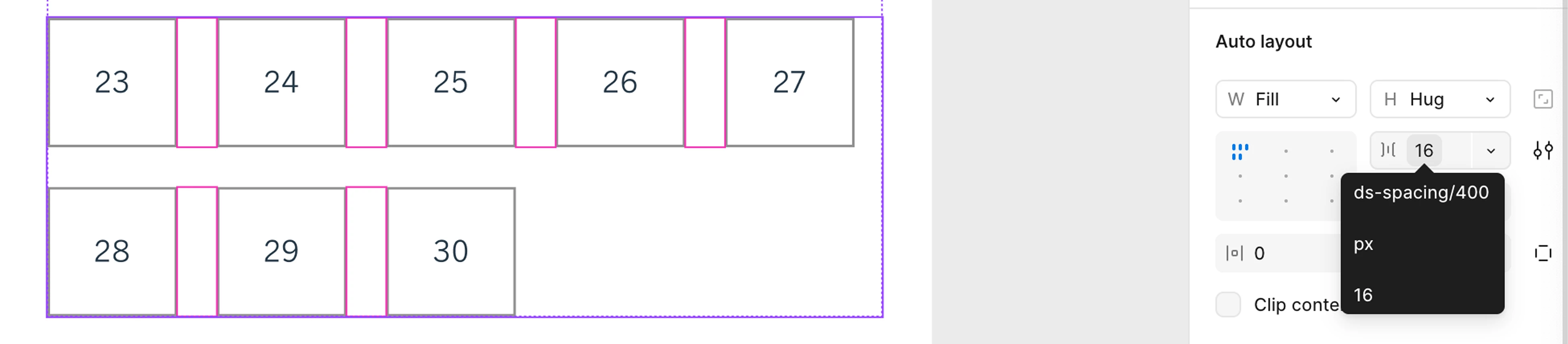
When I scale the component larger, (1) the numeric gap value scales up as expected, but (2) the gap value still appears as if it’s a variable in a white box with an outline (or gray box if it’s selected). This happens even though the size no longer maps to the design system value of ds-spacing/400.
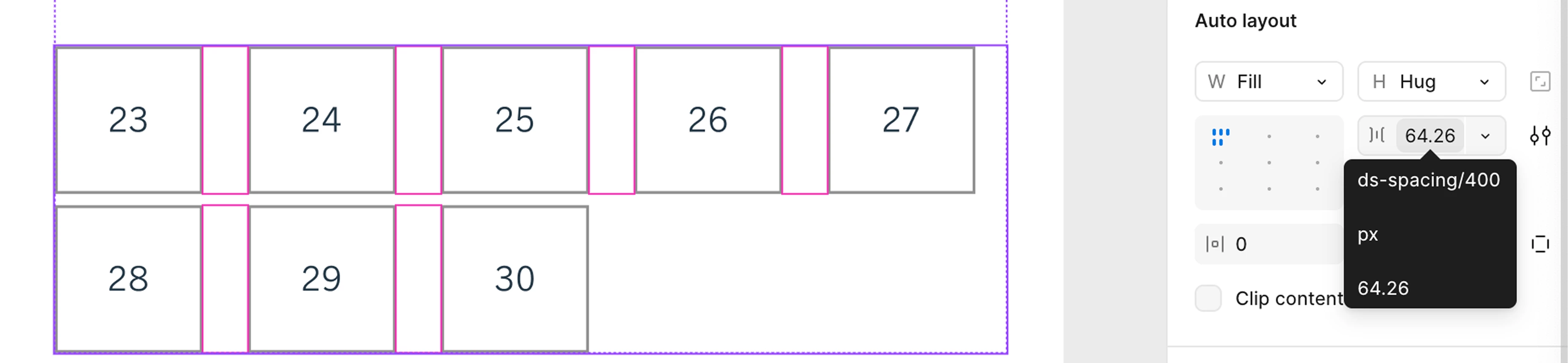
We think the variable should simply “detach” if the component instance is manually scaled, so that there is no confusion where developers or an AI system use the variable/token value of the original size.
BTW, the variable does detach and act as expected if it’s not being used within a component instance (for instance, if the design above were not within a component but instead simply part of an auto layout in a non-componentized design).
This might also be related to the problem mentioned in this post about component updates resetting overridden variables: