

Answer

Request to Cancel Accidental Annual Dev Seat and Adjust Billing

  • November 14, 2025
  • 2 replies
  • 49 views

Agilead Global

Hello Figma Support,

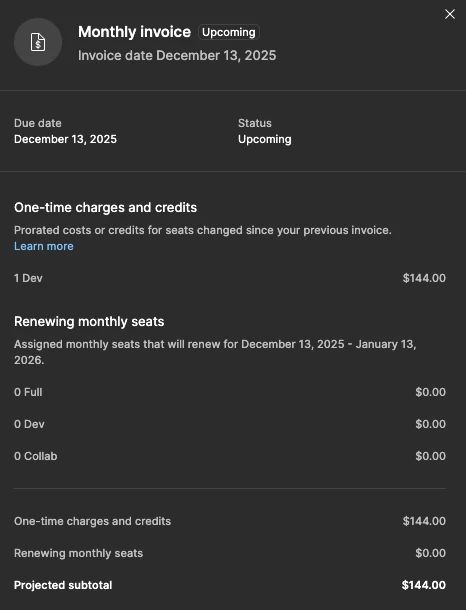
I accidentally added an extra annual Developer Seat to my workspace. The seat is billed as a 1-year subscription ($144), and the charge has been added to my monthly invoice, scheduled to be billed on December 13.

This was not an intentional purchase. Could you please help me with:

  1. Canceling the accidental annual Developer Seat.

  2. Adjusting or removing the upcoming invoice charge for this seat.

  3. If required, I’m happy to pay for the portion of time the seat has already been in use.

Thank you, and please let me know if you need any additional information.
 

Best answer by Agilead Global

@Junko3  Thanks for the quick response and for creating the support ticket! I’ve replied with the requested details and will continue the conversation. Appreciate the help!

2 replies

  • Figmate
  • November 17, 2025

Hi ​@Agilead Global,


I understand that you accidentally added a Dev seat as an annual subscription and are now looking for a way to cancel it.


Unfortunately, for security and privacy reasons, we’re unable to handle specific billing issues directly here on the Forum.

I’ve gone ahead and created a Support ticket(#1602142) for you using the details you’ve provided. One of our specialists will follow up with you directly at the email address associated with your account.

Please wait for their reply and continue the conversation through that ticket.


For future reference, here are some related articles that might be helpful:


For other community members who want to open a support ticket regarding a billing issue like this, please follow these steps:
Select “Contact us” via the (?) icon inside the app, or go to Hi there. How can we help? → type your question → click [Start Chat].
The chatbot will then help you open an email case with our Support team.
 

Thanks,


Agilead Global
  • Author
  • New Member
  • Answer
  • November 18, 2025

@Junko3  Thanks for the quick response and for creating the support ticket! I’ve replied with the requested details and will continue the conversation. Appreciate the help!