Solved

Request for Cancellation and Refund of Collaboration Seat

  • December 24, 2025
  • 1 reply
  • 8 views

hutom

Hi,

This is Hutom, and I’m reaching out regarding a billing issue related to collab seats.

One of our team members mistakenly requested a collab seat instead of a view seat. Although I personally did not approve this request, it seems the collaboration seat may have been approved unintentionally.

According to our records, this appears to have occurred on December 22nd. Would it be possible to cancel this collaboration seat and receive a refund for the charge?

Additionally, I’m unable to modify the number of collaboration seats. I would like to set the collaboration seat count to 0, but it is currently displayed as 1.

I’d appreciate your guidance on how to update this, or if you could assist in adjusting the seat count on your end.

Thank you very much for your help, and I look forward to your response.

Best regards,
Hutom

Best answer by Celine_

Hi Hutom, thanks for reaching out and explaining the situation.

For seat cancellations and refund requests, our support team is best equipped to assist, as we’re not able to make billing or account changes directly from the Forum. I can see that the support team has already replied to your case (case number #1654674). To keep things secure, please continue the conversation directly through your existing ticket.

For others who may encounter a similar situation, please note that:

  • When new seats are approved or added, they’re automatically included on your next invoice.

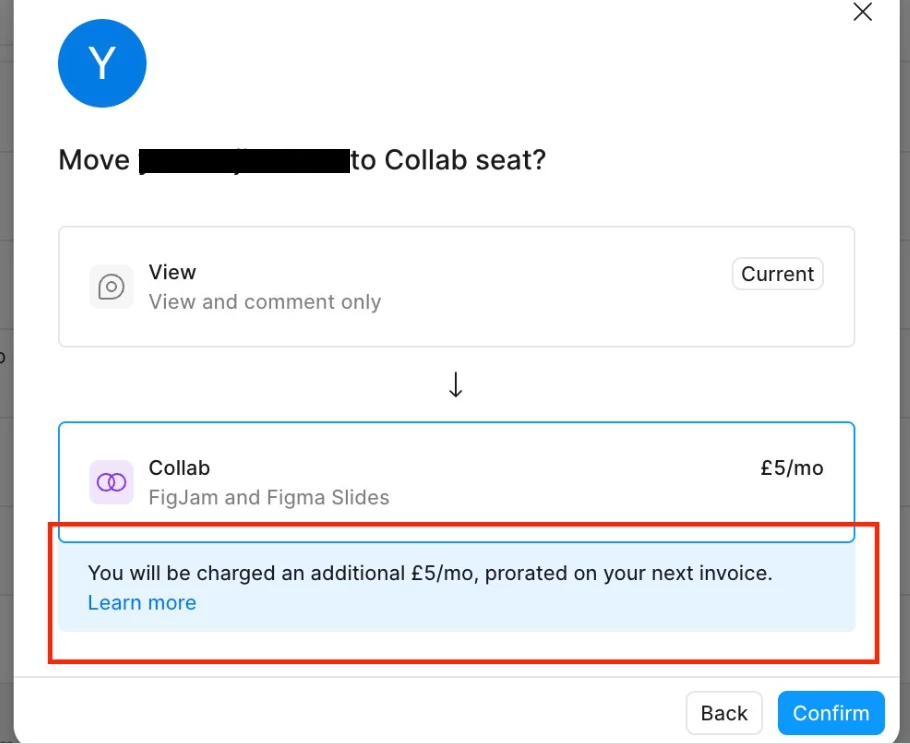
  • When a team owner changes a seat type, the system shows a confirmation step indicating that upgrades result in prorated charges, as you can see below:

  • Once a seat is upgraded, it can’t be downgraded back to a free View seat for a refund. However, the paid seat remains available for the rest of the billing period and can be reassigned to another team member.

For more details, you can also review our Help Center article: Learn more about billing on the Professional plan.

Since your support ticket has already been addressed, I’ve gone ahead and closed the topic here. If you need any further assistance, please continue the conversation directly via your existing ticket so the team can follow up securely.

This topic has been closed for replies.

1 reply

Celine_
Figmate
  • Community Support
  • Answer
  • December 24, 2025

Hi Hutom, thanks for reaching out and explaining the situation.

For seat cancellations and refund requests, our support team is best equipped to assist, as we’re not able to make billing or account changes directly from the Forum. I can see that the support team has already replied to your case (case number #1654674). To keep things secure, please continue the conversation directly through your existing ticket.

For others who may encounter a similar situation, please note that:

  • When new seats are approved or added, they’re automatically included on your next invoice.

  • When a team owner changes a seat type, the system shows a confirmation step indicating that upgrades result in prorated charges, as you can see below:

  • Once a seat is upgraded, it can’t be downgraded back to a free View seat for a refund. However, the paid seat remains available for the rest of the billing period and can be reassigned to another team member.

For more details, you can also review our Help Center article: Learn more about billing on the Professional plan.

Since your support ticket has already been addressed, I’ve gone ahead and closed the topic here. If you need any further assistance, please continue the conversation directly via your existing ticket so the team can follow up securely.