Question

Nested instance do not keep values if I change variant on a parent

  • December 9, 2025
  • 2 replies
  • 55 views

Alex172

There is a rather frustrating thing happening with nested instances and makes the use of components rather useless.
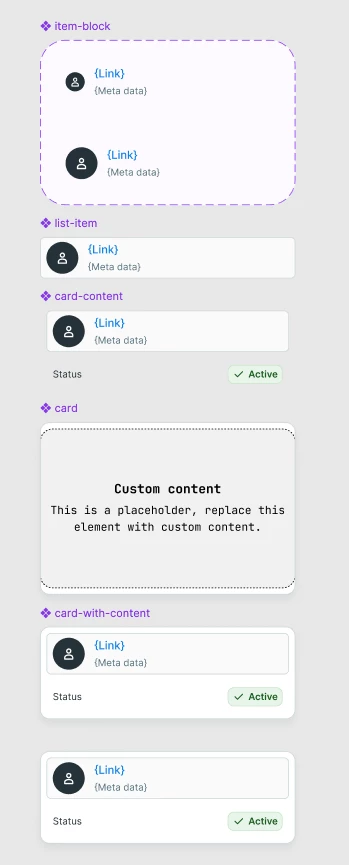
When I apply values to a component instance which uses a nested instance of another component (see image to understand matrioska structure), and I change variant (in the example provided I change the item-block size inside list-item) the value in the final instance resets even if the name of the layers and the structure are the same.

So Imagine now the final instance (card-with-content instance) used across multiple UIs and I decide to change the variant, I have to edit the overridden labels and icons everywhere because they will be reset.
 

Image 1 - Overridden value in last instance 
Image 2 - Variant of item-block changed inside list-item but values are not preserved inside the last instance


2 replies

Tom E.
  • New Participant
  • December 11, 2025

+1 on this, it feels like a bug.


In my case I noticed that even though I have the layer names overridden in all variants of a nested component, if the topmost component changes variants, I lose all overrides within the innermost nested instances. This is quite annoying with eg. tags where there might be several overridden labels and they all get reset.


Jeroen2
  • Active Member
  • January 23, 2026

I have had this issue myself, about a year ago. It seems this issue is still alive and relevant for Figma Design users, this thread proves it. I documented my issue here: 

I contacted Figma Support and had the opportunity to talk to some members of the Figma team, both Support and Engineering. As it stands, this is expected behavior. Furthermore, a Figmate from this forum pointed me on the fact that documenting my use case and submitting it as feedback could be useful for the Figma Support and Engineering teams. So that is what I did and what I suggested to others that were having the same issue. Maybe it is good to follow up on your use case here, as documented by the said Figmate, through providing feedback.

I would invite anyone that has this issue to document it and give feedback about it to the Figma support team.

Junko3 wrote:

Hi there, Thank you for providing those details. I truly appreciate you taking the time to share your setup and troubleshoot.

I recommend reaching out to our support team directly. They can closely examine your design file and provide direct support for each of your questions. Would you mind submitting a request from here?: https://help.figma.com/hc/en-us/requests/new
When contacting our support team, please make sure to provide the following information:

  • Please use your Figma account email address.
  • Share the direct links to the file in question and any related library files. Add support-share@figma.com as an Editor to those files (this won’t affect your billing)

Thank you for your assistance!


If it bears any relevance, you could also refer to my thread, as mentioned above.