

Question
Figma MCP - `get_design_context` ignores `forceClose` flag
⏺ figma-local-mcp - get_design_context (MCP)(clientLanguages: "kotlin", clientFrameworks: "android,jetpack-compose", forceCode: true)
  ⎿  import DesignSystemV4

     type AlternativePartsProps = {
       className?: string;
       varitant?: "Component Slot" | "Contents Area" | "Design Component Slot";
       type?: "Square" | "Rectangle";
     };

     function AlternativeParts({ className, varitant = "Contents Area", type = "Rectangle" }: AlternativePartsProps) {
       return (
         <div className={className} data-name="Varitant=Contents Area, Type=Rectangle" data-node-id="5274:65117">
           <div className="content-stretch flex items-center justify-center relative shrink-0 z-[1]" data-name="Frame" data-node-id="10005:89889">
             <div className="flex flex-col font-['Helvetica:Bold',sans-serif] h-[40px] justify-center leading-[normal] not-italic relative shrink-0 text-[#0180dd] text-[10px] text-center w-[69px]" data-node-id="5274:65116">
               <p className="mb-0">Contents</p>
               <p>Area</p>
             </div>
           </div>
         </div>
       );
     }
     type Lv2CommonBaseRowProps = {
       contentArea?: React.ReactNode | null;
       top?: boolean;
       separator?: boolean;
       bottom?: boolean;
       type?: "No Side Padding" | "Default";
       padding?: "Default" | "Small";
     };

     function Lv2CommonBaseRow({ contentArea = null, top = true, separator = true, bottom = true, type = "Default", padding = "Default" }: Lv2CommonBaseRowProps) {
       const element = { contentArea } || (
         <CodeConnectSnippet data-name="AlternativeParts" data-node-id="7170:33754" data-snippet-language="React">
           <div />
         </CodeConnectSnippet>
       );
     }
⏺ figma-local-mcp - get_design_context (MCP)(clientLanguages: "kotlin", clientFrameworks: "android,jetpack-compose", forceCode: false)
⎿ import DesignSystemV4
type AlternativePartsProps = {
className?: string;
varitant?: "Component Slot" | "Contents Area" | "Design Component Slot";
type?: "Square" | "Rectangle";
};
function AlternativeParts({ className, varitant = "Contents Area", type = "Rectangle" }: AlternativePartsProps) {
return (
<div className={className} data-name="Varitant=Contents Area, Type=Rectangle" data-node-id="5274:65117">
<div className="content-stretch flex items-center justify-center relative shrink-0 z-[1]" data-name="Frame" data-node-id="10005:89889">
<div className="flex flex-col font-['Helvetica:Bold',sans-serif] h-[40px] justify-center leading-[normal] not-italic relative shrink-0 text-[#0180dd] text-[10px] text-center w-[69px]" data-node-id="5274:65116">
<p className="mb-0">Contents</p>
<p>Area</p>
</div>
</div>
</div>
);
}
type Lv2CommonBaseRowProps = {
contentArea?: React.ReactNode | null;
top?: boolean;
separator?: boolean;
bottom?: boolean;
type?: "No Side Padding" | "Default";
padding?: "Default" | "Small";
};
function Lv2CommonBaseRow({ contentArea = null, top = true, separator = true, bottom = true, type = "Default", padding = "Default" }: Lv2CommonBaseRowProps) {
const element = { contentArea } || (
<CodeConnectSnippet data-name="AlternativeParts" data-node-id="7170:33754" data-snippet-language="React">
<div />
</CodeConnectSnippet>
);
}When I call `get_design_context` using Local Desktop Figma MCP, with the flag both `forceCode: true` and `forceCode: false`, but they return identical results.
I expected it to return with `<CodeConnectSnippet>` when `forceCode: true`, and `<div ...>` when `forceCode: false`.
Turns out that it only respects the setting on Figma Desktop here:
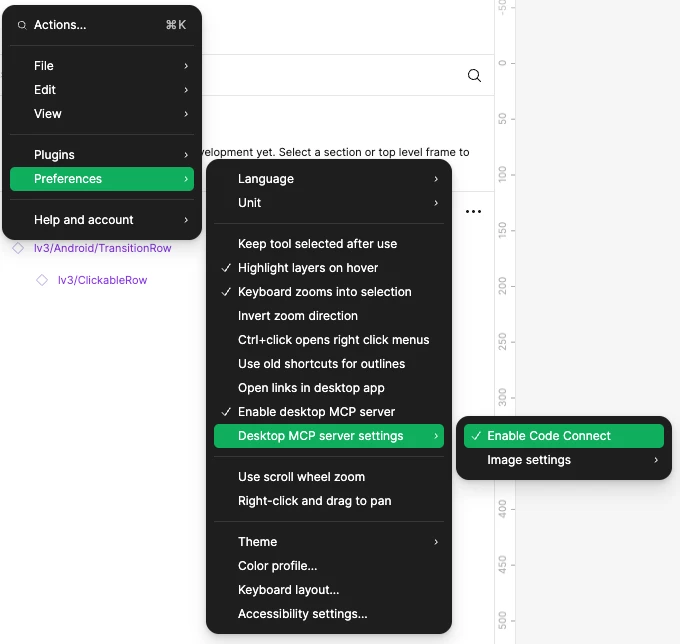
So can you help looking into it?
Perhaps it’s a bit weird by design that you have a setting on the Figma Desktop preference, but also a `forceCode` flag, so one will be ignored. I would expect the `forceCode` to have the priority, but it’s actually completely ignored.