

Question

Component properties memory loss for prototypes in Figma Design

  • January 8, 2026
  • 5 replies
  • 63 views

Mikael_Cederbom

Expectations:

As a designer in Figma i want my components to always remember my edited properties in all instances in my prototypes.

Problem:

When I sometimes have a instance component in another component it doesn’t behave as expected. It seems like my edited properties gets forgotten, like some memory loss.

Example:

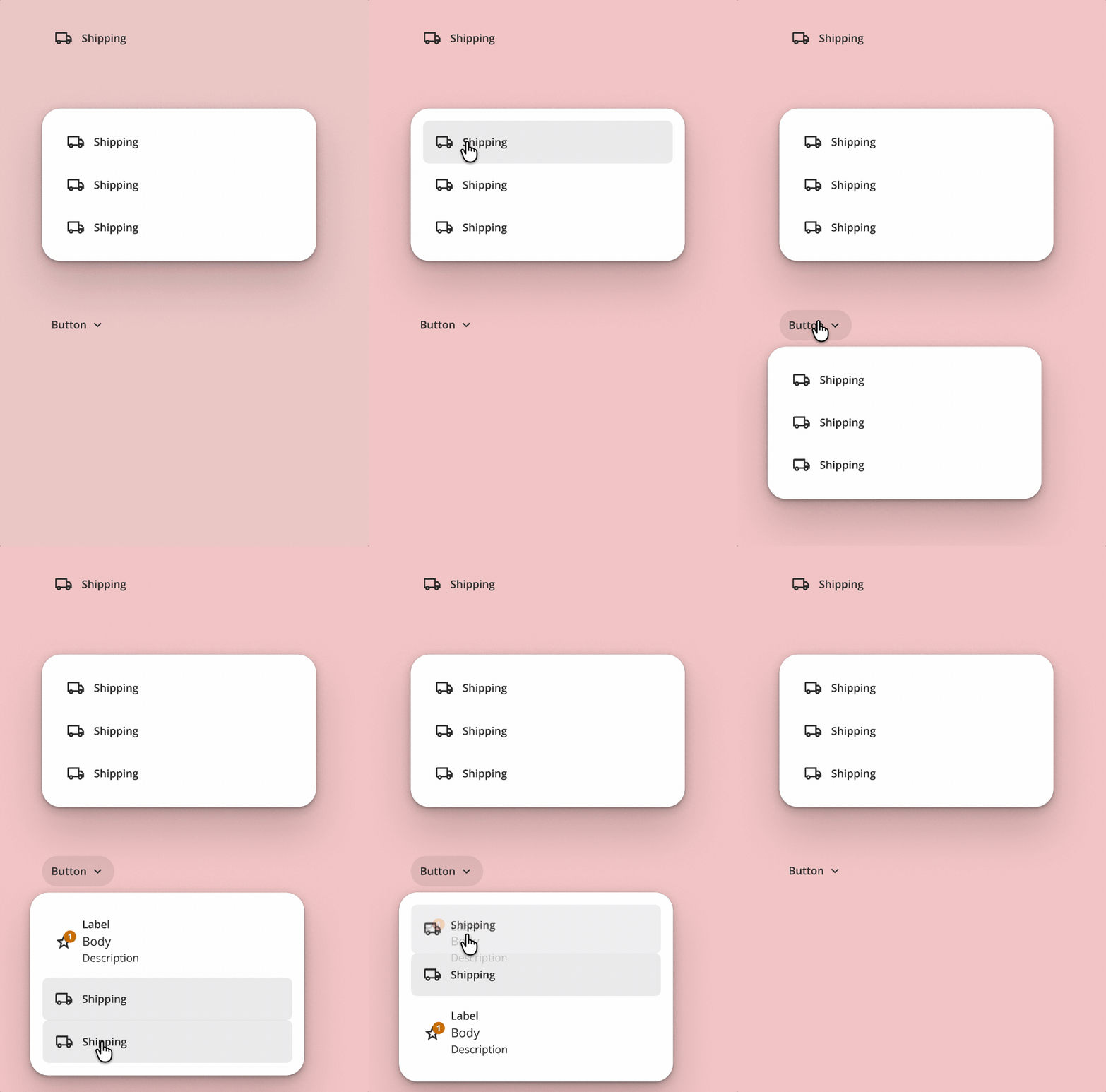
  • I have a “Button” where I can change properties for icon, label, body, description, badge.
  • I change it to only display a ‘truck’ icon and the label ‘Shipping’.
  • When I place it on my canvas it works good as expected, with a background being shown on hover and the icon and label remains the same.
  • When I use the buttons in another component called “Card” it still works good.
  • But when I use that same Card component in a third component called “Button dropdown” the problem is that on mouse leave the shipping button resets the instance (see gif).
Help:

Why does this happen in Figma Design prototypes? It seems to be happening due to the fact that I swap the downdrop card instance from a placeholder card to my shipping card.

So a work around at the moment would be to create a Button dropdown component for each card, instead of having a global style for all Button dropdown interactions.

But when I tested to add the Button dropdown i Figma Site, there it works good as intended.

5 replies

Dan_Wallin
  • New Member
  • January 8, 2026

I’m encountering the same issue where nested components (like buttons) that have interactivity built in (such as hover, pressed etc) are resetting icon visibility, text overrides etc. to their default state in prototype mode. Super frustrating. Hope this bug will be fixed ASAP.


Dx Cardian
  • New Member
  • January 9, 2026

yeah, i got the same issue since yesterday, i created my design for ui/ux team demo, but ends up like this, so annoying


ksn
Figmate
  • Community Support
  • January 16, 2026

HI all - sorry if this has been causing disruption to your work. It would be helpful to get a look a look at each of your files that you’ve seen this on. I can’t confirm if this is a bug just yet, but I can have someone look..

If that’s possible, please do the following:

  • Share edit access to all the relevant files with support-share@figma.com. This is our official Figma support account, and only select support and engineering members will be able to access them to try and replicate any problems. You will also not be charged for this.
  • File a help ticket here, and include a direct URL to the file[s] you’ve shared access to.

Once you’ve done that, please let me know and I will escalate each of your tickets for review.


Th!k you!


Mikael_Cederbom

When I was about to invite Figma support I checked the components and prototype again this morning, and now it works as expected. So at the moment the bug seem to be solved. 😅


Celine_
Figmate
  • Community Support
  • January 19, 2026

Hey ​@Mikael_Cederbom , Celine here, working closely with ​@ksn. Thanks for letting us know!

Glad to hear things are working as expected now. If you notice the issue happening again, please let us know and follow the steps ksn shared so the team can take a closer look. Thank you!