
Solved

The Figma Mobile app shows large images very blurrily

  • February 8, 2022
  • 29 replies
  • 9492 views

Pinton

For example, I took a screenshot on my phone and imported it into Figma. This screenshot can be clearly displayed in the Figma App for Mac, as well as on other Macs. It can be ruled out as a network problem.
But when I saw it in the Figma Mobile App, it was very blurry. It’s pretty fuzzy both in Prototype and Mirror.

So I tried to find the cause of the problem, and I found it through a series of experiments. When the long edge of the image is less than 1024px, the image will be clear. But when the size is larger than 1024px, the image becomes more blurry than the smaller image.
Maybe Figma made a size limit? Above this threshold, low-quality images will be displayed.
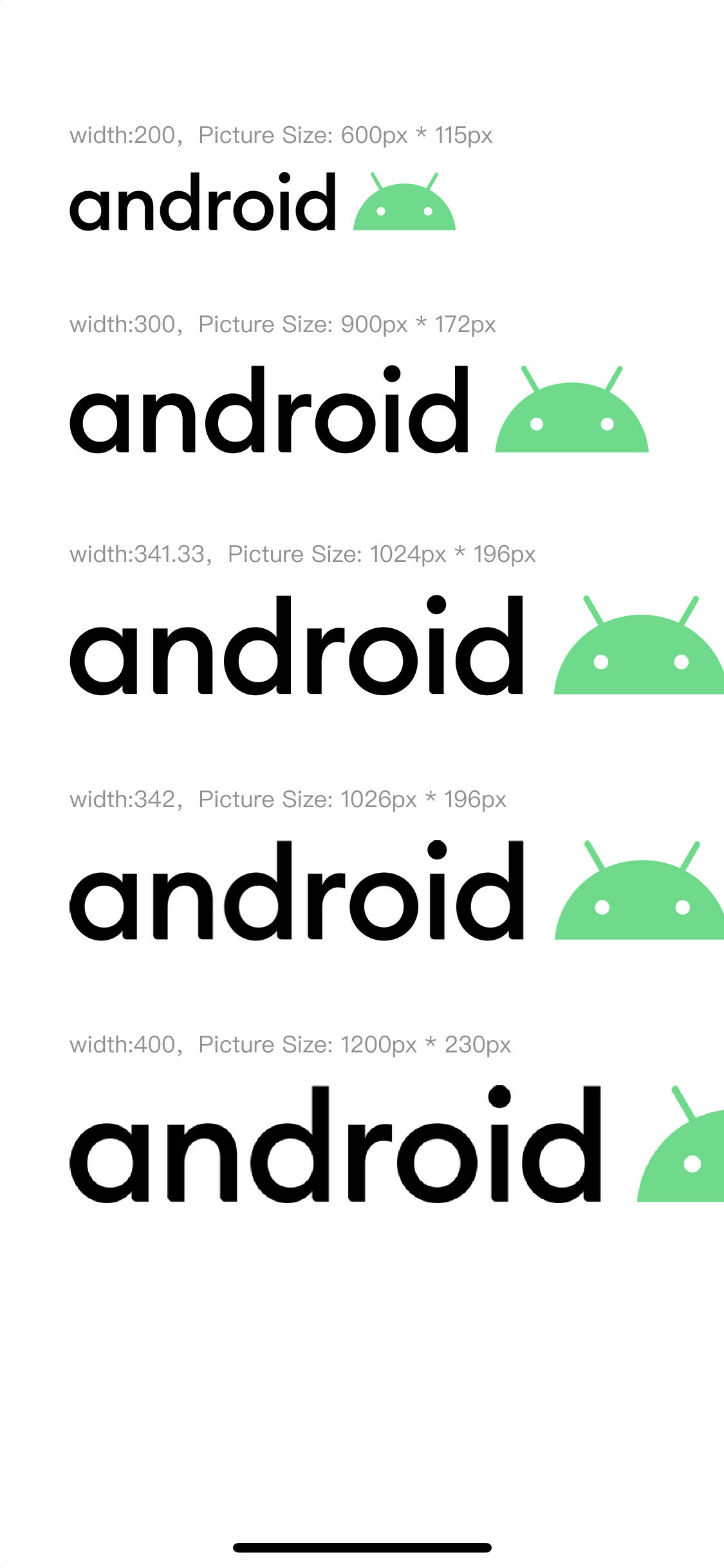
Although I write it in the Mobile Apps category, there may be an issue with the server. Because my iPhone uses the latest App, but Android phones have been using the old version of App, but they both have this problem.


Best answer by Marcela_Hippe

I had the same annoying problem and solved it by using Insert Big Image plugin.

This topic has been closed for replies.

29 replies

Julia_Wang
  • February 25, 2022

I have the exact same issue. The image looks fine in the Figma desktop app and desktop browser. When I view it in Figma mobile app, it becomes blurry. Does anyone have a resolution to this?


Mylene
  • February 28, 2022

I am having the same issue too, both in mirror and prototype 😔
I was using a very large image that I cropped directly into Figma. By directly importing the part of the image that interested me (a smaller file, width 1024px), it is a little better but still not completely clear 🤔


Antonio_Afonso

I am having exact the same - but only since a week or two, and nothing helps.
Looking good in a web browser and Figma - but in my mobile all is pixled.


Draz
  • April 8, 2022

Hi! I’m having the same problem, and my solution is to pretty much keep restarting figma. The images will slowly cache in and load all of the pixelated images.

What I did is pretty much open figma in my prototype, load everything, double check what hasnt loaded yet and close the app, and do it again until everything is loaded.

I know it’s not practical, but thats my alternate solution for now


Paul_Meagher

I am having the same issue, when trying to preview my app in my phone it only displays a very blurry image


Peter_Main1

Same issue here. I suspected Figma only ‘sends’ a preview image if the image file size is too large. I’ve found making the asset a jpg instead of a png helps, but not always. I have a 1700x1100 JPG right now refusing to go across full resolution, which seems very small.


Jonny1
  • New Member
  • May 18, 2022

Have the exact same issue. Looks great on desktop and mobile Figma App, previewing in Figma Mirror makes the image blurred/pixelated


Alexey_Ivanovsky

Having the same issue but only with PNGs, the same image but in Jpeg renders correctly


Eugene_Sheeleen

I have the same issue
Android - Google Pixel 4


Sonja2
  • June 13, 2022

Same issue here. It is super annoying


Alexander_Hahn

Same here ☹


Jakub_Svrcek

Same problem here


Litus
  • New Member
  • July 8, 2022

same problem. I see the issue has been around since Feb…


jessie1
  • Active Member
  • August 9, 2022

Same issue…


Max_Bardus1

same problem - Figma Mirror App - iPhone 13 Pro


Michael_Gubik

Same problem. @Figma please fix this bug


Anthony_Moore

This solved my problem. I took a screenshot on my iPad, loaded it into Figma no problem at all. Viewed the same screenshot on Figma Mirror on the iPad, blurred and pixelated. So I saved the screenshot in Figma but as a Jpg, loaded it back in and tested it again on the iPad and all fine. So maybe PNG is the issue. But thanks @Alexey_Ivanovsky for the find, life saver 🙂


Marcela_Hippe

I had the same annoying problem and solved it by using Insert Big Image plugin.


Pax
  • September 20, 2022

I had a problem with Figma mirror on the iPad. I tried the plugin mentioned above but it didn’t work. The solution I found to be working is to:

  1. Export the image in PDF,
  2. Convert PDF to PNG (after this the image was still blurry and pixelated),
  3. Convert PNG to JPG.

After this final step, the image got better quality.


John_Ghadimi

I was grappling with this as well. The InsertBigImage plugin didn’t do anything for me. I ended up using the Photoshop Save As Web with the JPEG Low setting. That did the trick for me. It’s still “clean” enough for prototype purposes, and now loads fine in mobile.


Loic_VIEIRA

It’s working


Kieran_Kelly

Can confirm that, yeah this is broken for me too, PNG does not render correctly over a certain size, however JPG does. Kudos to @Alexey_Ivanovsky for the work around…

Please fix FIGMA 👍


Kieran_Kelly

Legend! thanks man


Maty
  • New Participant
  • January 30, 2023

This still happens.

Any response from Figma team?


Karttunen_Juha

It’s a file size issue on Figma mobile app. Convert all larger images to .jpg (or .webp, if Figma eats them), and it should work