

Alan Davis
New Member
June 5, 2025
Question

Show/hide a layer using a checkbox (on/off) and variables

  • June 5, 2025
  • 2 replies
  • 506 views

Hi folks,


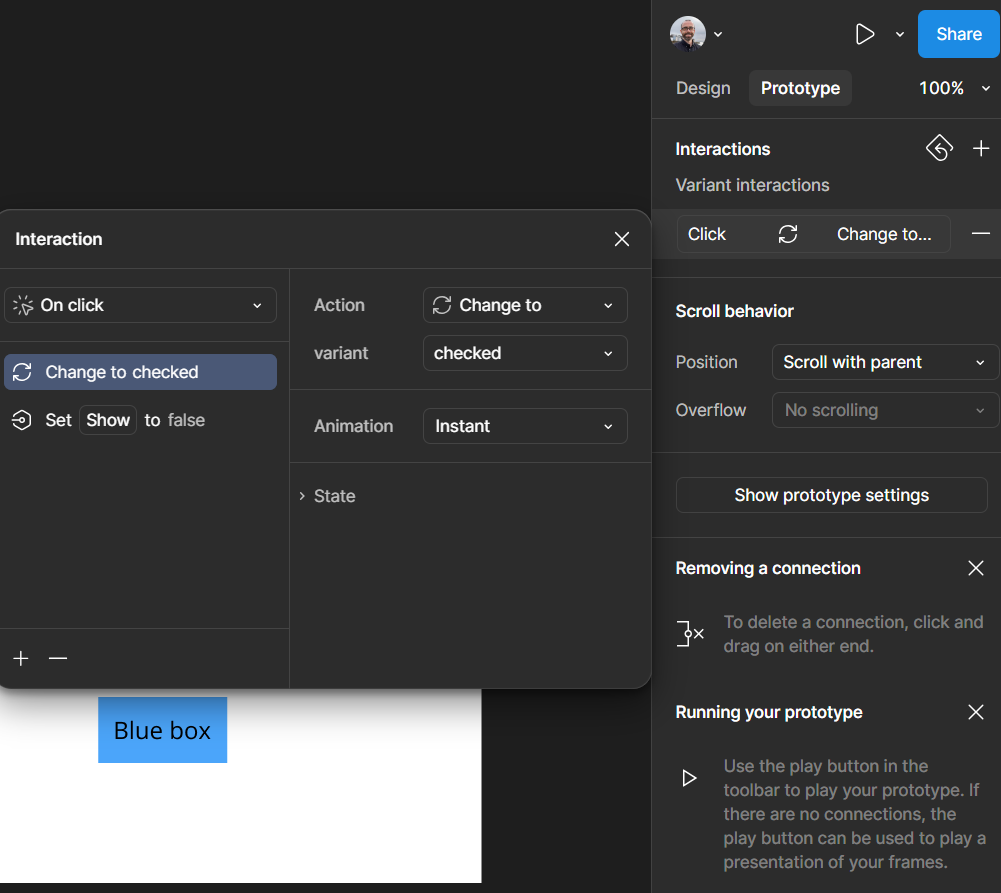
I’m trying to create a prototype which allows me to toggle a layer visibility on and off using a ‘Hide’ checkbox which sets a boolean variable (applied to Blue box layer appearance ). In the file, I can hide the blue box when checkbox toggled on, but I cannot show the blue box when toggled off. 

Here is prototype: Show hide layer


Am I missing something really simple here? 


Any advice appreciated…


This topic has been closed for replies.

2 replies

Ondrej_Pavlicek
Power Member
June 5, 2025

Hi there,

It looks like the issue might be that the second variant of the component (e.g., "Selected") doesn’t have the prototype interaction linked properly. Even though you're toggling the boolean variable, if the layer visibility isn’t tied to the variable on that second variant, the blue box won’t show again as expected.

Hope this helps point you in the right direction!

Product designer @ NETWORG | Designing Model-driven Power Apps in Figma | Power Apps DesignKit (Model-driven)
Alan Davis
New Member
June 10, 2025

Thanks for your explanation ​@Ondrej_Pavlicek. Problem solved.

One small but important detail to highlight, is that the interaction must be assigned to the component, and not the instance of the component. 

Thanks again! 😎