

Question

Prototype doesn’t reflect icon instance swap after variant change in nested component?

  • January 23, 2026
  • 3 replies
  • 133 views

Matej_Koutsky

Hi everyone,

I’ve been struggling with a prototyping issue for several hours and haven’t been able to figure out a solution. Hoping someone here has encountered a similar problem or has a workaround.

Setup:

  • I have a button component that contains only an icon (also a component), and the icon is set up to be swappable via instance swap.

  • This button is used inside a navigation component, which has two variants (expanded/collapsed).

  • Each variant is supposed to use a different icon inside the button — a left oriented arrow for expanded state and a right oriented arrow for collapsed state.

  • In design mode, everything works as expected. Switching between the navigation variants shows the correct icon in the button.
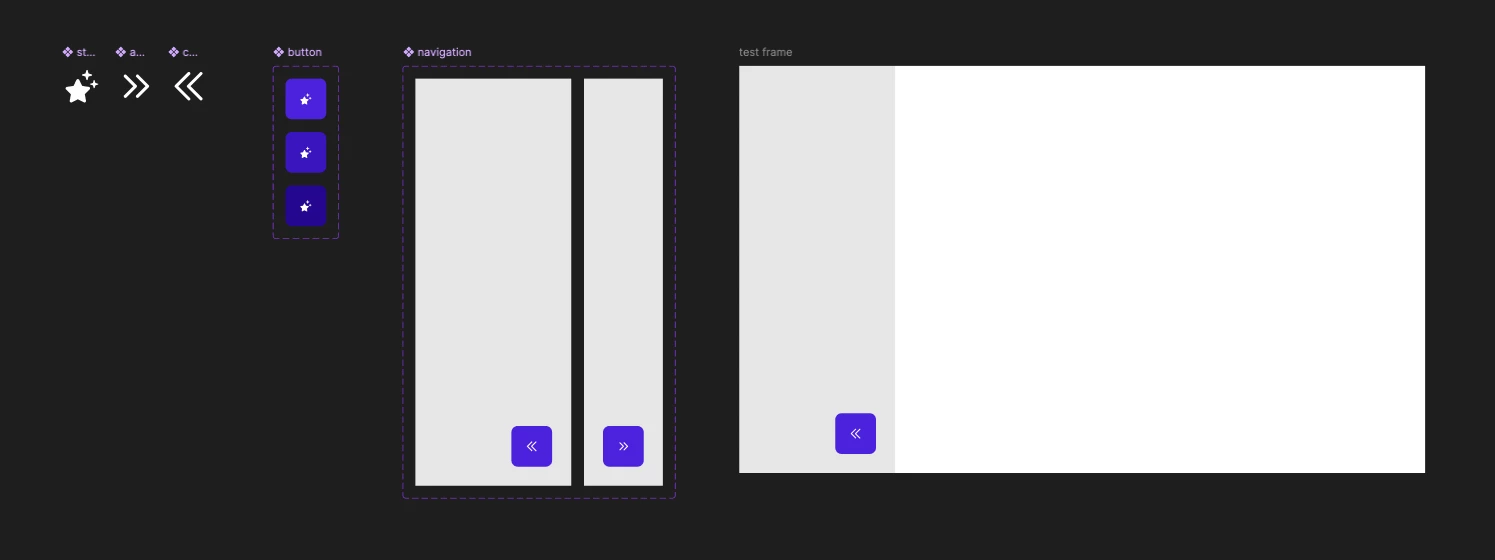
Problem:

  • In prototype mode, the icon does not change to the right oriented icon when the navigation component switches (via a "Change to" interaction).

Question:

Is this a known bug or limitation when swapping component instances in nested structures during variant changes in prototypes?
Is there a reliable workaround to ensure the icon updates as expected when switching variants?

I’ve attached a simple test file that demonstrates the issue.

Any help or insight would be hugely appreciated!


3 replies

Matej_Koutsky
  • Author
  • New Member
  • February 17, 2026

Anyone please?


Tascha
  • Active Member
  • March 16, 2026

I’ve run into the same issue just now… From what I just tested, it has to do with those two things:
1. the button being an instance inside another instance and
2. the icon being a property

if you change any of those two things, then it works again.

Ofc that is absolutely not ideal and just removing your instance property in the component will result in all your instances loosing their assigned icons, so be careful!

Workaround I did was duplicating the original component, so I have 2 identical ones now that I can use interchangeably every time I run into this issue…

top button is the “icon button 2”, bottom one “icon button”


Again, absolutely not ideal, but at least it works for now. Hope it’ll help you too ✌ 


Matej_Koutsky
  • Author
  • New Member
  • March 17, 2026

Thank you very much for your answer ​@Tascha! I was afraid I was the only one.

Your workaround is a good idea! But for my use-case I finally decided not to give the icon the "instance swap" option at all.

I would be quite interested if it's just supposed to work like this or if it's a bug. Someone from Figma, can you please comment on this?

You just made my day, thanks again. 🖐