
Simon Rankin
New Member
August 6, 2025
Question

Problem aligning lines with stroke

  • August 6, 2025
  • 10 replies
  • 1368 views

When I draw a straight line, the coordinate of the line remains on the edge even when i set the stroke position to centre. This make it difficult to align perfectly. See this example where I am making a cross. Alignment is imperfect even when I use the align tools. You can see the bounding box of the line is on the edge rather than the centre. Can I fix this?
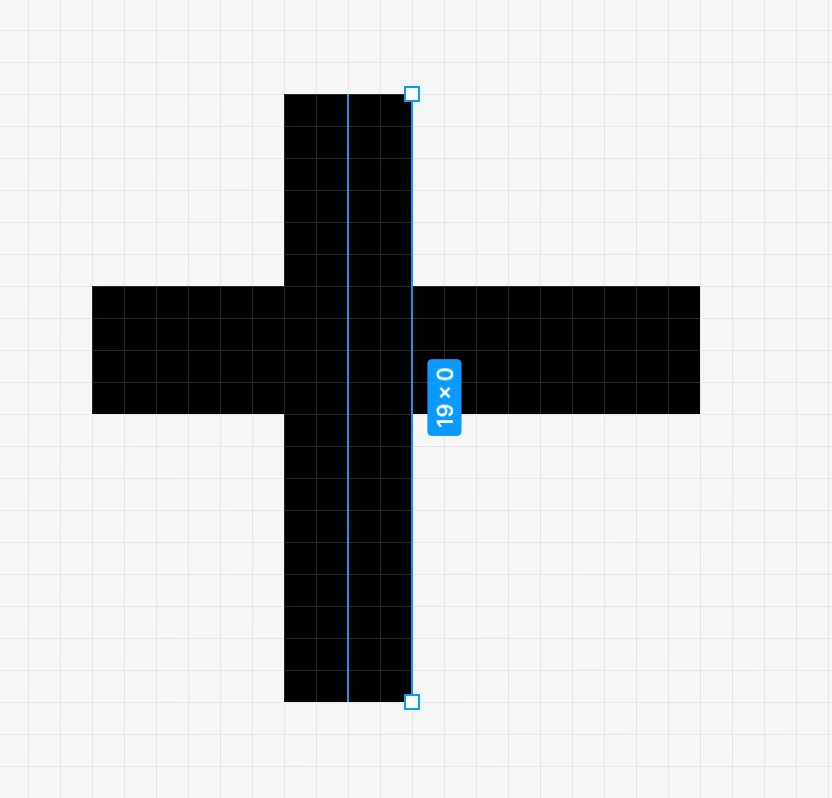
Object aligns to the selection bounding box rather than centre of line. This is the result of align both lines with the position align options. I’m trying to make a perfect cross, this is the result.


10 replies

Chelsea Chapman
New Member
August 8, 2025

I’m also having this issue. Would love to find a solution.

ZebrAlpha
New Member
August 12, 2025

If these lines are going to be merged together into a shape, you can “flatten” the lines and turn it into a single vector and the lines will be centered. Outside of that, I haven’t found another solution.  

ZebrAlpha
New Member
August 13, 2025

I found a new solution: just go into point mode (double click the line) and you can align it properly. 

Simon Rankin
New Member
August 13, 2025

Nice! I wonder why it behaves like that? Thanks for considering this problem.

Jordan_Morris1
New Member
August 19, 2025

Almost (but not entirely) certain it did not behave this way until recently and is almost certainly a bug with the LINE tool specifically. It is not apparent when applying a stroke to a shape (where inside, outside, and center work as expected). 

It’s maddening, and I suspect is related to how they implemented the new variable stroke/drawing stuff.

As an example, I’m trying to make a simple node-connected timeline (see attached) with autolayout. Now this is effectively impossible unless I either flatten each line or make them as rectangles, whereas before I could dynamically modify the design as I go.

Jordan_Morris1
New Member
August 19, 2025

To follow up: If you add an arrow or end cap to either end of a line, the center-out width adjustment works. It’s just broken by default until you modify something

Pu_Koh
New Participant
December 10, 2025

still broken


Sadie Parris
New Member
March 16, 2026

This has been a thorn in my side for awhile now. Can someone please fix this? I am not sure why this even happens in the first place as it makes no sense. The line tool need to have the stroke aligned to the center and not the edge.

Lorand Coc
New Member
September 4, 2026

Guys, don’t bother flattening the lines and do all sorts of gimmicks. Just use the pen tool instead of line tool. Problem solved, as it creates the line with the correct vector/mathematical center. Peace out!

Lorand Coc
New Member
September 4, 2026

This has been a thorn in my side for awhile now. Can someone please fix this? I am not sure why this even happens in the first place as it makes no sense. The line tool need to have the stroke aligned to the center and not the edge.

Use the pen tool.