

Solved

Is it possible to embed Figma Make designs via iframe?

  • December 11, 2025
  • 5 replies
  • 204 views

migi

Hello Figma Team,

I am trying to embed a Figma Make design into an external website using an iframe, with a URL like:
https://www.figma.com/make/xxx/yyy?node-id=0-1&t=zzz-1. 

However, the iframe does not seem to load, likely due to Content Security Policy (CSP) restrictions.

I have confirmed that Figma Photo (Prototype) can be embedded using the same method without any issues, for example:
https://www.figma.com/proto/xxx/yyy?node-id=2-1&starting-point-node-id=2%3B1

I have been using the following embed format:

https://www.figma.com/embed?embed_host=share&url=${encodeURIComponent(originalUrl)}

Could you please let me know if there is any way to embed Figma Make designs via iframe, 
or if there is an official workaround or recommended approach for displaying Make designs externally?

Thank you very much for your support.
Best answer by NMS

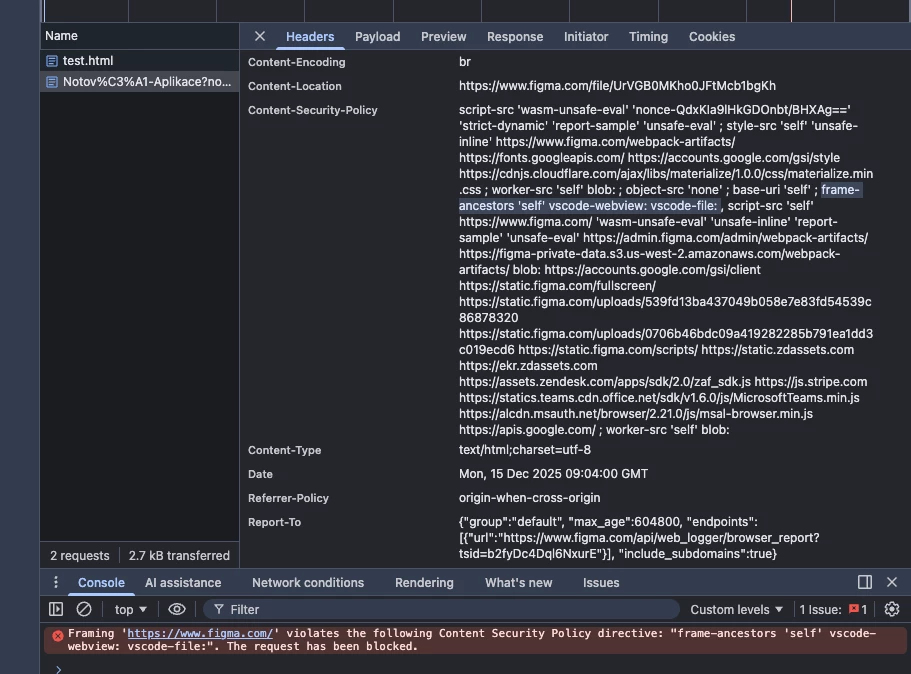
It looks that Figma make it not possible to embed make-figma into iframe. Figma explicitly forbids to include self into iframe. Here is Content Security Policy (CSP) header of make-figma. 


Thats why:
`frame-ancestors 'self' vscode-webview: vscode-file: `
Unfortunatelyl, you are right.


There is minimal example of code to try (NOT WORKS)

<!DOCTYPE html>
<html>
<head>
<meta charset="utf-8">
<meta name="viewport" content="width=device-width, initial-scale=1">
<title>test</title>
</head>
<body>

<iframe src="https://www.figma.com/make/UrVGB0MKho0JFtMcb1bgKh/Notov%C3%A1-Aplikace?node-id=0-4&t=yhi1oGZH9jCM4f4B-1"></iframe>

</body>
</html>


You can disable CSP policy in your browser with startup parameter `--disable-web-security` (but it don`t help to your visitors, just helps you for one session).

And old URL format did not help too. It only makes redirect to this URL.

You can to try to contact figma dev team, it is possible there is a request for this feature. I can imagine this embed will be part of new Embed API one day. But I don`t know. For now it is not possible.

For now, you can share link like this:
My make-figma app: click to try
https://www.figma.com/make/UrVGB0MKho0JFtMcb1bgKh/Notov%C3%A1-Aplikace?node-id=0-4&t=yhi1oGZH9jCM4f4B-1


5 replies

Garry lind
  • New Member
  • December 11, 2025

do you know about Google


NMS
  • New Member
  • December 12, 2025

Hi, you should use a new Embed url format defined in Embed Kit 2.0

like

https://embed.figma.com/design/nrPSsILSYjesyc5UHjYYa4?embed-host=your_app_name_or_just_share


Documentation
https://developers.figma.com/docs/embeds/embed-figma-file/


migi
  • Author
  • New Member
  • December 15, 2025

Hi, you should use a new Embed url format defined in Embed Kit 2.0

like

https://embed.figma.com/design/nrPSsILSYjesyc5UHjYYa4?embed-host=your_app_name_or_just_share


Documentation
https://developers.figma.com/docs/embeds/embed-figma-file/


Thanks for the suggestion.

I reviewed the Embed Kit 2.0 documentation and tried the new embed URL format as described:
https://embed.figma.com/{design|board|proto|slides}/:file_key


However, I noticed that `make` is not listed as a supported type in the documentation.
I also tried embedding a Figma Make file using similar embed URLs, but in my tests this consistently resulted in a CSP error such as:

“Framing 'https://www.figma.com/' violates the following Content Security Policy directive: frame-ancestors 'self'”

From the response headers, it looks like Make content is redirected to `www.figma.com` and explicitly disallows iframe embedding.


Given this behavior, I wanted to ask:
- Have you successfully embedded a **Figma Make** file in an iframe using Embed Kit 2.0?
- If so, could you share the specific URL format or setup that works?
- Or is there a workaround or recommended approach for embedding interactive Make content externally?

I just want to make sure I’m not missing something in the current implementation or documentation.

Thanks in advance for the clarification.


NMS
  • New Member
  • Answer
  • December 15, 2025

It looks that Figma make it not possible to embed make-figma into iframe. Figma explicitly forbids to include self into iframe. Here is Content Security Policy (CSP) header of make-figma. 


Thats why:
`frame-ancestors 'self' vscode-webview: vscode-file: `
Unfortunatelyl, you are right.


There is minimal example of code to try (NOT WORKS)

<!DOCTYPE html>
<html>
<head>
<meta charset="utf-8">
<meta name="viewport" content="width=device-width, initial-scale=1">
<title>test</title>
</head>
<body>

<iframe src="https://www.figma.com/make/UrVGB0MKho0JFtMcb1bgKh/Notov%C3%A1-Aplikace?node-id=0-4&t=yhi1oGZH9jCM4f4B-1"></iframe>

</body>
</html>


You can disable CSP policy in your browser with startup parameter `--disable-web-security` (but it don`t help to your visitors, just helps you for one session).

And old URL format did not help too. It only makes redirect to this URL.

You can to try to contact figma dev team, it is possible there is a request for this feature. I can imagine this embed will be part of new Embed API one day. But I don`t know. For now it is not possible.

For now, you can share link like this:
My make-figma app: click to try
https://www.figma.com/make/UrVGB0MKho0JFtMcb1bgKh/Notov%C3%A1-Aplikace?node-id=0-4&t=yhi1oGZH9jCM4f4B-1


migi
  • Author
  • New Member
  • December 17, 2025

Thanks for the detailed investigation and the minimal repro example — that’s very helpful.

Yes, I agree with your conclusion. Because the frame-ancestors 'self' directive is explicitly set in the CSP for Figma Make, embedding Make apps in an iframe is currently not possible, and disabling web security only works locally for development, not for real users. The redirect from the old URL format also confirms that there’s no supported workaround at the moment.

Given this limitation, sharing the Make app via a direct link seems to be the only viable option for now. We may also consider reaching out to the Figma dev team or submitting a feature request, as iframe embedding could potentially be supported in a future Embed API.

Thanks again for confirming this — it clarifies the constraints very clearly.