

Answer

How to prototype the same button to land on different screens?
  • June 10, 2024
  • 8 replies
  • 969 views

Candice_Sterling

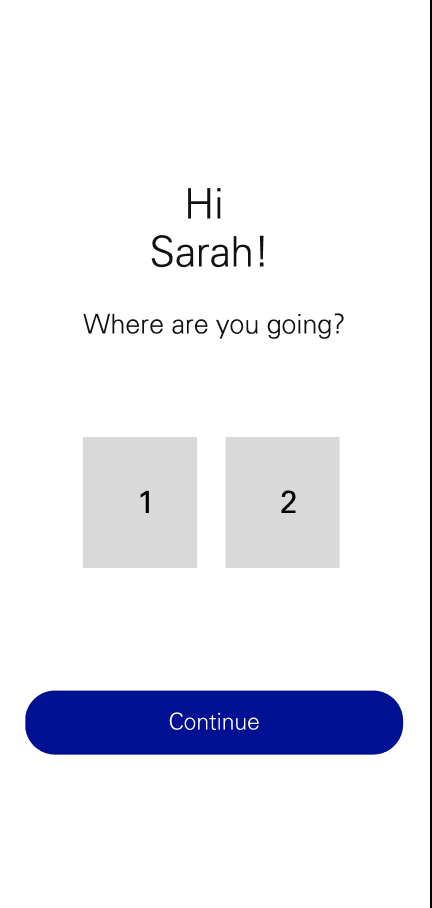
(Please see screenshot example )I would like user to be able to click/select option 1 or 2 and be navigated to different screens depending on which option is selected using the same ‘continue’ button’
Best answer by Vishal_Ramawat

You don’t need modes for the variable.
You just create a string variable with value “none”.
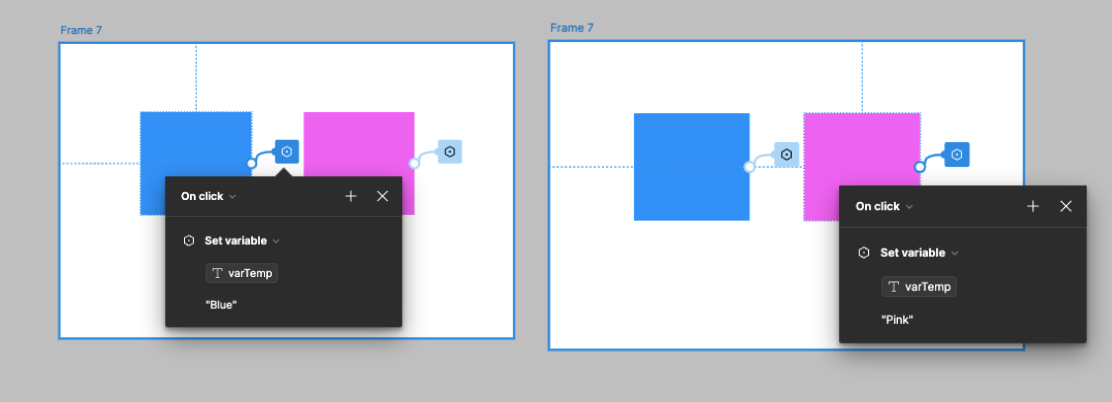
On click of each button, you set the Color variable to either Pink or Blue.

This topic has been closed for replies.

8 replies

Vishal_Ramawat

Create a string variable with value “”.
On Selecting 1 or 2, set variable to screen name.
On Continue, use conditional statement to check the value and use Navigate to accordingly


Candice_Sterling

Thank you! I haven’t used variables much but I’ll give it a go. Cheers!


Vishal_Ramawat

Glad this was helpful. Please do mark it resolved if it has solved your issue.


Candice_Sterling

I’m having some issues if you can help. I have set up the conditional values but I can only navigate to the pink frame. What am I doing wrong?


Vishal_Ramawat

Can you share the interaction of Pink and Blue buttons as well? These are case sensitive so, if button has set variable as “blue” instead of “Blue”, it wont work.


Candice_Sterling

I thought it might be case sensitive so I did double check but no joy. Have I set the variable correctly?


Vishal_Ramawat

You don’t need modes for the variable.
You just create a string variable with value “none”.
On click of each button, you set the Color variable to either Pink or Blue.


Candice_Sterling

I’ve got it. 😀 Thank you so much! 🙌