Question

How to align one element in a container different from the rest?

  • May 18, 2023
  • 2 replies
  • 1905 views

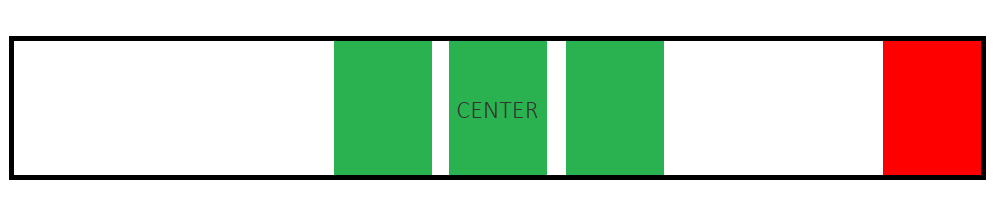
I have a container (black square) with 3 green elements that are aligned in the center using auto layout.

Now I want to add a red element in that same container but aligned to the right.

Having a hard time achieving this, can somebody help point me in the right direction?

How can I achieve a result like in the image I attached:
This topic has been closed for replies.

2 replies

  • September 26, 2023

Did you find out how? I want to do the same thing!


Fernando_Lins
  • New Participant
  • September 27, 2023

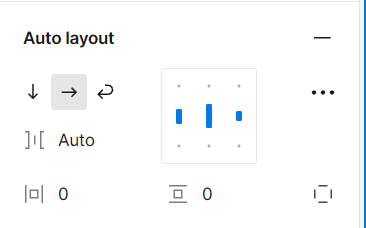
Make the black square into an auto-layout frame and set its Horizontal Gap Between Items to Auto and orientation to horizontal.
image

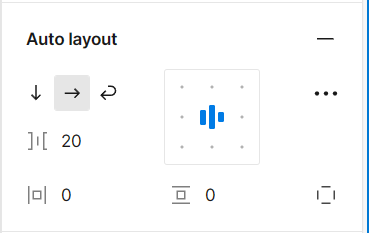
Wrap the three green elements in an auto-layout frame and set its Horizontal Resizing to Fill and the auto-layout alignment to Center.
image

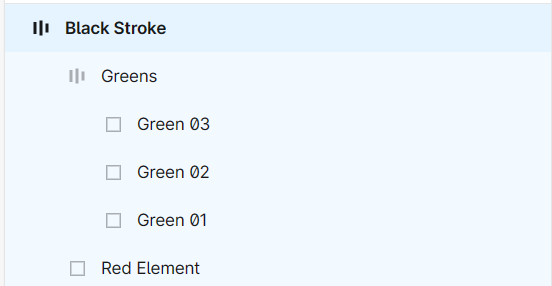
Now place the red element inside the black square auto-layout frame, to the right of the green element’s auto layout frame.

image