

Sally_Chan
Apr 9, 2024 9:55 PM UTC
Question

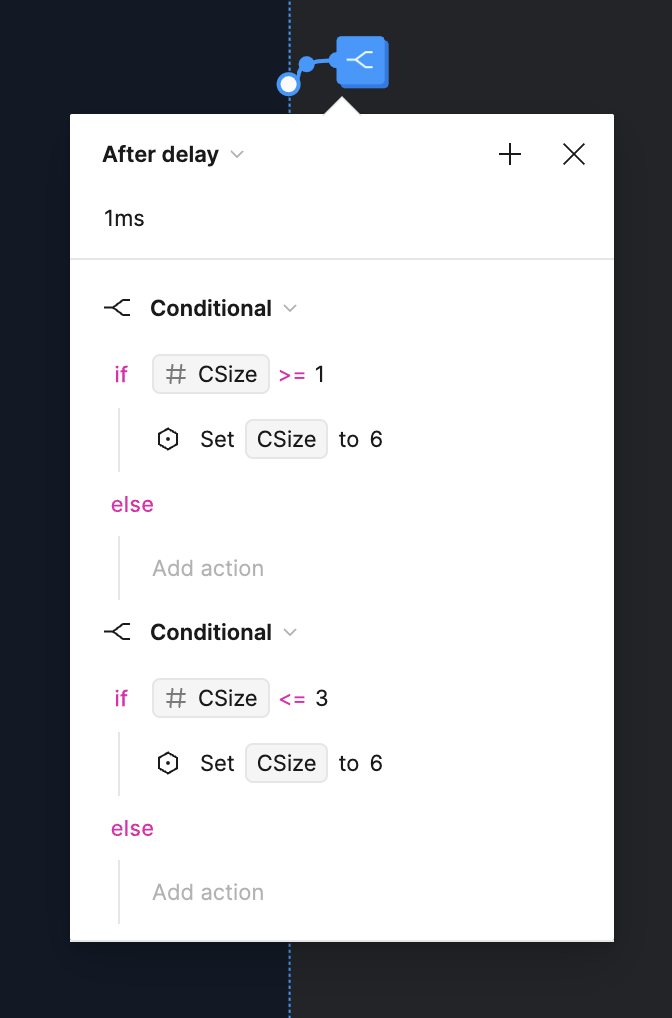
How can I add number ranges to Conditional statements?

How can I add number ranges to my Conditional statements? I’ve tried a lot of different formats and none seem to work.

It would be easy to just do >= 1 and <=3 as individual conditions, but I have a lot of ranges to add.

The conditions are 1-3, 4-6, 7-9, 10-12 … up to 24.
This topic has been closed for replies.

4 replies

Vishal_Ramawat
Apr 10, 2024 3:25 AM UTC

You can use divide by 3 logic to reduce the steps:


Maybe, you’ll have to use both If and Else, depending on the result you want.

Sally_Chan
Apr 10, 2024 8:03 PM UTC

Hmm I’m not sure if I understand or if this actually solves what I’m needing.

Essentially I have a component set named from 1-24. The interaction is that the numbers go up and down in sequence, and for every three, I need it to show another number when “confirmed”.

For example, if a user lands on any component in the 1-3 range, I have the prototype linked to a page that needs to show “6” for example. For components 4-6, show “7”. For components 7-9, show “8” and so on…

Vishal_Ramawat
Apr 11, 2024 4:15 AM UTC

Yupp, so basically you are just creating Multiples of 3 and using the result in conditional statement.
So, till 24, you’ll have 8 conditional statements. 1-3 gets covered in 3/3 = 1, 4-6 gets covered in 2, and so on.

tank666
Apr 11, 2024 5:36 AM UTC
Figma Learn - Help Center

I don’t know why you are suggested to use the division operation. This is an unnecessary calculation.

As a result, you should end up with something like this:

if (numberVar >= 1 && numberVar <= 3) {
  // actions
}
UX/UI designer. Figma expert. Creator and developer of plugins and widgets for Figma and FigJam. Check out my resources in Figma Community: figma.com/@tank