Is there anyone able to connect Figma MCP Server with Google Antigravity (I know it is not supported tool yet)?
I tried using client ID and secret, but I am receiving the following error:
Invalid scope: mcp:connect
Thanks a lot for comments!

Best answer by aaronjellis
I was able to get it working via the latest Antigravity…
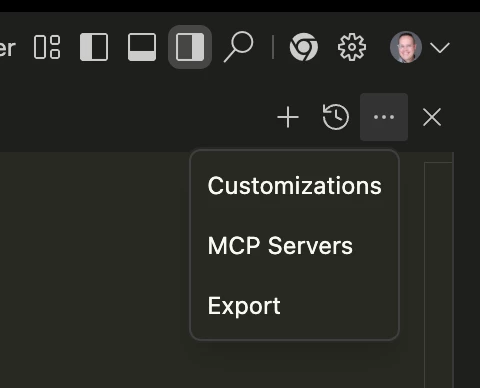
Just had to go into the editor, then hit these 3 dots and select MCP servers. It will ask you to install the Figma MCP config, then you should be able to run it just fine without much additional config. (easier than configuring claude code 😅).
I was able to get it working via the latest Antigravity…
Just had to go into the editor, then hit these 3 dots and select MCP servers. It will ask you to install the Figma MCP config, then you should be able to run it just fine without much additional config. (easier than configuring claude code 😅).
I was able to get it working via the latest Antigravity…
Just had to go into the editor, then hit these 3 dots and select MCP servers. It will ask you to install the Figma MCP config, then you should be able to run it just fine without much additional config. (easier than configuring claude code 😅).
As always, @aaronjellis is helping us all succeed. 👋 What a small world moment.
I did have to go through “Manage MCP Servers” > “Configure” > “Uninstall”
Then I reinstalled the MCP Server to get it working.
As always, @aaronjellis is helping us all succeed. 👋 What a small world moment.
lolol Happy to see your face here @Kirby Yardley!
If anyone has better guidance on how to get it to actually work well I’m all ears. Seems as though it pulls odd frames out of the file and struggles to really stay focused or get all the details. Figma Make is so good at adhering to the design, but I’ve yet to get Figma MCP to really stick to my screens. I have found a bit more luck using Dev Mode annotations while designing and telling the MCP server to pay attention to those.
I was able to get it working via the latest Antigravity…
Just had to go into the editor, then hit these 3 dots and select MCP servers. It will ask you to install the Figma MCP config, then you should be able to run it just fine without much additional config. (easier than configuring claude code 😅).
Thanks a lot @aaronjellis for your response ✌🏼 I was trying to work with Remote MCP server. I see that your way is for Local (Desktop) MCP server which is also fine. I hope soon we can also use the Remote server.
I did somehow find a way to overcome this. first check if you have node.js installed. try uninstalling the figma mcp on your antigravity and disable the mcp server in figma. close both applications and try installing the mcp server in antigravity it would most likely fail after that enable the mcp server in figma and refresh the mcp in antigravity. it should work
Has anyone tried connecting to a cloud MCP server?
I tried using the official config: { "mcpServers": { "Figma": { "url": "https://mcp.figma.com/mcp" } } }
and also switching to Antigravity’s format: { "mcpServers": { "Figma": { "serverUrl": "https://mcp.figma.com/mcp" } } }
Result in the error: Error: streamable http connection failed: calling "initialize": sending "initialize": Unauthorized, sse fallback failed: missing endpoint: first event is "", want "endpoint".
Looks like I must give it access token, but where to set it?
Has anyone tried connecting to a cloud MCP server?
I tried using the official config: { "mcpServers": { "Figma": { "url": "https://mcp.figma.com/mcp" } } }
and also switching to Antigravity’s format: { "mcpServers": { "Figma": { "serverUrl": "https://mcp.figma.com/mcp" } } }
Result in the error: Error: streamable http connection failed: calling "initialize": sending "initialize": Unauthorized, sse fallback failed: missing endpoint: first event is "", want "endpoint".
Looks like I must give it access token, but where to set it?
I ended up building this repo locally: https://github.com/GLips/Figma-Context-MCP.git Using the absolute path for Node (since I'm using NVM and Antigravity couldn't find it some how...), and clearing out the welcome messages that break the protocol.