

Oded_Livnat_Tal
New Participant
May 16, 2025
Question

Can't send element to back

  • May 16, 2025
  • 2 replies
  • 294 views

Hello everyone, 


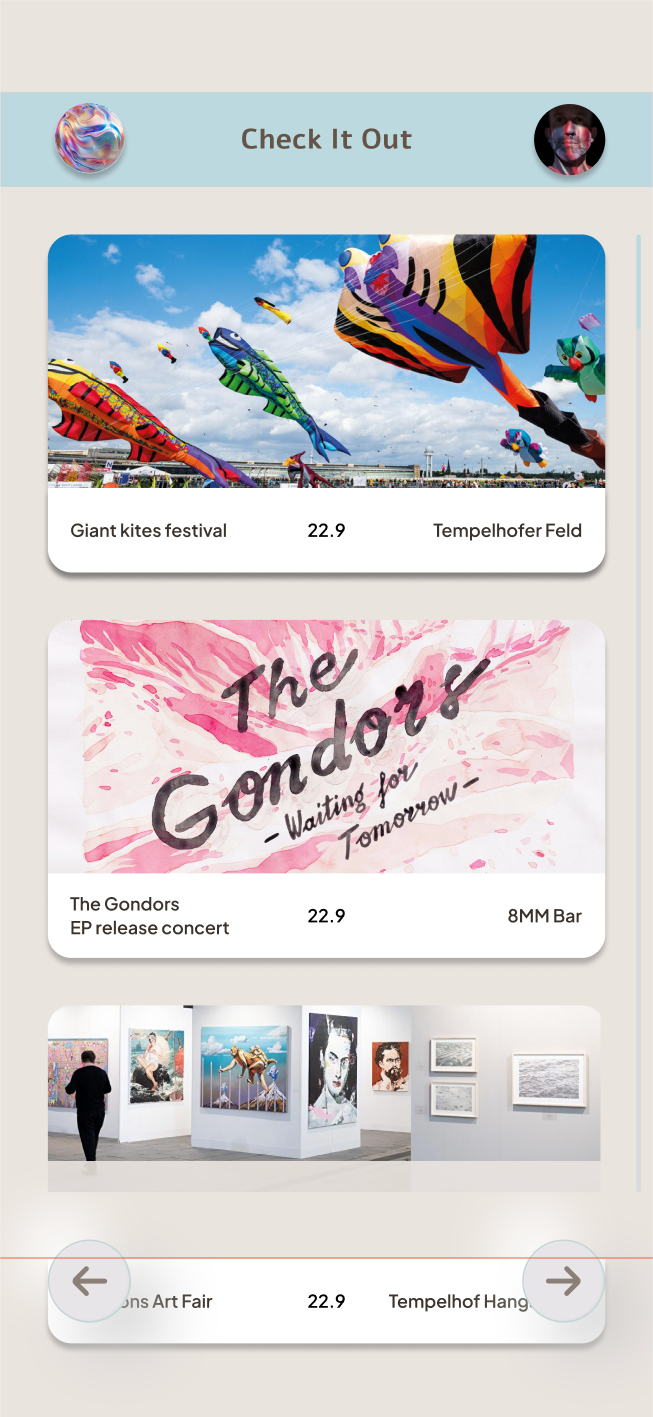
I’m trying the hide  the content on the bottom (underneath the arrows) so it will be visible only when scrolling in prototype mode. I cannot seem to hide it, ‘since move to back’ doesn’t work in this case. Any tips? 

Also I’m not sure this is the right way to do it, but maybe after I will be able to hide it, I could figure it out. Thank you!


    This topic has been closed for replies.

    2 replies

    Ondrej_Pavlicek
    Power Member
    May 16, 2025

    Hi there!
    I've run into a similar situation and what worked best for me is this structure:

    • Set the top and bottom parts of the screen (like the header and bottom navigation) to fixed or sticky in position.
    • The middle area (usually the content or feed) should have a larger height than the screen to allow overflow.
    • Then, apply vertical scrolling to that middle section.

    This setup ensures that only the content scrolls while the navigation stays in place. I’ve attached a few screenshots from my file in case it helps.


    Hope it’s useful!

    Product designer @ NETWORG | Designing Model-driven Power Apps in Figma | Power Apps DesignKit (Model-driven)
    Oded_Livnat_Tal
    New Participant
    May 19, 2025

    Thanks! I’ll check it out.